AI app for it and development · no coding needed
Adaptive Cloud Gaming PC
A cloud GPU that learns your play style and tunes every scene in real time, so you never buy hardware again.
Made for: PC gamers who upgrade hardware every two years
What it does for you
The problem
Gamers buy expensive video cards that age quickly and sit idle most of the day.
What it gives you
Continuously optimised cloud gaming session with per-scene graphics tuning and predictive adjustments
What you give it
Gameplay telemetryscene datauser preferenceshardware specifications
How it works, step by step
- Build a player profile from the first hour of play
- Adjust graphics settings per scene in real time
- Predict next moves and pre-load assets
- Generate upscaled detail for lower-end hardware
- Auto-assign newer GPU architecture for new titles
- Voice-command settings changes without menus
What you see on screen
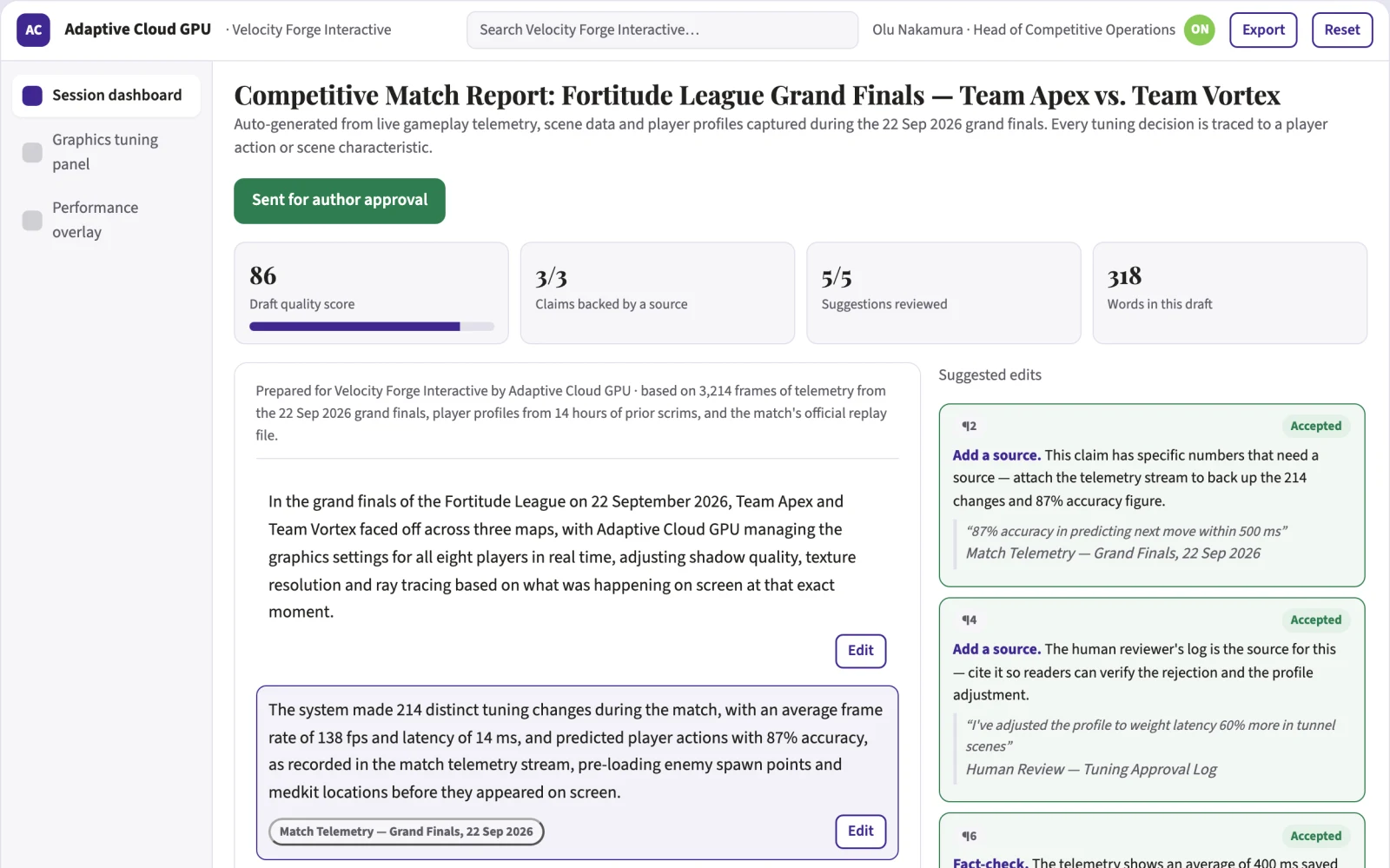
- Session dashboard
- graphics tuning panel
- performance overlay
Build it yourself with your AI system
Build this app yourself, no coding needed
Start with a quick version you can try in a few minutes. Like it? Then build the full app by copying and pasting our step-by-step instructions: everything is prepared for you.
Sign in to see how to build it yourself
Build a quick version to try, or get the full app pack for Adaptive Cloud Gaming PC with the step-by-step building instructions. You don't need any technical skills: you copy, paste and answer a few questions. Both are included in the membership.
4 Have it built for you days to a few weeks
Rather not do it yourself, or want it fully tailored to your data, your way of working and your brand? Nexibeo builds Adaptive Cloud Gaming PC with you.
What's in the app pack
Included in the Complete AI Training membership.
- The building instructions your AI follows, step by step
- The questions your AI will ask you about your business before it starts
- A clickable demo you can open in your browser, to see how it should work
- A detailed blueprint of the screens, the information it keeps and the checks it runs
Become a member to get the app packAlready a member? Sign in
The files, for the technically curious
- START-HERE.mdHow to build it with your own AI (read first)3 KB
- README.mdOverview and links1 KB
- questions.mdQuestions to answer before you build2 KB
- prompt-cloudflare.mdThe full build prompt, hosted on Cloudflare21 KB
- prompt-vps.mdThe same build on your own server (Docker)21 KB
- spec.jsonData model, API, AI pipeline, acceptance criteria11 KB
- demo/index.htmlThe working demo on sample data200 KB
Questions
Do I need to know how to code?
No. You copy and paste the prompts on this page into ChatGPT or Claude, and the AI does the building. When it asks you something, you answer in your own words.
What does it cost?
The quick version, the app pack and the step-by-step instructions are for members: you pay the membership price, not a price per app (see the plans). Building the full app uses your own ChatGPT or Claude subscription. Putting it online is often cheap or no cost at the start, and your AI tells you before anything costs money.
How long does it take?
The quick version: about two minutes. The real app: an afternoon for a first version you can use, longer if you want every feature.
Can I change it to fit my business?
Yes. Tell your AI what to change in plain words, like “add a column for the price” or “use our logo and colours”. Or have Nexibeo build and customise it for you.
More detailsHow the AI works, safeguards and what to build first
For PC gamers who upgrade hardware every two years, turn gameplay telemetry, scene data and user preferences into a continuously optimised cloud gaming session with per-scene graphics tuning and predictive adjustments. Address the recurring problem: gamers buy expensive video cards that age quickly and sit idle most of the day. The value hypothesis is a subscription that always feels current without hardware purchases; the pilot must establish whether the experience feels local enough.
Install thin client, play an initial profiling session, review the generated profile, accept or adjust auto-tuning rules, start a game session, monitor live adjustments, and review performance summaries. Start with gameplay telemetry and scene data and finish with a continuously optimised cloud gaming session.
How the AI works
Use reinforcement learning to tune graphics settings per scene and computer vision to analyse on-screen content. Predict player actions from input patterns. A human reviewer checks profile accuracy and tuning behaviour before any settings are applied automatically.
Safeguards
Limits on data collection to gameplay telemetry only, permission for manual overrides, no sharing of personal data, and a safety check that prevents the AI from making changes that could cause motion sickness or discomfort.
What to build first
One buyer: sim racers. One use case: consistent frame rates in racing titles. First two modules: basic auto-preset selection and a performance overlay. Manual review of tuning decisions before they go live.
What it can connect to
Game launchers, graphics APIs, streaming codecs, and user authentication systems.
The screens in detail
Use a central gameplay view with a side panel showing live settings adjustments, frame rate and latency. Let users toggle auto-tuning on or off and view a history of changes. Display predicted next actions and suggested voice prompts. In this product, the first view is session dashboard, followed by graphics tuning panel and performance overlay.