AI agent for elected officials
Campaign Finance Filing Agent
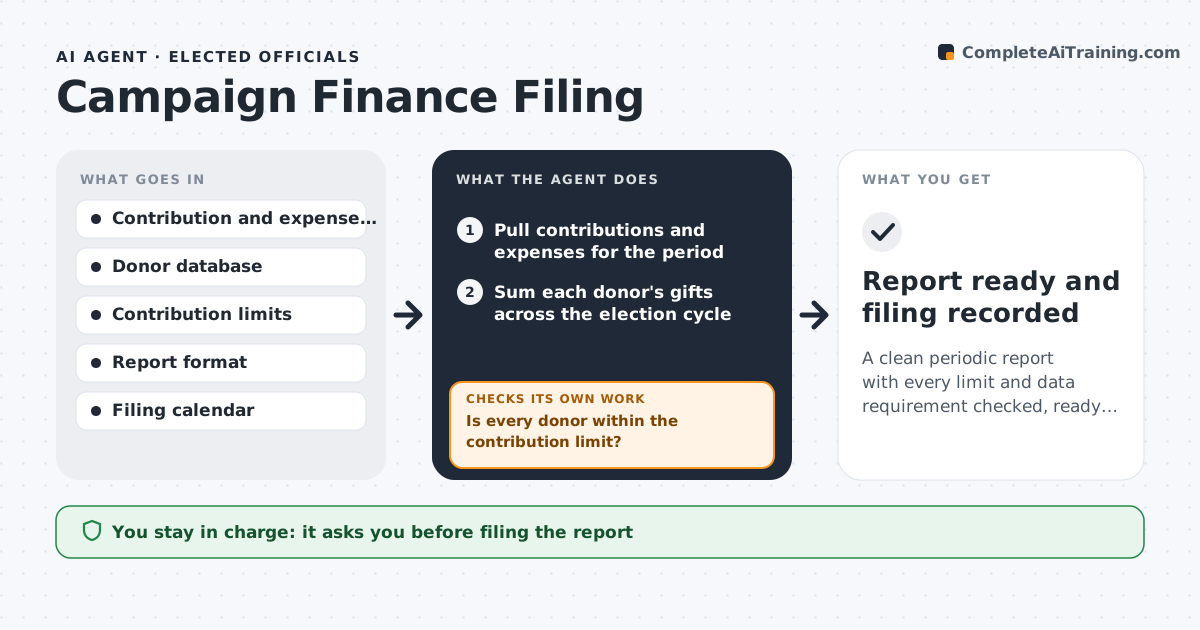
A clean periodic report with every limit and data requirement checked, ready for the treasurer well before the deadline
What it does
A campaign must report every contribution and expense on a schedule, with the donor's name, address, employer and amount, and it must refuse or refund gifts over the limit. Errors cause fines. Treasurers often check by hand in the last days. This agent reads the contributions and expenses for the reporting period, checks each donor against the contribution limits, the required donor information and prohibited sources, and checks expenses against the allowed categories. It flags problems, such as a donor who gave twice and passed the limit or a missing employer, and drafts the periodic report. After the treasurer corrects the data, it recomputes the totals and checks again until the report passes. The treasurer approves filing. Edge case: two small gifts from spouses on one card are treated as separate donors if the rules say so.
How it works
Follow the arrows from top to bottom. The orange dashed arrow is the loop: when a check fails, the agent goes back and tries again.
Read the steps as a list
- A reporting deadline is ten days away
- Pull contributions and expenses for the period
- Sum each donor's gifts across the election cycle
- Is every donor within the contribution limit?If not: list the excess amounts and propose refunds or redesignation. Back to step 3.
- Check required donor data: name, address, employer and occupation above the threshold
- Check expenses against allowed categories and vendor details
- Is every record complete and correct?If not: send each gap to the treasurer, wait for corrections and recheck. Back to step 5.
- Draft the periodic report and reconcile totals to the bank
- Treasurer approves filingThe agent waits here for your OK.
- Report ready and filing recorded
How it decides
It adds each donor's gifts across the cycle, compares the total with the limit and flags missing required fields and prohibited sources, then reruns after each correction.
- Add gifts across the cycle before comparing with the limit
- Flag donors over the itemization threshold with missing employer data
- Flag corporate or foreign sources where prohibited
- Reconcile the report totals with bank balances
Make it yours
Every agent is a starting point. You choose these settings for your own situation.
- Contribution limits for the race
- Itemization threshold
- Filing calendar
- Expense categories
What keeps you in control
It always asks you first
- Filing the report
- Any refund or redesignation
Hard limits
- Never files the report
- Never makes refunds itself
- Does not give legal advice
It stops when
- Done: report is clean and approved
- Stop: records do not reconcile with the bank
Set it up
We guide you through the set-up, step by step
Members get the full set-up guide for this agent. No technical skills needed: you copy, paste and upload.
- One set of instructions to paste into your AI, with the clicks for ChatGPT, Claude, Microsoft 365 Copilot, Gemini and Grok
- The agent then walks you through connecting your own data, one source at a time
- A downloadable copy with the flow chart, the rules and the full guide