AI agent for business coachs
Cohort and Group Program Progress Agent
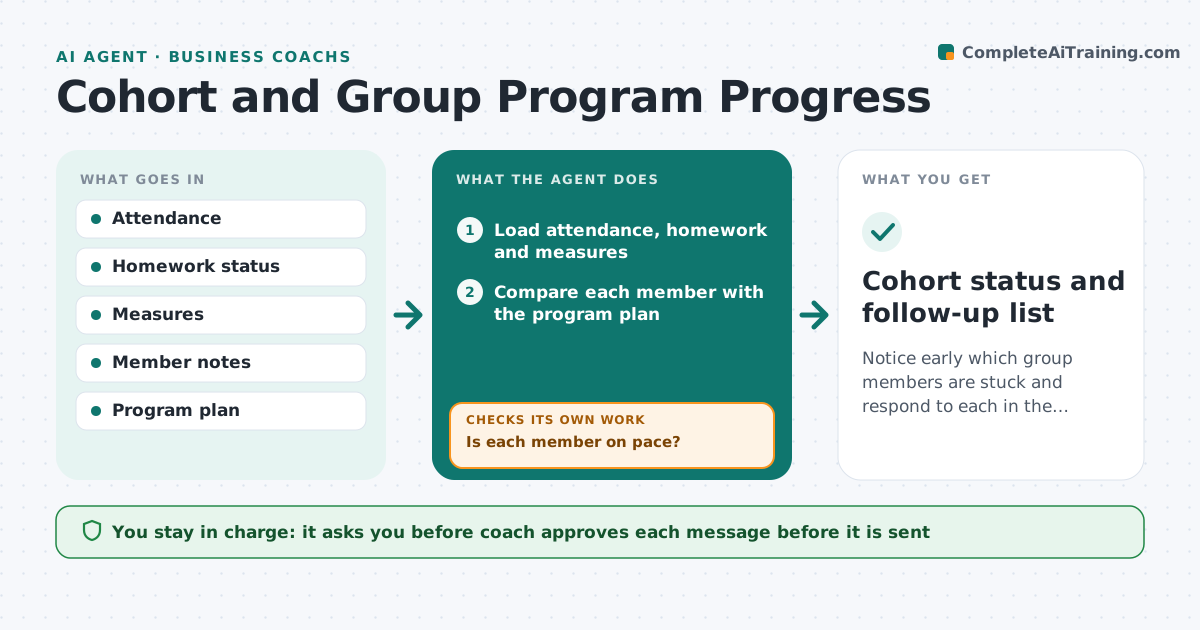
Notice early which group members are stuck and respond to each in the right way.
What it does
In a group coaching program, members move at different speeds and nobody sees who is stuck until it is too late. The agent tracks attendance, homework and measures for each member, spots those falling behind, and checks reasons in their notes and messages. It drafts a personal check-in for each member and a topic for the group session. It then watches for a response and changes the follow-up if there is none. The coach approves each message. Edge case: a member missed two sessions but completed all homework, so the agent drafts a scheduling question, not a motivation message.
How it works
Follow the arrows from top to bottom. The orange dashed arrow is the loop: when a check fails, the agent goes back and tries again.
Read the steps as a list
- Weekly cohort check
- Load attendance, homework and measures
- Compare each member with the program plan
- Is each member on pace?If not: Flag the member and look at notes for a likely cause. Back to step 3.
- Choose the follow-up type from the cause
- Draft a personal check-in and a group topic
- Coach approves each messageThe agent waits here for your OK.
- Send the approved messages
- Did the member respond or improve within a week?If not: Change the approach and notify the coach. Back to step 5.
- Cohort status and follow-up list
How it decides
A member is flagged when they miss two sessions or two assignments, or a measure stalls. The follow-up depends on the cause shown in the data.
- Two misses in a row means flag
- Attendance without homework suggests workload; the reverse suggests scheduling
- One follow-up per member per week
- Group topics address issues shared by 3 or more members
Make it yours
Every agent is a starting point. You choose these settings for your own situation.
- Flag rule (default 2 misses)
- Check frequency (default weekly)
- Message tone
- Measures tracked
What keeps you in control
It always asks you first
- Coach approves each message before it is sent
Hard limits
- Never contacts a member without approval
- Never shares one member's data with the group
It stops when
- Done: members back on pace or coach has decided
- Stop: member leaves the program
Set it up
We guide you through the set-up, step by step
Members get the full set-up guide for this agent. No technical skills needed: you copy, paste and upload.
- One set of instructions to paste into your AI, with the clicks for ChatGPT, Claude, Microsoft 365 Copilot, Gemini and Grok
- The agent then walks you through connecting your own data, one source at a time
- A downloadable copy with the flow chart, the rules and the full guide