AI agent for global head of finances
Contractor and Agency Spend Review Agent
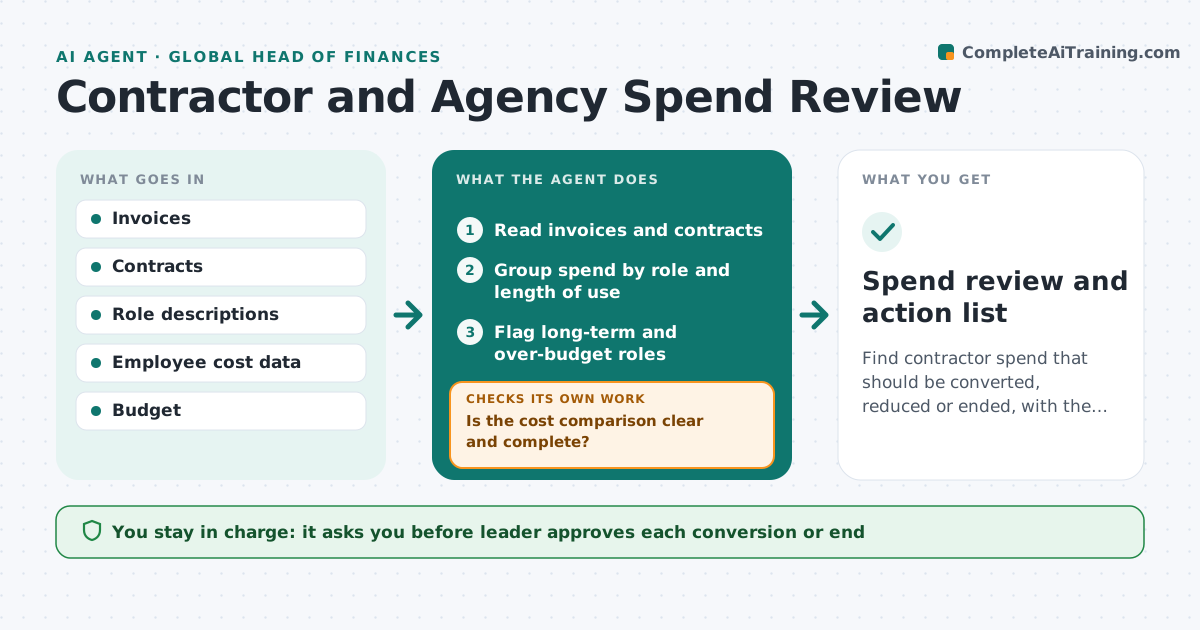
Find contractor spend that should be converted, reduced or ended, with the numbers shown.
What it does
Contractor and agency use grows beyond budget, and some roles have turned into long-term work that employees could do for less. The agent reads contractor invoices and contracts, groups them by role and length of use, and flags long-term use. It compares the cost with an employee equivalent, including benefits and overhead, and tests alternatives such as conversion or ending the contract. If the numbers are close, it checks more cost lines. It proposes conversions or ends. The leader approves each action. Edge case: a contractor has billed 22 months at $95 an hour, while an employee costs about $78 an hour, so the agent proposes conversion.
How it works
Follow the arrows from top to bottom. The orange dashed arrow is the loop: when a check fails, the agent goes back and tries again.
Read the steps as a list
- Monthly spend review
- Read invoices and contracts
- Group spend by role and length of use
- Flag long-term and over-budget roles
- Estimate the employee equivalent cost
- Is the cost comparison clear and complete?If not: Add benefits, overhead and recruitment costs and rerun it. Back to step 5.
- Propose conversion, renegotiation or end for each flagged role
- Leader approves each actionThe agent waits here for your OK.
- Is the budget effect within the target after the actions?If not: Re-rank the options and propose alternatives. Back to step 3.
- Spend review and action list
How it decides
It flags roles used for more than 12 months or above budget. It converts when the employee cost is at least 15 percent lower and the need continues. Otherwise it proposes keep, renegotiate or end.
- More than 12 months of use is long-term
- Convert if the employee cost is at least 15 percent lower and the need continues
- Include benefits and overhead in the employee cost
- End if the need no longer exists
Make it yours
Every agent is a starting point. You choose these settings for your own situation.
- Months that count as long-term (default 12)
- Savings needed to convert (default 15 percent)
- Overhead rate
- Roles excluded
What keeps you in control
It always asks you first
- Leader approves each conversion or end
Hard limits
- Never ends a contract or contacts an agency
- Never decides conversions
It stops when
- Done: actions approved
- Stop: leader holds the review for later
Set it up
We guide you through the set-up, step by step
Members get the full set-up guide for this agent. No technical skills needed: you copy, paste and upload.
- One set of instructions to paste into your AI, with the clicks for ChatGPT, Claude, Microsoft 365 Copilot, Gemini and Grok
- The agent then walks you through connecting your own data, one source at a time
- A downloadable copy with the flow chart, the rules and the full guide