AI agent for event planners
Event Registration Duplicate Agent
Accurate registration counts without merging different people.
What it does
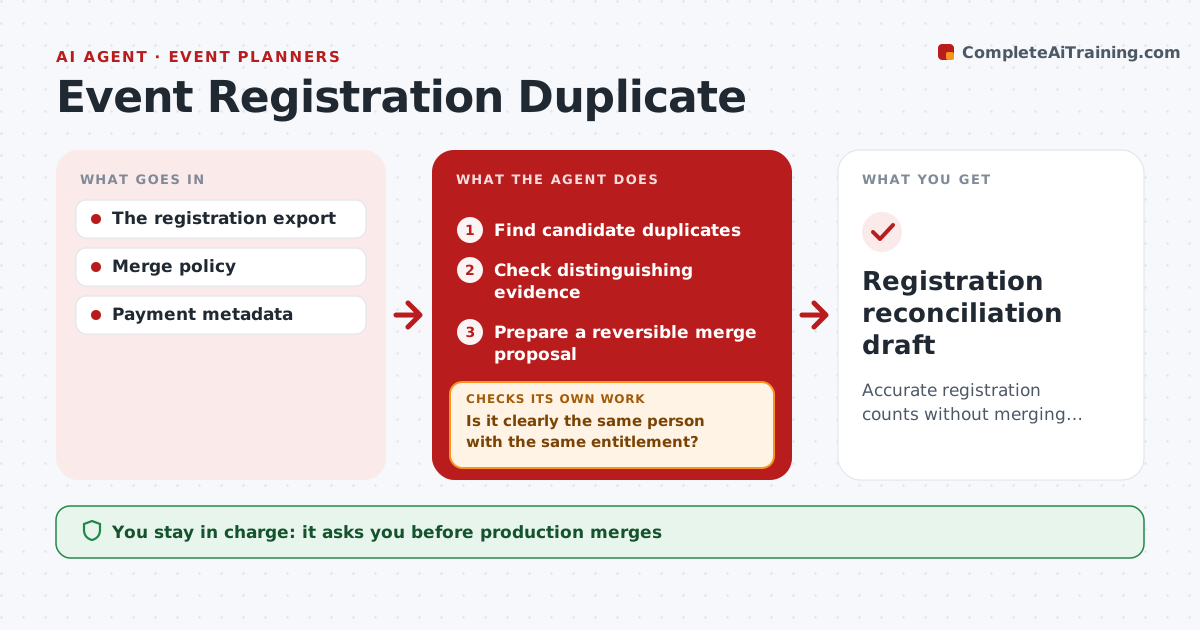
Duplicate conference registrations inflate attendance counts and create conflicting entitlements, such as two badges or two meal plans. Each day this agent reads the registration export and finds candidate duplicates by name, company and timing. It then checks distinguishing evidence: verified email, payment record and ticket type. It proposes a merge only when the evidence clearly shows the same person with the same entitlement. Different entitlements or uncertain identity keep the records separate, with a note on why. Merge proposals are reversible. The registration lead approves merges and refunds; attendee messages stay with staff. Edge case: one person bought a day pass and later a full pass, so the agent flags a possible refund rather than merging.
How it works
Follow the arrows from top to bottom. The orange dashed arrow is the loop: when a check fails, the agent goes back and tries again.
Read the steps as a list
- Daily export
- Find candidate duplicates
- Check distinguishing evidence
- Is it clearly the same person with the same entitlement?If not: keep separate and note why. Back to step 3.
- Prepare a reversible merge proposal
- Registration lead approves merges and refundsThe agent waits here for your OK.
- Registration reconciliation draft
How it decides
It matches on identifiers and context and only proposes merges with consistent evidence.
- Same person requires a verified email or payment match.
- Different entitlements block a merge.
- Every merge proposal is reversible.
- Possible refunds go to the registration lead.
Make it yours
Every agent is a starting point. You choose these settings for your own situation.
- Fields used to find candidates (name, company, email)
- Evidence required to merge (default verified email or payment match)
- Daily export time
- Who approves merges and refunds
- Draft format
What keeps you in control
It always asks you first
- Production merges
- Refunds
- Attendee communications
Hard limits
- Staging only.
It stops when
- Done: all candidates reviewed.
Set it up
We guide you through the set-up, step by step
Members get the full set-up guide for this agent. No technical skills needed: you copy, paste and upload.
- One set of instructions to paste into your AI, with the clicks for ChatGPT, Claude, Microsoft 365 Copilot, Gemini and Grok
- The agent then walks you through connecting your own data, one source at a time
- A downloadable copy with the flow chart, the rules and the full guide