AI agent for product analysts
Experiment Ship Decision Follow-Up Agent
Confirm that shipped experiment wins hold up in production and flag them early when they do not.
What it does
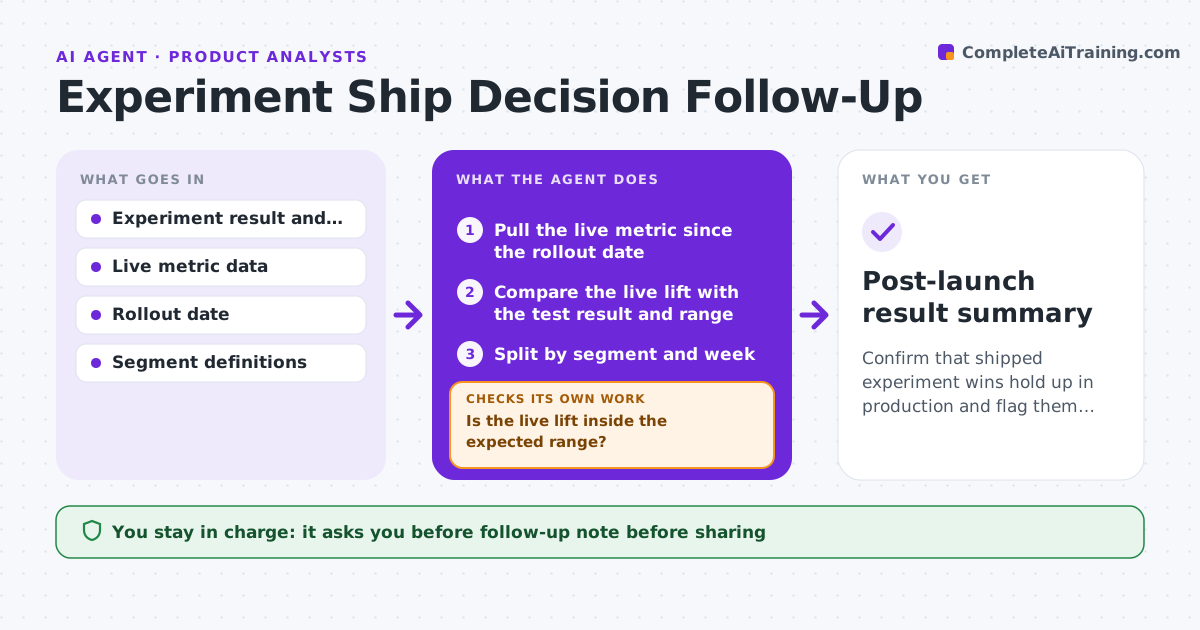
After a winning test ships, the team moves on and nobody checks whether the lift held. This agent tracks the live metric after rollout and compares it with the lift expected from the test. It checks for novelty decay, where the lift fades after a few weeks, and splits the result by segment, such as new and returning users or platform. If results drift from the test result by more than your threshold, it writes a follow-up note with the data. If needed, it proposes a holdout group to measure the true effect. You review the note and decide what goes to the product team. Edge case: the lift holds on web but is gone on Android, and the agent shows that split.
How it works
Follow the arrows from top to bottom. The orange dashed arrow is the loop: when a check fails, the agent goes back and tries again.
Read the steps as a list
- Test is shipped to all users
- Pull the live metric since the rollout date
- Compare the live lift with the test result and range
- Split by segment and week
- Is the live lift inside the expected range?If not: Check for novelty decay, seasonality and tracking changes. Back to step 3.
- Rank the likely causes of the gap
- Draft a follow-up note with charts
- Analyst approves the note and any holdout proposalThe agent waits here for your OK.
- Send the note to the product team
- Does the next week's data confirm the pattern?If not: Keep tracking and update the note. Back to step 3.
- Post-launch result summary
How it decides
It compares the live lift with the test's confidence range. A result outside the range for two weeks in a row counts as drift.
- Two weeks outside the range counts as drift (default)
- Segments with under 1,000 users are not reported alone
- Always check tracking and seasonality before blaming the change
- Recommend a holdout only when the cause is unclear
Make it yours
Every agent is a starting point. You choose these settings for your own situation.
- Tracking period (default 8 weeks)
- Drift rule
- Segments to split by
- Minimum segment size
- Who receives the note
What keeps you in control
It always asks you first
- Follow-up note before sharing
- Holdout proposal
Hard limits
- Never reverts a feature
- Never reports a segment under the size limit
- Shows the data behind every claim
It stops when
- Done: eight weeks tracked and the result confirmed or explained
- Stop: metric tracking is broken; analyst fixes the data first
Set it up
We guide you through the set-up, step by step
Members get the full set-up guide for this agent. No technical skills needed: you copy, paste and upload.
- One set of instructions to paste into your AI, with the clicks for ChatGPT, Claude, Microsoft 365 Copilot, Gemini and Grok
- The agent then walks you through connecting your own data, one source at a time
- A downloadable copy with the flow chart, the rules and the full guide