AI agent for legislative assistants
Legislative Calendar and Deadline Agent
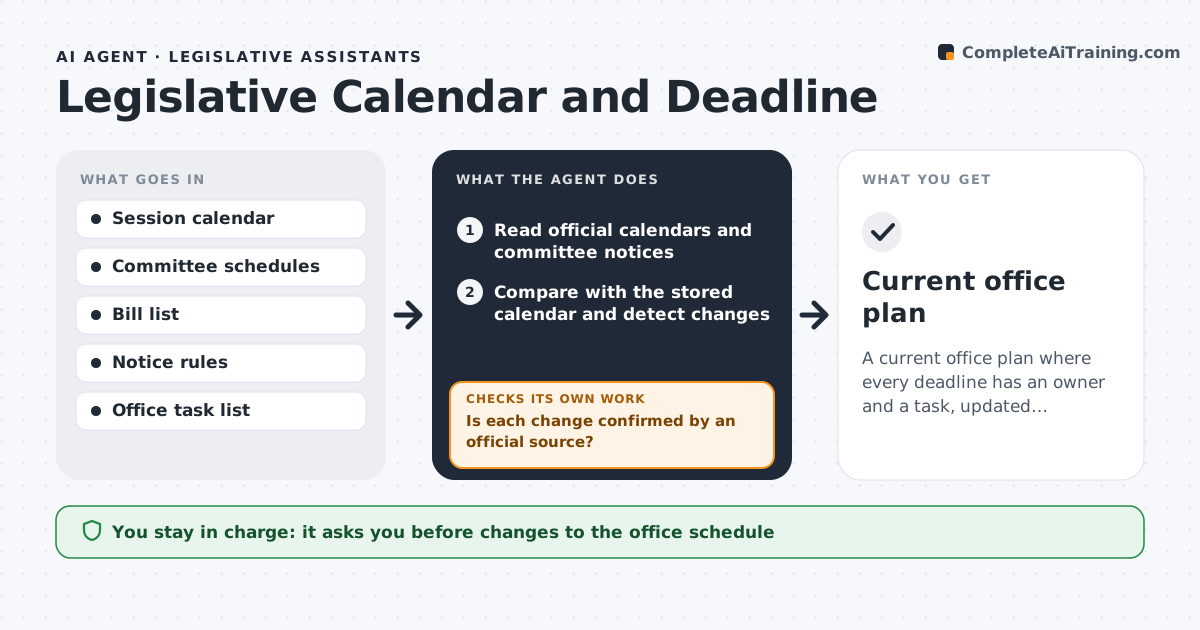
A current office plan where every deadline has an owner and a task, updated whenever sources change
What it does
Committee deadlines, notice periods and filing cutoffs change with each session, and a missed one can kill a bill. This agent tracks the session calendar, each bill's deadlines and the notice periods that apply. It checks the official sources regularly and detects changes, such as a hearing moved or a cutoff shifted. When something changes, it updates the office plan, lists the tasks that are affected and checks that each task has an owner and a due date before the new deadline. It also warns about conflicts, such as two deadlines on the same day for the same person. It rechecks the sources before the weekly digest so the digest is current. The assistant approves any change to the schedule. Edge case: a bill whose committee cutoff moves earlier triggers a reminder to move the amendment draft too.
How it works
Follow the arrows from top to bottom. The orange dashed arrow is the loop: when a check fails, the agent goes back and tries again.
Read the steps as a list
- Daily source check
- Read official calendars and committee notices
- Compare with the stored calendar and detect changes
- Is each change confirmed by an official source?If not: hold the change as unconfirmed and check again the next day. Back to step 2.
- List the tasks affected by each change
- Does every affected task have an owner and a date before the deadline?If not: assign a default owner, set the date and flag it. Back to step 4.
- Check for conflicts among deadlines for the same person
- Assistant approves schedule changesThe agent waits here for your OK.
- Update the calendar and send the weekly digest
- Current office plan
How it decides
A change is real when an official source shows it. Tasks are placed backward from the deadline using lead times the office set.
- Accept a change only when an official source confirms it
- Set task due dates a set number of days before the deadline
- Escalate any deadline within 3 days without an owner
- Flag two deadlines on one day for the same person
Make it yours
Every agent is a starting point. You choose these settings for your own situation.
- Lead time before deadlines (default 2 days)
- Sources to watch
- Digest day and time
- Owners by task type
What keeps you in control
It always asks you first
- Changes to the office schedule
Hard limits
- Never changes the member's calendar without approval
- Does not treat unofficial posts as confirmed
It stops when
- Done: the plan is updated and the digest sent
- Stop: official sources are unreachable
Set it up
We guide you through the set-up, step by step
Members get the full set-up guide for this agent. No technical skills needed: you copy, paste and upload.
- One set of instructions to paste into your AI, with the clicks for ChatGPT, Claude, Microsoft 365 Copilot, Gemini and Grok
- The agent then walks you through connecting your own data, one source at a time
- A downloadable copy with the flow chart, the rules and the full guide