AI agent for vice president of business developments
New Hire Ramp and Territory Handoff Agent
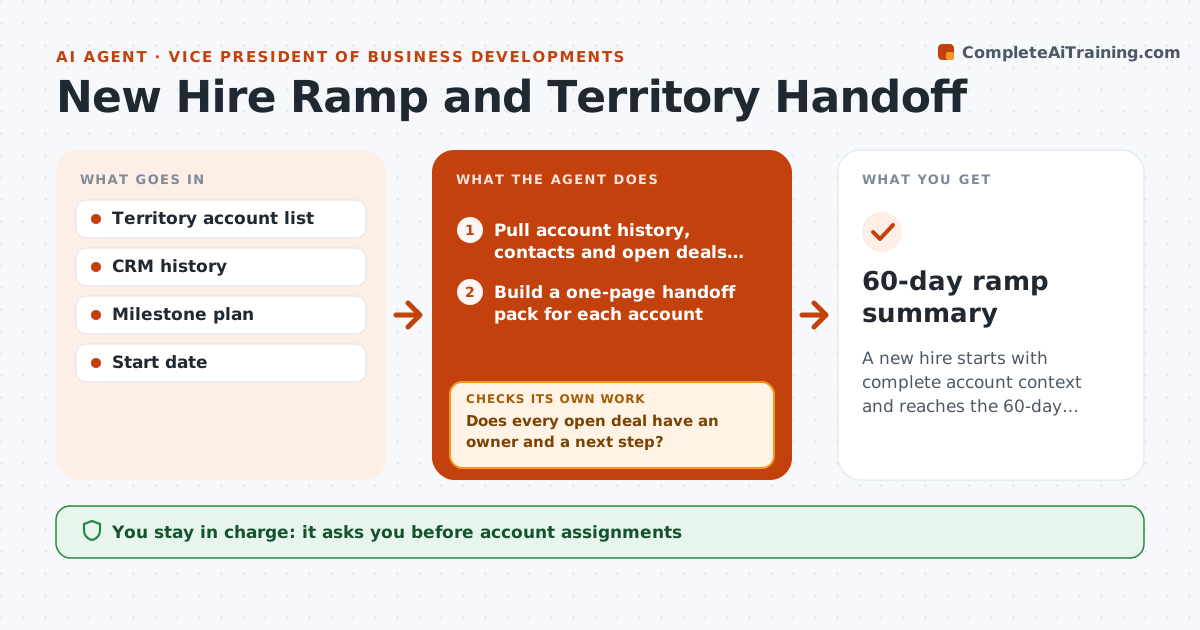
A new hire starts with complete account context and reaches the 60-day milestones with no deal left ownerless.
What it does
When a new business developer starts, the accounts they inherit come with half-remembered context, and deals sit untouched for weeks. This agent builds a handoff pack for every account from the CRM: history, key contacts, last contact, open deals and risks. It checks that every open deal has an owner and a next step, and flags the ones that do not. After the start date it tracks the first 60 days against the milestones you set, such as first calls, first pipeline and shadowed meetings, and drafts a weekly check-in for you to use. If a milestone slips, it suggests a fix and rechecks the next week. You approve every account assignment. Edge case: an account with no contact in 90 days is marked at risk before handoff.
How it works
Follow the arrows from top to bottom. The orange dashed arrow is the loop: when a check fails, the agent goes back and tries again.
Read the steps as a list
- Start date and territory confirmed
- Pull account history, contacts and open deals from the CRM
- Build a one-page handoff pack for each account
- Does every open deal have an owner and a next step?If not: list the gaps and ask the current owner to fill them, then rebuild the pack. Back to step 3.
- VP approves account assignments to the new hireThe agent waits here for your OK.
- Build a 60-day milestone plan with dates
- Each week compare CRM activity to the milestones
- Is the new hire on track for this week's milestones?If not: propose a fix such as a shadow call or an intro, and recheck next week. Back to step 7.
- Draft the weekly check-in agenda for the VP
- 60-day ramp summary
How it decides
It flags an account when it has no owner, no next step or no contact in the stale period. It flags the ramp when a milestone is more than a week behind.
- No contact on an account in 90 days: mark at risk and put it first in the pack
- Open deal over the size limit: assign a senior backup
- Two milestones behind: propose a plan reset to the VP
- Key contact left the company: list the replacement search as a task
Make it yours
Every agent is a starting point. You choose these settings for your own situation.
- Milestones and their dates
- Stale contact limit in days (default 90)
- Deal size that needs a backup
- Check-in day of the week
- Pack format and length
What keeps you in control
It always asks you first
- Account assignments
- Any change to the milestone plan
- Messages to the new hire about performance
Hard limits
- Never reassign accounts without approval
- Never share previous owner's private notes outside the pack
It stops when
- Done: 60 days complete and summary delivered
- Stop: hire leaves or territory changes, rebuild
Set it up
We guide you through the set-up, step by step
Members get the full set-up guide for this agent. No technical skills needed: you copy, paste and upload.
- One set of instructions to paste into your AI, with the clicks for ChatGPT, Claude, Microsoft 365 Copilot, Gemini and Grok
- The agent then walks you through connecting your own data, one source at a time
- A downloadable copy with the flow chart, the rules and the full guide