AI agent for civil servants
Permit Intake Completeness Agent
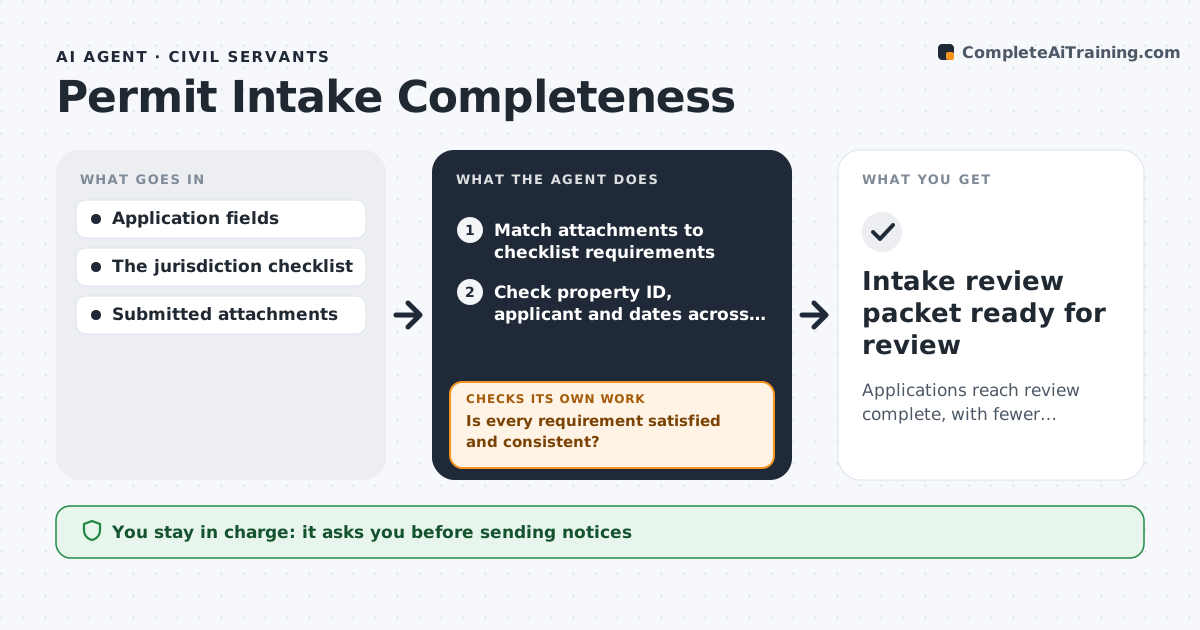
Applications reach review complete, with fewer back-and-forth requests.
What it does
Permit applications go back and forth because documents are missing or do not match the application. When an application or attachment is submitted, this agent matches each attachment to the jurisdiction's checklist. It checks property ID, applicant name and dates across all documents. For each requirement that is missing or inconsistent, it drafts a targeted clarification that names exactly what is needed. The intake supervisor approves sending the notice. When a corrected document arrives, the agent rechecks only the requirements that document affects, not the whole file. It keeps the internal completeness state current. Approving or denying the permit and any legal interpretation stay with staff. Edge case: a site plan shows parcel 112-04 while the application says 112-40, so the agent asks the applicant to confirm.
How it works
Follow the arrows from top to bottom. The orange dashed arrow is the loop: when a check fails, the agent goes back and tries again.
Read the steps as a list
- Application or attachment submitted
- Match attachments to checklist requirements
- Check property ID, applicant and dates across documents
- Is every requirement satisfied and consistent?If not: draft a targeted clarification for the gap. Back to step 2.
- Intake supervisor approves sending the noticeThe agent waits here for your OK.
- Update the internal completeness state
- Intake review packet ready for review
How it decides
It checks the next requirement on the checklist, verifies identity and content of each attachment, and drafts a request only for what's actually missing or inconsistent.
- A requirement is satisfied only by the right document type with matching details.
- After a new document, recheck only the requirements it touches.
- Draft one request per real gap, never a generic reminder.
- Permit approval or denial is never decided by the agent.
Make it yours
Every agent is a starting point. You choose these settings for your own situation.
- Checklist per permit type
- Fields to cross-check (parcel, applicant, dates, contractor license)
- Wording template for clarification notices
- Who approves sending notices
- Days before an incomplete file is flagged as stalled (default 10)
What keeps you in control
It always asks you first
- Sending notices
- Legal interpretations
- Approving or denying permits
Hard limits
- No permit decisions.
It stops when
- Done: packet complete.
- Waiting: applicant response.
Set it up
We guide you through the set-up, step by step
Members get the full set-up guide for this agent. No technical skills needed: you copy, paste and upload.
- One set of instructions to paste into your AI, with the clicks for ChatGPT, Claude, Microsoft 365 Copilot, Gemini and Grok
- The agent then walks you through connecting your own data, one source at a time
- A downloadable copy with the flow chart, the rules and the full guide