AI agent for event planners
RSVP and Attendee List Reconciliation Agent
An accurate guest list and final counts for vendors
What it does
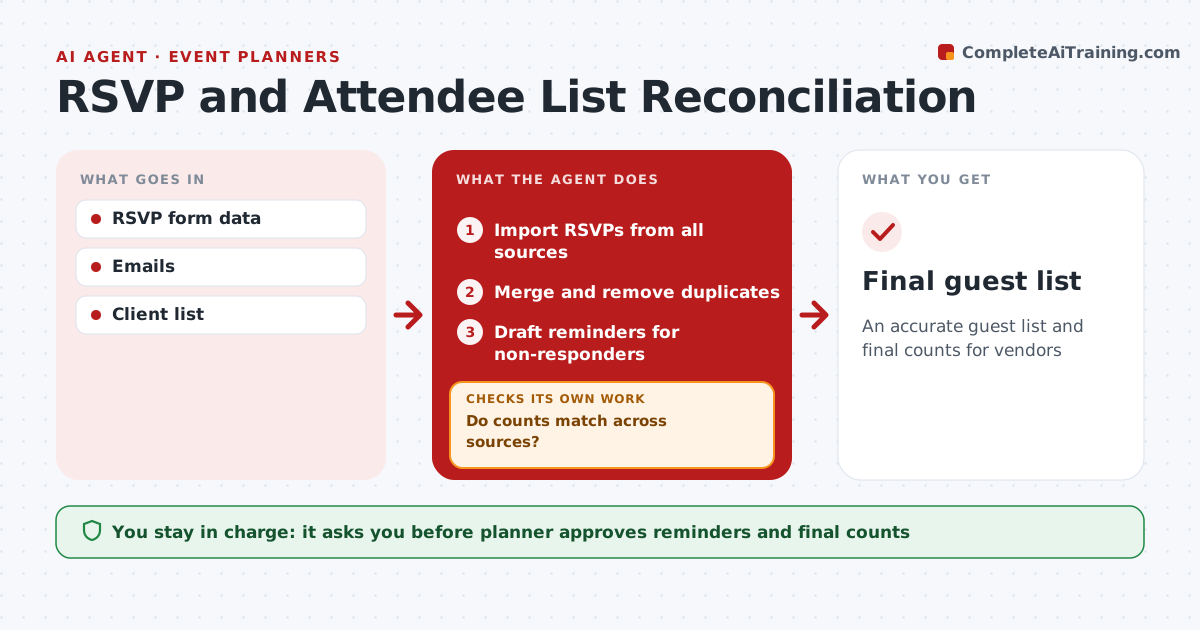
RSVPs arrive through the registration form, direct emails, phone calls to the client and late additions from executives. Keeping one true count is hard. This agent imports RSVPs from every source each day, merges them by name and company, and removes duplicates. It tracks plus-ones, dietary needs and accessibility requests per guest. It drafts reminders for non-responders at 7 and 3 days, which the planner approves. Before vendors need final numbers, it compares the count across all sources. If counts differ, it traces the mismatch to the specific guests and fixes the list. The planner approves the final numbers sent to the caterer and venue. Edge case: a guest who registered twice with different emails is merged only after the planner confirms it is the same person.
How it works
Follow the arrows from top to bottom. The orange dashed arrow is the loop: when a check fails, the agent goes back and tries again.
Read the steps as a list
- RSVP period opens
- Import RSVPs from all sources
- Merge and remove duplicates
- Draft reminders for non-responders
- Planner approves remindersThe agent waits here for your OK.
- Do counts match across sources?If not: find mismatches and fix. Back to step 3.
- Planner approves final numbers to vendorsThe agent waits here for your OK.
- Final guest list
How it decides
Duplicates are merged by name and company. Final counts are given only after reconciling.
- Merge by name and company
- Reminders at 7 and 3 days
- Dietary needs listed per guest
Make it yours
Every agent is a starting point. You choose these settings for your own situation.
- Reminder schedule
- Data sources
- Final count deadline
- Fields to collect
What keeps you in control
It always asks you first
- Planner approves reminders and final counts
Hard limits
- Never sends messages without approval
- Protects guest data
It stops when
- Done: final counts sent
- Stop: event canceled
Set it up
We guide you through the set-up, step by step
Members get the full set-up guide for this agent. No technical skills needed: you copy, paste and upload.
- One set of instructions to paste into your AI, with the clicks for ChatGPT, Claude, Microsoft 365 Copilot, Gemini and Grok
- The agent then walks you through connecting your own data, one source at a time
- A downloadable copy with the flow chart, the rules and the full guide