AI agent for managing directors
Strategic Initiative Portfolio Review Agent
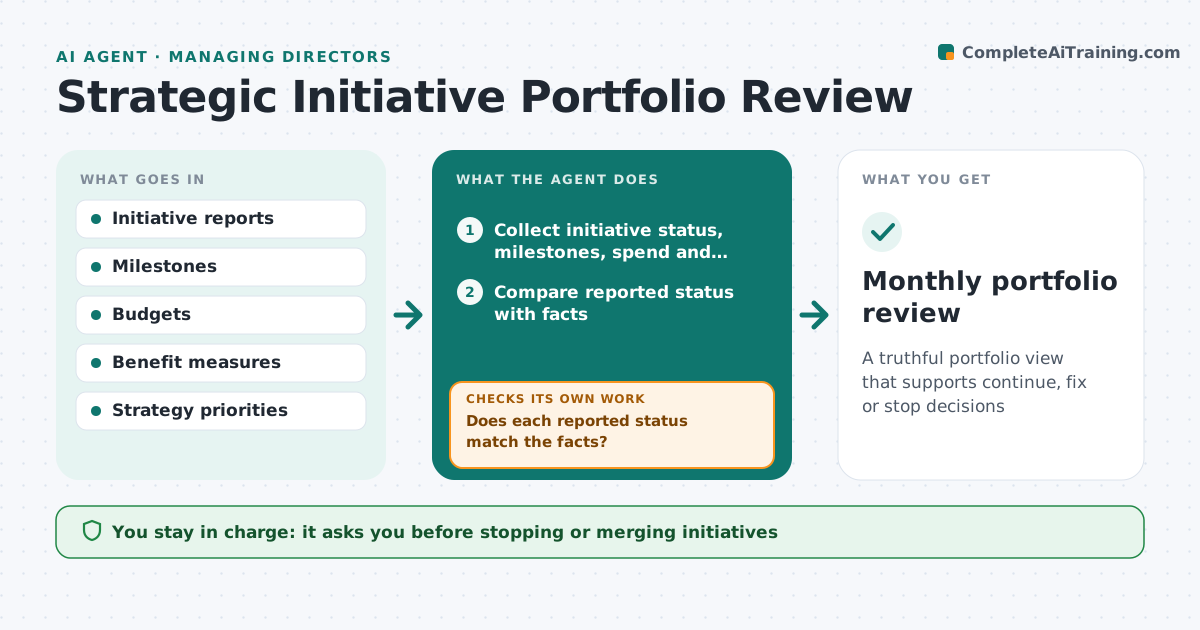
A truthful portfolio view that supports continue, fix or stop decisions
What it does
Most companies run many strategic initiatives at once, and status reports stay green while milestones and benefits slip. Each month this agent collects each initiative's status, milestones, spend and benefit measures. It checks the reported status against the facts: missed milestones, spend over budget or benefits behind plan. If a status does not match, it asks the lead for an explanation and a recovery plan. It checks resource overlaps, such as the same people on several initiatives. An initiative that no longer fits the strategy is flagged even if it is on track. It drafts a portfolio view with recommendations to continue, fix, merge or stop. The leader decides.
How it works
Follow the arrows from top to bottom. The orange dashed arrow is the loop: when a check fails, the agent goes back and tries again.
Read the steps as a list
- Month closes
- Collect initiative status, milestones, spend and benefits
- Compare reported status with facts
- Does each reported status match the facts?If not: ask the lead for an explanation and recovery plan. Back to step 3.
- Check resource overlaps and strategy fit
- Draft portfolio view with recommendations
- Leader decides on each initiativeThe agent waits here for your OK.
- Monthly portfolio review
How it decides
It overrides reported status when milestones or spend show otherwise and flags poor fit with strategy.
- Two missed milestones make status amber
- Spend 10% over budget is a flag
- Poor strategy fit flagged even if on track
Make it yours
Every agent is a starting point. You choose these settings for your own situation.
- Status rules
- Budget threshold
- Recommendation types
What keeps you in control
It always asks you first
- Stopping or merging initiatives
Hard limits
- Never changes budgets
It stops when
- Done: review held
- Stop: reports missing; delay one week
Set it up
We guide you through the set-up, step by step
Members get the full set-up guide for this agent. No technical skills needed: you copy, paste and upload.
- One set of instructions to paste into your AI, with the clicks for ChatGPT, Claude, Microsoft 365 Copilot, Gemini and Grok
- The agent then walks you through connecting your own data, one source at a time
- A downloadable copy with the flow chart, the rules and the full guide