AI app for education · no coding needed
Daily Child Insight
Parents get a warm daily story of their child's day, without the daycare storing raw video.
Made for: Daycare managers in independent urban centres
What it does for you
The problem
Generic daily reports miss emotional and developmental details.
What it gives you
Private daily narrative reports
What you give it
Live audiovisual streams
How it works, step by step
- Identify specific child by face and voice
- Filter out other identifiable data
- Detect learning moments and social interactions
- Draft plain English narrative
- Anonymise other children in output
- Generate timestamped observations
What you see on screen
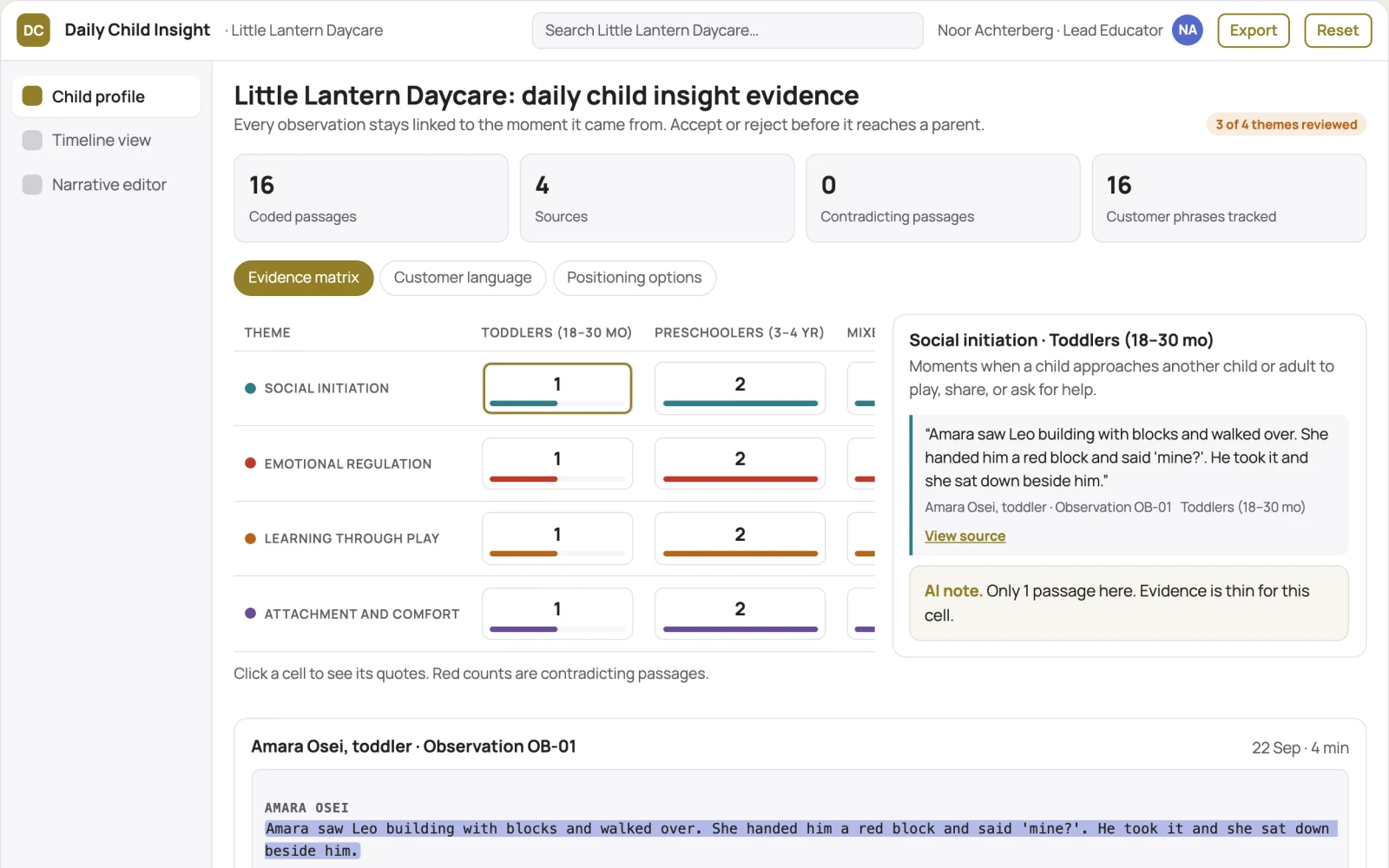
- Child profile
- timeline view
- narrative editor
Jobs this app suits
Our AI checked this app against 500 jobs; these get the most out of it. Each job links to its learning path.
Build it yourself with your AI system
Build this app yourself, no coding needed
Start with a quick version you can try in a few minutes. Like it? Then build the full app by copying and pasting our step-by-step instructions: everything is prepared for you.
Sign in to see how to build it yourself
Build a quick version to try, or get the full app pack for Daily Child Insight with the step-by-step building instructions. You don't need any technical skills: you copy, paste and answer a few questions. Both are included in the membership.
4 Have it built for you days to a few weeks
Rather not do it yourself, or want it fully tailored to your data, your way of working and your brand? Nexibeo builds Daily Child Insight with you.
What's in the app pack
Included in the Complete AI Training membership.
- The building instructions your AI follows, step by step
- The questions your AI will ask you about your business before it starts
- A clickable demo you can open in your browser, to see how it should work
- A detailed blueprint of the screens, the information it keeps and the checks it runs
Become a member to get the app packAlready a member? Sign in
The files, for the technically curious
- START-HERE.mdHow to build it with your own AI (read first)3 KB
- README.mdOverview and links1 KB
- questions.mdQuestions to answer before you build2 KB
- prompt-cloudflare.mdThe full build prompt, hosted on Cloudflare18 KB
- prompt-vps.mdThe same build on your own server (Docker)18 KB
- spec.jsonData model, API, AI pipeline, acceptance criteria10 KB
- demo/index.htmlThe working demo on sample data196 KB
Questions
Do I need to know how to code?
No. You copy and paste the prompts on this page into ChatGPT or Claude, and the AI does the building. When it asks you something, you answer in your own words.
What does it cost?
The quick version, the app pack and the step-by-step instructions are for members: you pay the membership price, not a price per app (see the plans). Building the full app uses your own ChatGPT or Claude subscription. Putting it online is often cheap or no cost at the start, and your AI tells you before anything costs money.
How long does it take?
The quick version: about two minutes. The real app: an afternoon for a first version you can use, longer if you want every feature.
Can I change it to fit my business?
Yes. Tell your AI what to change in plain words, like “add a column for the price” or “use our logo and colours”. Or have Nexibeo build and customise it for you.
More detailsHow the AI works, safeguards and what to build first
For daycare managers in independent urban centres, turn live audio and visual streams into private daily narrative reports. Address the recurring problem: generic reports miss emotional and developmental details. The pilot measures parent satisfaction score and staff time saved on notes against the buyer's current method, before the larger build.
Set up child profile, configure privacy filters, run edge processing, review draft narrative, approve and send to parents. Start with live audio and visual streams and finish with private daily narrative reports.
How the AI works
Use multimodal models to detect speech, emotions and interactions. Keep raw video on device. A human reviewer checks the narrative for accuracy and tone before delivery.
Safeguards
Strict data deletion, no cloud storage, face blurring
What to build first
One room, one child profile, manual review of draft, email delivery
What it can connect to
Existing room cameras and microphones
The screens in detail
Use a timeline view for chronological events, a profile section for child stats, and an editor for the final narrative. In this product, the first view is child profile, followed by timeline view and narrative editor.