AI app for healthcare · no coding needed
Pediatric Symptom Triage Assistant
Night-time symptom triage for children that hands parents straight to the right telemedicine doctor when it matters.
Made for: Parents of young children
What it does for you
The problem
Parents wake up to a sick child and struggle to determine if it is an emergency or requires home care.
What it gives you
Structured triage plan, care instructions, risk assessment, doctor summary
What you give it
Symptom descriptionsphotosvoice recordingschild profile
How it works, step by step
- Capture symptoms via text, photo or voice
- Cross-reference age and medical history
- Analyse visual data for skin conditions
- Generate structured care instructions
- Identify red flags requiring immediate care
- Generate summary for medical professionals
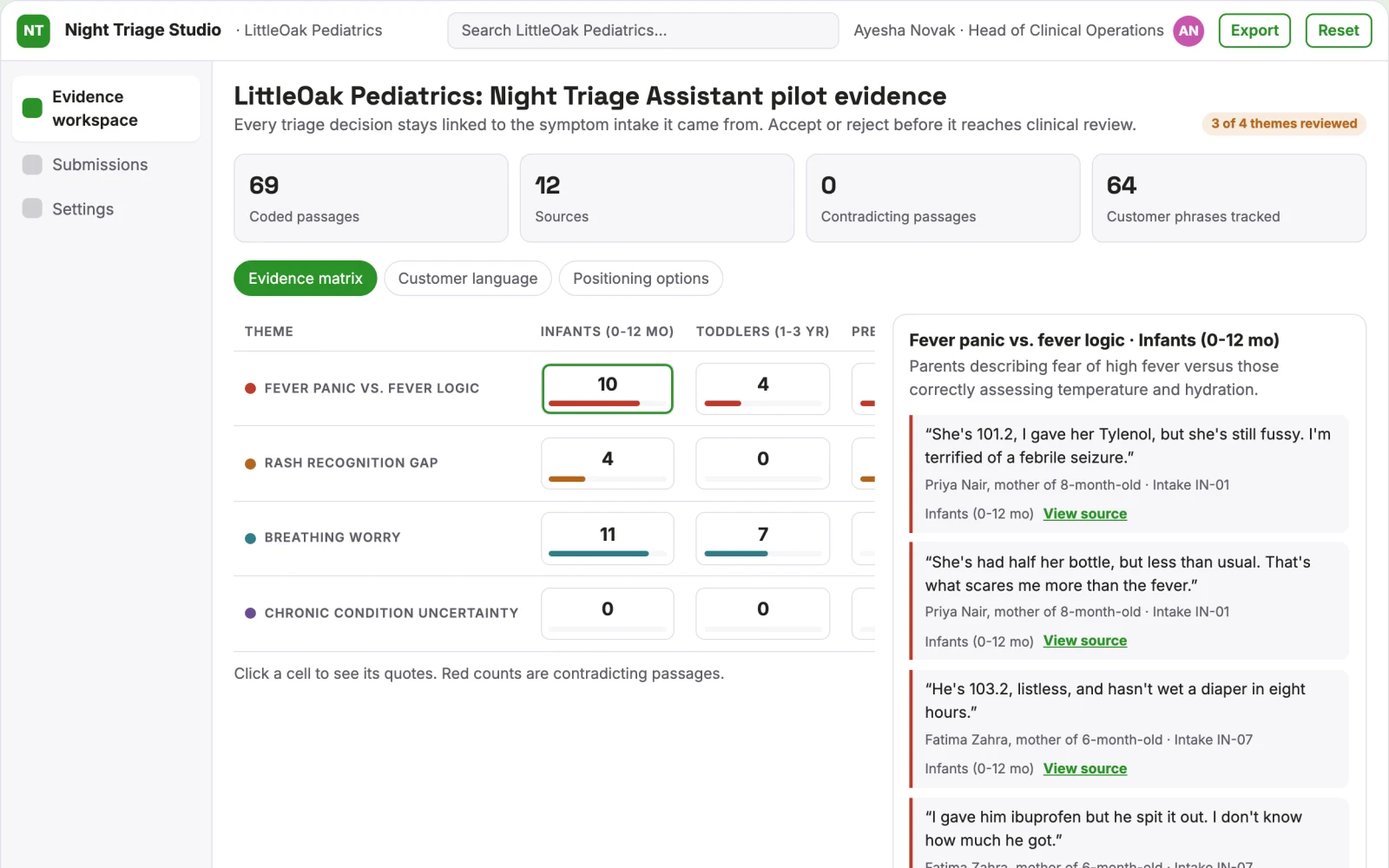
What you see on screen
- Symptom intake
- analysis dashboard
- doctor booking
Jobs this app suits
Our AI checked this app against 500 jobs; these get the most out of it. Each job links to its learning path.
Build it yourself with your AI system
Build this app yourself, no coding needed
Start with a quick version you can try in a few minutes. Like it? Then build the full app by copying and pasting our step-by-step instructions: everything is prepared for you.
Sign in to see how to build it yourself
Build a quick version to try, or get the full app pack for Pediatric Symptom Triage Assistant with the step-by-step building instructions. You don't need any technical skills: you copy, paste and answer a few questions. Both are included in the membership.
4 Have it built for you days to a few weeks
Rather not do it yourself, or want it fully tailored to your data, your way of working and your brand? Nexibeo builds Pediatric Symptom Triage Assistant with you.
What's in the app pack
Included in the Complete AI Training membership.
- The building instructions your AI follows, step by step
- The questions your AI will ask you about your business before it starts
- A clickable demo you can open in your browser, to see how it should work
- A detailed blueprint of the screens, the information it keeps and the checks it runs
Become a member to get the app packAlready a member? Sign in
The files, for the technically curious
- START-HERE.mdHow to build it with your own AI (read first)3 KB
- README.mdOverview and links1 KB
- questions.mdQuestions to answer before you build2 KB
- prompt-cloudflare.mdThe full build prompt, hosted on Cloudflare20 KB
- prompt-vps.mdThe same build on your own server (Docker)20 KB
- spec.jsonData model, API, AI pipeline, acceptance criteria12 KB
- demo/index.htmlThe working demo on sample data205 KB
Questions
Do I need to know how to code?
No. You copy and paste the prompts on this page into ChatGPT or Claude, and the AI does the building. When it asks you something, you answer in your own words.
What does it cost?
The quick version, the app pack and the step-by-step instructions are for members: you pay the membership price, not a price per app (see the plans). Building the full app uses your own ChatGPT or Claude subscription. Putting it online is often cheap or no cost at the start, and your AI tells you before anything costs money.
How long does it take?
The quick version: about two minutes. The real app: an afternoon for a first version you can use, longer if you want every feature.
Can I change it to fit my business?
Yes. Tell your AI what to change in plain words, like “add a column for the price” or “use our logo and colours”. Or have Nexibeo build and customise it for you.
More detailsHow the AI works, safeguards and what to build first
For parents of young children, turn symptom descriptions, photos and voice recordings into a structured triage plan and care instructions. This addresses the problem of panic and uncertainty during night-time illness and the risk of unnecessary emergency room visits.
Capture symptom, upload photo, record voice, AI analysis, review care plan, book doctor if needed, receive summary for doctor. Start with symptom descriptions, photos and voice recordings and finish with a structured triage plan and care instructions.
How the AI works
Use multimodal models to analyse symptom descriptions, photos and voice recordings against medical knowledge bases. A parent must verify the child's identity and review the care plan before taking action.
Safeguards
The system must not provide a diagnosis, must always default to seeing a doctor for emergencies, and requires parental consent for all data processing
What to build first
First cut is a subscription service for parents to triage minor illnesses using text and photos with manual review of the AI output
What it can connect to
Telemedicine platforms, electronic health records
The screens in detail
Use a central intake screen for text, photo and voice inputs, a dashboard showing the triage result and care plan, and a booking interface for video consultations. The first view is the symptom intake screen followed by the analysis dashboard.