AI app for marketing · no coding needed
Field Content Capture Assistant
Turns frontline employees into content creators without requiring them to write or understand brand guidelines.
Made for: Marketing leads at multi-location hospitality and trade service businesses
What it does for you
The problem
Head office marketing teams are too far from daily operations to capture authentic moments while employees lack time to write captions.
What it gives you
Branded social media posts ready for publication
What you give it
Raw photosshort video clips from frontline staff
How it works, step by step
- Capture media via mobile device
- Identify objects and actions using vision models
- Generate on-brand caption options
- Format content for specific social channels
- Queue content for review
- Track engagement metrics for future suggestions
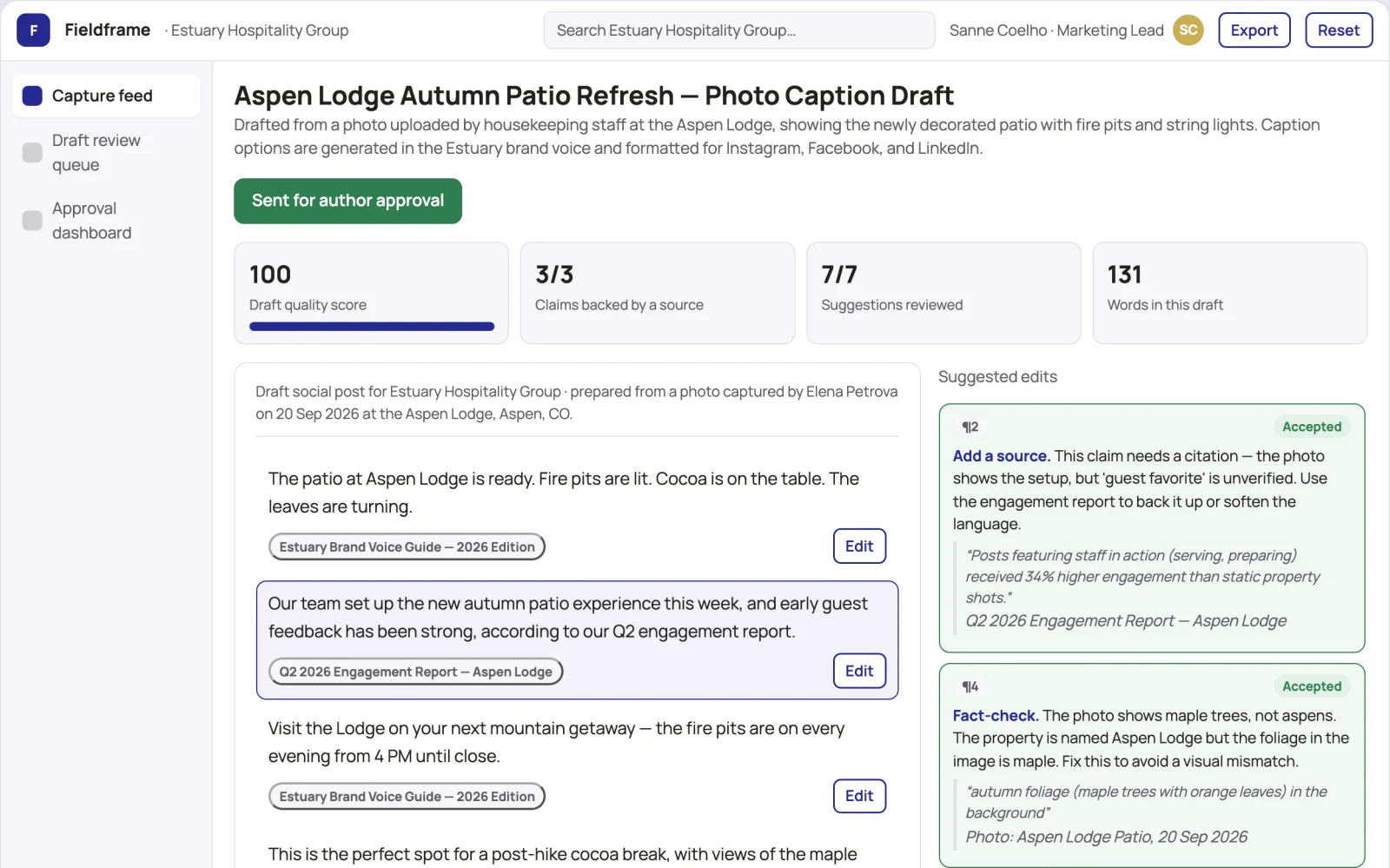
What you see on screen
- Capture feed
- draft review queue
- approval dashboard
Jobs this app suits
Our AI checked this app against 500 jobs; these get the most out of it. Each job links to its learning path.
Build it yourself with your AI system
Build this app yourself, no coding needed
Start with a quick version you can try in a few minutes. Like it? Then build the full app by copying and pasting our step-by-step instructions: everything is prepared for you.
Sign in to see how to build it yourself
Build a quick version to try, or get the full app pack for Field Content Capture Assistant with the step-by-step building instructions. You don't need any technical skills: you copy, paste and answer a few questions. Both are included in the membership.
4 Have it built for you days to a few weeks
Rather not do it yourself, or want it fully tailored to your data, your way of working and your brand? Nexibeo builds Field Content Capture Assistant with you.
What's in the app pack
Included in the Complete AI Training membership.
- The building instructions your AI follows, step by step
- The questions your AI will ask you about your business before it starts
- A clickable demo you can open in your browser, to see how it should work
- A detailed blueprint of the screens, the information it keeps and the checks it runs
Become a member to get the app packAlready a member? Sign in
The files, for the technically curious
- START-HERE.mdHow to build it with your own AI (read first)3 KB
- README.mdOverview and links1 KB
- questions.mdQuestions to answer before you build2 KB
- prompt-cloudflare.mdThe full build prompt, hosted on Cloudflare20 KB
- prompt-vps.mdThe same build on your own server (Docker)20 KB
- spec.jsonData model, API, AI pipeline, acceptance criteria12 KB
- demo/index.htmlThe working demo on sample data199 KB
Questions
Do I need to know how to code?
No. You copy and paste the prompts on this page into ChatGPT or Claude, and the AI does the building. When it asks you something, you answer in your own words.
What does it cost?
The quick version, the app pack and the step-by-step instructions are for members: you pay the membership price, not a price per app (see the plans). Building the full app uses your own ChatGPT or Claude subscription. Putting it online is often cheap or no cost at the start, and your AI tells you before anything costs money.
How long does it take?
The quick version: about two minutes. The real app: an afternoon for a first version you can use, longer if you want every feature.
Can I change it to fit my business?
Yes. Tell your AI what to change in plain words, like “add a column for the price” or “use our logo and colours”. Or have Nexibeo build and customise it for you.
More detailsHow the AI works, safeguards and what to build first
For marketing leads at multi-location hospitality and trade service businesses, turn raw photos and video clips into branded social media posts and schedule them for publication. This addresses the problem of generic stock photos and empty feeds while authentic moments vanish. The value hypothesis is a faster, more authentic content pipeline with less manual effort; the pilot must establish whether this improves engagement and saves time.
Upload media, identify scene, generate captions, review options, approve content, schedule publication, and analyse engagement. Start with raw photos or short clips and finish with published social media posts.
How the AI works
Use multimodal models to interpret visual context and generate text in the brand voice. A human marketing lead reviews and approves the drafts before publication to ensure brand safety.
Safeguards
Content moderation filters to prevent inappropriate uploads, approval gatekeeping to ensure brand safety, limits on daily uploads per employee.
What to build first
Mobile web app with camera upload, single caption draft per upload, and a simple approval dashboard for one marketing manager. Ship to two local cafés or a small trade business with no multi-platform logic.
What it can connect to
Social media platforms for publishing, internal employee communication apps for distribution.
The screens in detail
Use a feed view where staff upload media, a queue view for marketing leads to approve drafts, and a dashboard to track content status. Display draft, pending approval and published states. Provide a quick approve or edit option. In this product, the first view is the capture feed, followed by the draft review queue and approval dashboard.