AI app for operations · no coding needed
Daily Needs Agent
A persistent, personal model that learns individual rhythms and acts across messy real-world interfaces, not just structured APIs.
Made for: Dual-income parents and solo founders
What it does for you
The problem
Essential household items run out and deadlines slip because life moves faster than manual tracking.
What it gives you
Proactive reorder suggestions, task completions and a daily action digest
What you give it
Calendaremailpurchase historyhome service account credentials
How it works, step by step
- Connect calendar, email and home service accounts
- Learn consumption rhythms and recurring commitments
- Detect low-stock signals and upcoming deadlines
- Send a single message with a suggested action
- Execute approved actions across apps and websites
- Adjust confidence threshold based on approval patterns
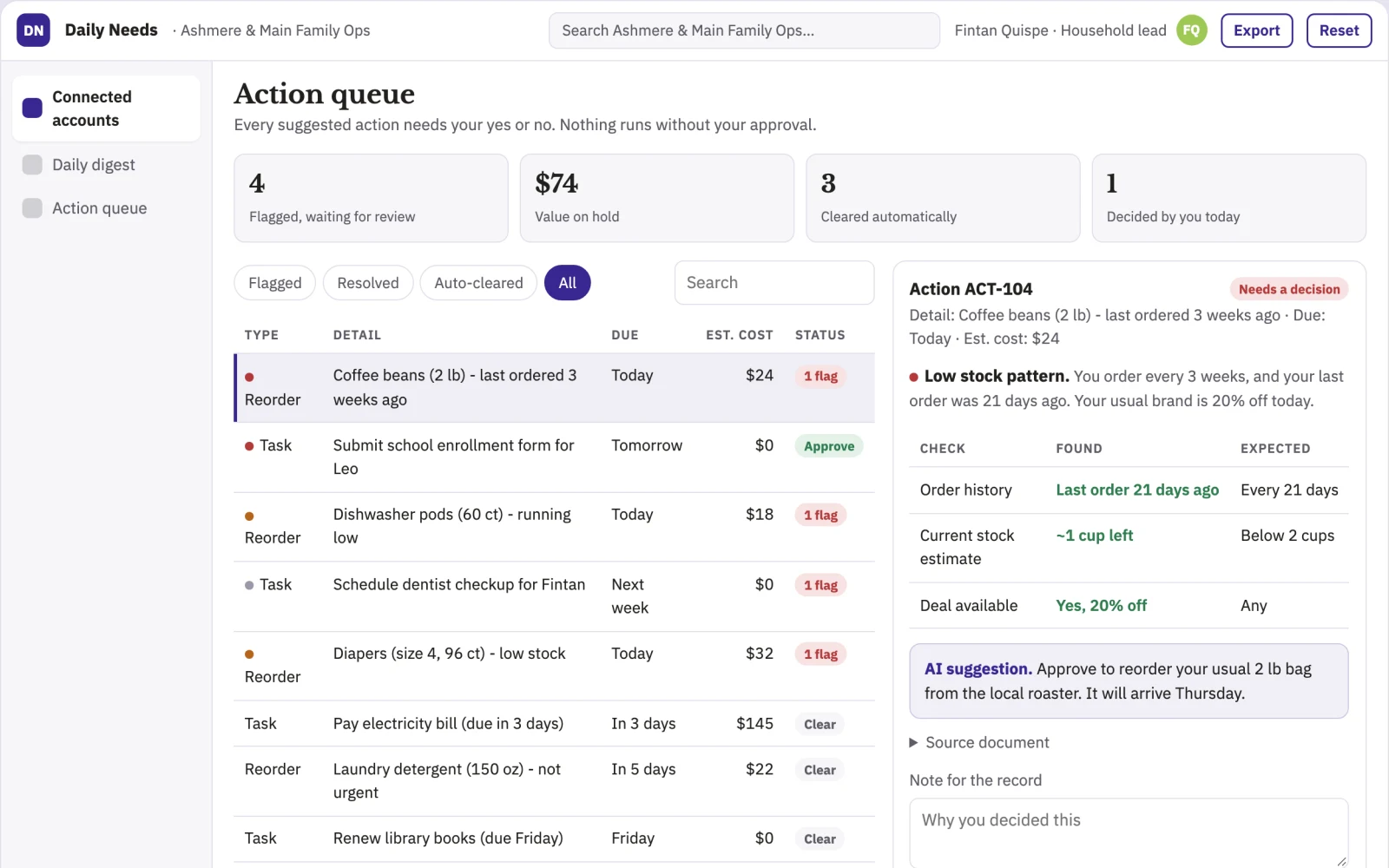
What you see on screen
- Connected accounts
- daily digest
- action queue
Build it yourself with your AI system
Build this app yourself, no coding needed
Start with a quick version you can try in a few minutes. Like it? Then build the full app by copying and pasting our step-by-step instructions: everything is prepared for you.
Sign in to see how to build it yourself
Build a quick version to try, or get the full app pack for Daily Needs Agent with the step-by-step building instructions. You don't need any technical skills: you copy, paste and answer a few questions. Both are included in the membership.
4 Have it built for you days to a few weeks
Rather not do it yourself, or want it fully tailored to your data, your way of working and your brand? Nexibeo builds Daily Needs Agent with you.
What's in the app pack
Included in the Complete AI Training membership.
- The building instructions your AI follows, step by step
- The questions your AI will ask you about your business before it starts
- A clickable demo you can open in your browser, to see how it should work
- A detailed blueprint of the screens, the information it keeps and the checks it runs
Become a member to get the app packAlready a member? Sign in
The files, for the technically curious
- START-HERE.mdHow to build it with your own AI (read first)3 KB
- README.mdOverview and links1 KB
- questions.mdQuestions to answer before you build2 KB
- prompt-cloudflare.mdThe full build prompt, hosted on Cloudflare21 KB
- prompt-vps.mdThe same build on your own server (Docker)21 KB
- spec.jsonData model, API, AI pipeline, acceptance criteria11 KB
- demo/index.htmlThe working demo on sample data195 KB
Questions
Do I need to know how to code?
No. You copy and paste the prompts on this page into ChatGPT or Claude, and the AI does the building. When it asks you something, you answer in your own words.
What does it cost?
The quick version, the app pack and the step-by-step instructions are for members: you pay the membership price, not a price per app (see the plans). Building the full app uses your own ChatGPT or Claude subscription. Putting it online is often cheap or no cost at the start, and your AI tells you before anything costs money.
How long does it take?
The quick version: about two minutes. The real app: an afternoon for a first version you can use, longer if you want every feature.
Can I change it to fit my business?
Yes. Tell your AI what to change in plain words, like “add a column for the price” or “use our logo and colours”. Or have Nexibeo build and customise it for you.
More detailsHow the AI works, safeguards and what to build first
For dual-income parents and solo founders, turn calendar, email and purchase history into proactive reorder suggestions and task completions. Address the recurring problem: essential household items run out and deadlines slip because life moves faster than manual tracking. The value hypothesis is reduced mental load with a single-tap approval flow; the pilot must establish whether trust and accuracy hold.
Connect accounts, observe patterns, detect a trigger, draft a suggestion, send for approval, execute if approved, and log the outcome. Start with calendar, email and purchase history and finish with proactive reorder suggestions and task completions.
How the AI works
Use language models to parse unstructured emails, receipts and notes, and pattern recognition to spot recurring needs. A deterministic rule engine checks spending limits and calendar conflicts. A human user reviews and approves every action before execution; the system never acts autonomously without explicit consent.
Safeguards
Users set spending limits, approval requirements and confidence thresholds. The system must not execute any action without explicit approval, must not share data with third parties, and must allow full account disconnection at any time.
What to build first
One buyer: dual-income parents. One use case: grocery reordering. First two modules: silent observer and morning digest. Manual review of every suggestion before any action.
What it can connect to
Google Calendar, Gmail, a grocery delivery service, and a payment method; later add more calendars, email providers and home service accounts.
The screens in detail
Use a dashboard showing connected services and a timeline of detected patterns. The main screen is a daily digest listing suggested actions with one-tap approve or dismiss. Show confidence levels and history of past approvals. Provide a settings panel for guardrails and spending limits. In this product, the first view is connected accounts, followed by daily digest and action queue.