MCP server · Research
Astronomy Oracle MCP server
by gregario
Look up deep-sky objects and plan a stargazing night with real catalog data and rise/set times.
This is a small helper that gives your AI real astronomy data instead of made-up numbers. It knows over 13,000 deep-sky objects from the OpenNGC catalog, and it can work out when each one rises, crosses the sky, and sets from where you are. It is handy if you stargaze, own a telescope, or just like looking up at the night sky.
What is an MCP server? The 30-second version
On its own, your AI can only chat. It cannot check a star catalog or do the math for where a galaxy will be at 11pm. An MCP server is a small helper program that gives your AI a new skill, and this one gives it astronomy knowledge and sky math. Once it is connected, you ask a question in normal words and the AI quietly asks this helper for the real numbers.
What this MCP server does
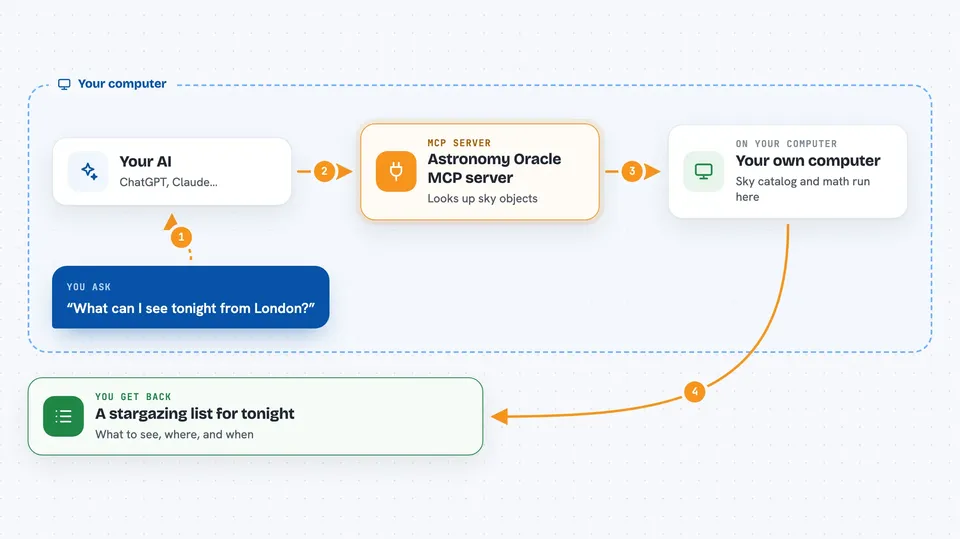
You ask your AI something like what can I see tonight from London. The AI passes your location and date to this helper. The helper looks through its built-in catalog of galaxies, nebulae, and clusters, and does the sky math for your spot on Earth. Then it hands back a tidy list of objects with their positions and best viewing times, and your AI explains it to you in the chat. Nothing is sent over the internet, everything happens on your own computer.
 Click to zoom
What you can do with it
- Look up any Messier, NGC, or IC object by name or number
- See an object's coordinates, brightness, size, and type
- Check when an object rises, crosses the sky, and sets from your location
- Search the catalog by type, constellation, or brightness
- Plan a whole observing session for a given night and place
- Get objects grouped into evening, midnight, and pre-dawn windows
Try asking your AI
- “Look up M31 and tell me if it is visible from London tonight at 10pm”
- “Find planetary nebulae in Lyra brighter than magnitude 12”
- “Plan an observing session for New York on March 20, only galaxies and clusters above 20 degrees”
- “What time does the Orion Nebula set tonight from my location at latitude 40.7, longitude -74.0”
What it gives back to you
You get back clear answers in the chat: object details like type, coordinates, magnitude, and size, or a table of matching objects sorted by brightness. For session plans, you get lists of objects grouped by time of night, with a score for how easy each one is to see. If you gave a location and time, you also get the object's current height in the sky and its rise, transit, and set times.
Before you start
What you need
- Node.js installed on your computer (the free software that runs npx commands)
- The Claude desktop app or Claude Code, so you can add the server
Good to know
The catalog data is bundled and fixed, so it will not include newly discovered objects or recent updates.
Install it with your AI
Add Astronomy Oracle MCP server to your AI, no technical skills needed
You don't install anything by hand. You copy one prompt, paste it into an AI that can work on your computer, and it checks, installs and connects the server for you, asking you when it needs something.
Sign in to get the install prompt
Members get a ready-made prompt that lets the Claude desktop app check Astronomy Oracle MCP server, install it and connect it for them, step by step. You don't need any technical skills: you copy, paste and answer a few questions. Your connected AI can also find and install any of the 4,609 MCP servers here for you.
Who it's for
Backyard astronomers, telescope owners, and anyone who plans stargazing nights and wants real catalog numbers instead of guesses.