AI agent for clinical research coordinators
Adverse Event Reporting Timeline Agent
Every serious adverse event reported on time
What it does
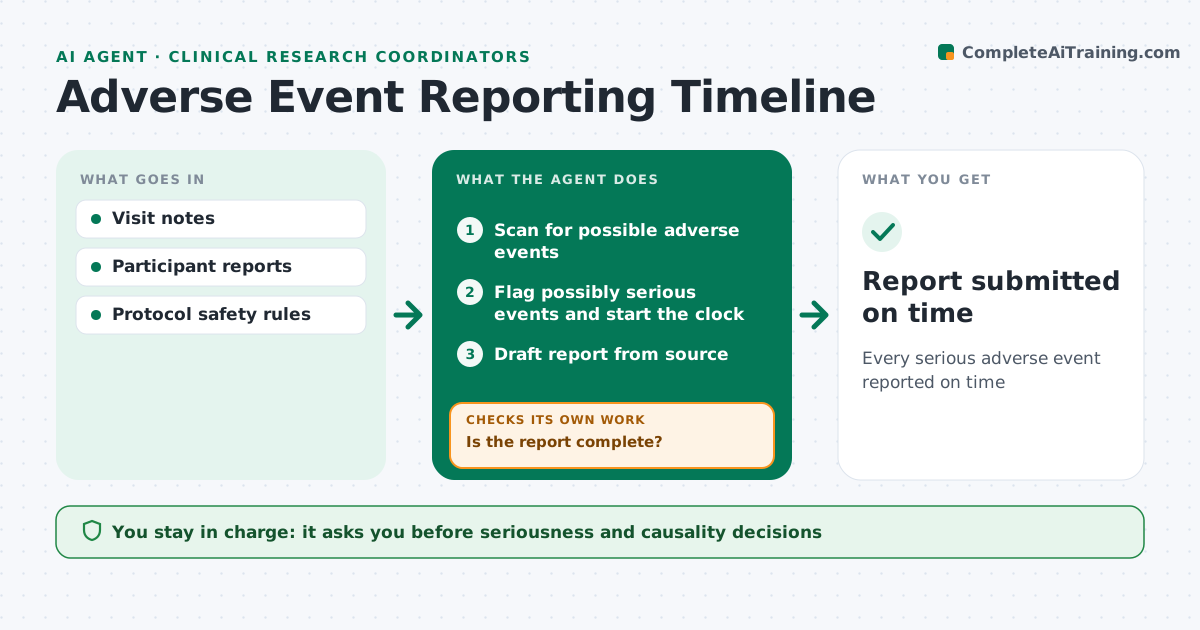
Serious adverse events must be reported to the sponsor and ethics board within strict timelines, and missing one is a major compliance finding. Whenever new notes are entered, this agent scans visit notes and participant reports for possible adverse events. It flags those that may be serious, such as hospitalizations, and starts the reporting clock. It drafts the report from source information and tracks follow-up information requests. Before review, it checks that the report is complete. If fields are missing, it lists what is needed and checks again once added. The investigator reviews and signs the report; the agent never decides seriousness or causality on its own. Edge case: a hospitalization discovered days later starts the clock from when the site learned of it, not from the event date.
How it works
Follow the arrows from top to bottom. The orange dashed arrow is the loop: when a check fails, the agent goes back and tries again.
Read the steps as a list
- New notes entered
- Scan for possible adverse events
- Flag possibly serious events and start the clock
- Draft report from source
- Is the report complete?If not: list missing information and request it. Back to step 4.
- Investigator reviews and signsThe agent waits here for your OK.
- Report submitted on time
How it decides
It flags events that meet serious criteria and calculates deadlines from the protocol rules.
- Start the clock when the site learns of the event
- Flag hospitalizations as possibly serious
- Track follow-up requests
Make it yours
Every agent is a starting point. You choose these settings for your own situation.
- Protocol reporting timelines
- Keywords for events
- Alert channel
- Report template
What keeps you in control
It always asks you first
- Seriousness and causality decisions
- Submitting reports
Hard limits
- Never decides causality
- Never submits without signature
It stops when
- Done: report submitted
- Stop: investigator unavailable; escalate
Set it up
We guide you through the set-up, step by step
Members get the full set-up guide for this agent. No technical skills needed: you copy, paste and upload.
- One set of instructions to paste into your AI, with the clicks for ChatGPT, Claude, Microsoft 365 Copilot, Gemini and Grok
- The agent then walks you through connecting your own data, one source at a time
- A downloadable copy with the flow chart, the rules and the full guide