AI agent for dispatchers
After-Hours Escalation Ladder Agent
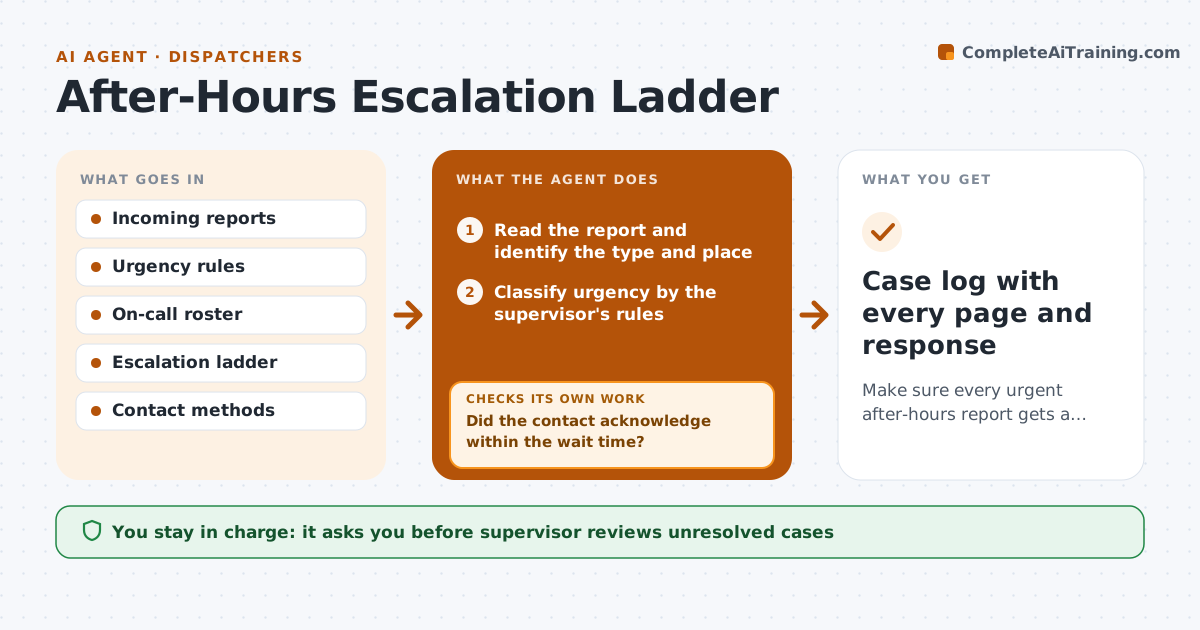
Make sure every urgent after-hours report gets a human response, with a full record.
What it does
After-hours problems arrive through phone lines, alarms and web forms, and a missed page can turn into damage or danger. This agent reads each report, sorts it by urgency using the rules the supervisor set, and pages the right on-call person for that type. It waits for an acknowledgment. If nobody answers within the set time, it moves to the next person on the ladder, then the next, and writes every step to the log. It also checks that the person who acknowledged has marked the issue handled. The supervisor reviews any case that reached the end of the ladder or stayed open. Edge case: a report for a gas smell skips straight to the senior contact and the emergency line.
How it works
Follow the arrows from top to bottom. The orange dashed arrow is the loop: when a check fails, the agent goes back and tries again.
Read the steps as a list
- After-hours report arrives
- Read the report and identify the type and place
- Classify urgency by the supervisor's rules
- Page the first on-call contact
- Did the contact acknowledge within the wait time?If not: Page the next person on the ladder and log the miss. Back to step 4.
- Record the acknowledgment and the plan
- Check the status of the issue after the set time
- Is the issue marked handled?If not: Remind the contact, then escalate to the next person. Back to step 6.
- Close the log entry with the timeline
- Supervisor reviews unresolved or fully escalated casesThe agent waits here for your OK.
- Case log with every page and response
How it decides
It classifies by the rules, pages the first contact for that class, and escalates on silence using fixed wait times.
- Life safety reports go to the senior contact and the emergency line at once
- Wait 10 minutes for urgent pages and 30 for routine
- After the third level, call the supervisor directly
- Routine reports can wait for morning with a note
Make it yours
Every agent is a starting point. You choose these settings for your own situation.
- Wait time per level (default 10 minutes urgent)
- The escalation ladder and contacts
- Report types that count as life safety
- Who reviews unresolved cases
What keeps you in control
It always asks you first
- Supervisor reviews unresolved cases
- Supervisor approves any change to the ladder
Hard limits
- Never close a case without a human acknowledgment
- Never skip the log
It stops when
- Done: the issue is handled and logged
- Stop: the ladder is exhausted and the supervisor takes over
Set it up
We guide you through the set-up, step by step
Members get the full set-up guide for this agent. No technical skills needed: you copy, paste and upload.
- One set of instructions to paste into your AI, with the clicks for ChatGPT, Claude, Microsoft 365 Copilot, Gemini and Grok
- The agent then walks you through connecting your own data, one source at a time
- A downloadable copy with the flow chart, the rules and the full guide