AI agent for paramedics
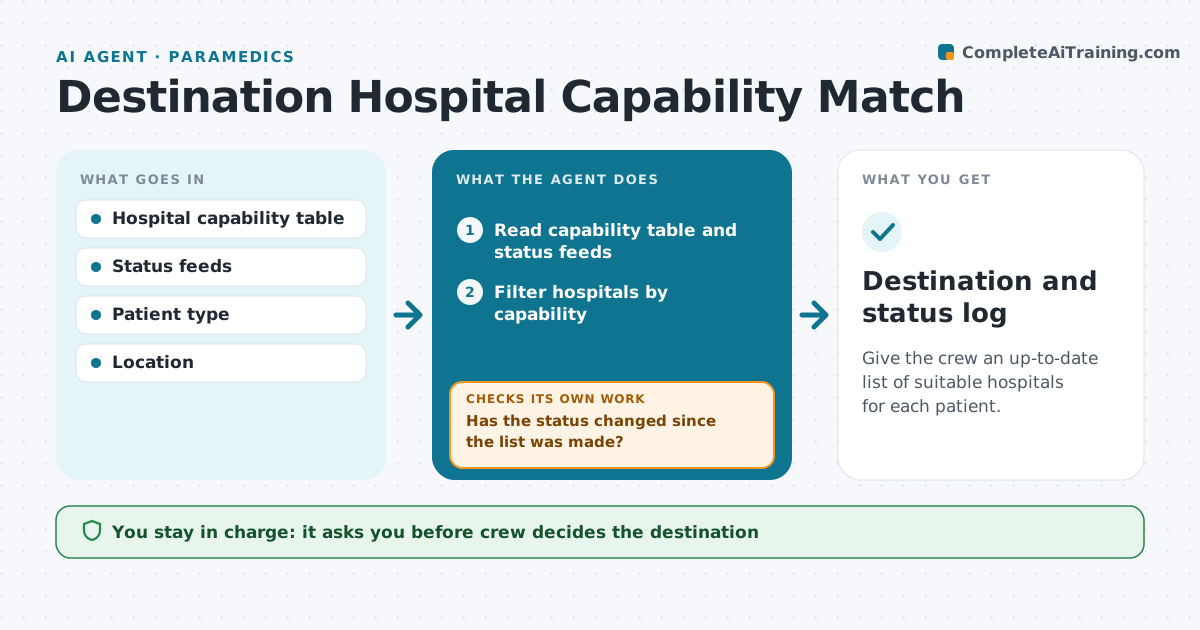
Destination Hospital Capability Match Agent
Give the crew an up-to-date list of suitable hospitals for each patient.
What it does
Which hospital can take a stroke, trauma or pediatric patient depends on staff, beds and diversion status, and it changes through the day. This agent keeps a current table of hospital capabilities, reads status feeds, and compares them with the patient type the crew enters. It lists suitable destinations ordered by drive time and gives the reason each is on or off the list. As the status changes, it updates the list and tells the crew. After a destination is chosen, it checks that the status has not changed since. The crew always decides. Edge case: the nearest stroke center goes on diversion while the crew is en route, so the agent flags it and shows the next option.
How it works
Follow the arrows from top to bottom. The orange dashed arrow is the loop: when a check fails, the agent goes back and tries again.
Read the steps as a list
- Crew enters patient type and location
- Read capability table and status feeds
- Filter hospitals by capability
- Remove hospitals on diversion or without capacity
- Get drive times
- Rank suitable hospitals with reasons
- Crew chooses the destinationThe agent waits here for your OK.
- Has the status changed since the list was made?If not: rebuild the list and alert the crew. Back to step 2.
- Is the chosen hospital still suitable on arrival time?If not: show the next best option. Back to step 7.
- Destination and status log
How it decides
A hospital is listed if its capability matches and it is not on diversion. They are sorted by time.
- Exclude any hospital on diversion for the patient type
- Rank by drive time among suitable ones
- Show the time of the last status update
- Alert on any change before arrival
Make it yours
Every agent is a starting point. You choose these settings for your own situation.
- Hospital capability table
- Patient types supported
- Status refresh time (default 5 minutes)
- Alert method
What keeps you in control
It always asks you first
- Crew decides the destination
Hard limits
- Never decide a destination
- Always show the age of the status data
It stops when
- Done: destination chosen and confirmed
- Stop: no suitable hospital, call dispatch
Set it up
We guide you through the set-up, step by step
Members get the full set-up guide for this agent. No technical skills needed: you copy, paste and upload.
- One set of instructions to paste into your AI, with the clicks for ChatGPT, Claude, Microsoft 365 Copilot, Gemini and Grok
- The agent then walks you through connecting your own data, one source at a time
- A downloadable copy with the flow chart, the rules and the full guide