AI agent for elected officials
Agency Rulemaking Watch Agent
No relevant proposed rule is missed, and each has a tracked deadline and a draft response when warranted
What it does
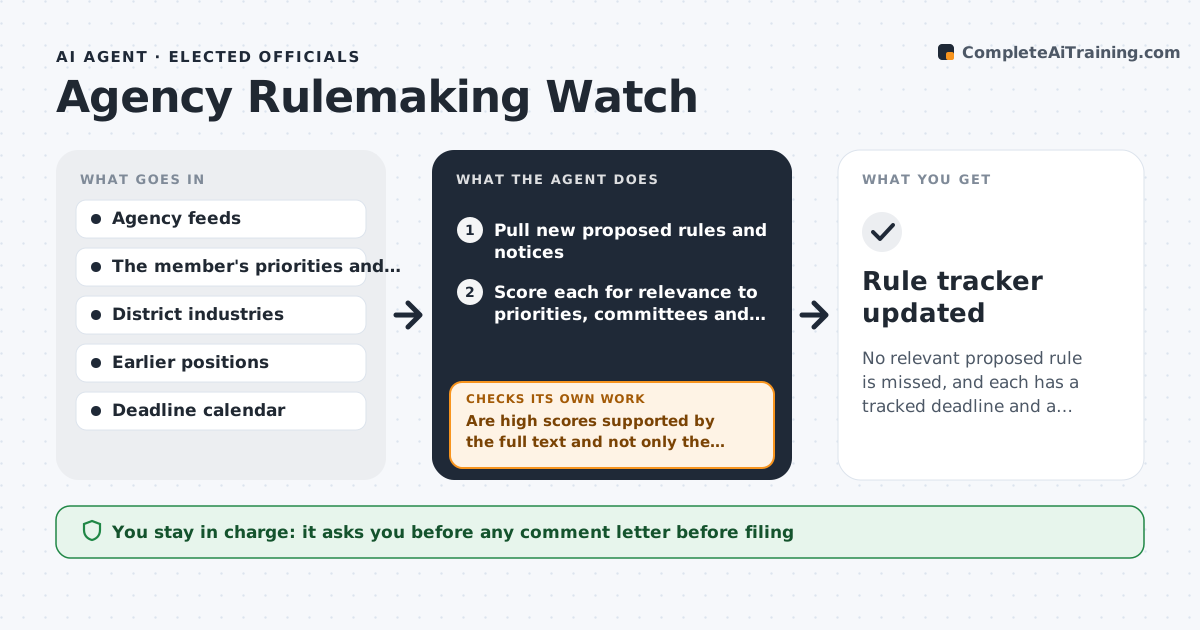
Federal and state agencies publish proposed rules every day, and each has a comment deadline. A rule that hurts the member's district can pass without any comment because nobody saw it. This agent watches rulemaking notices, scores each for relevance to the member's priorities and district industries, and summarizes the proposed changes in plain language. It records the comment deadline and checks later for extensions, reopened comment periods, revised proposals and the final rule. When a rule scores high, it compares it with earlier versions and drafts the main points a comment letter could make, using constituent impact and the member's earlier positions. If the first score was wrong because of missing context, it rescored after reading the full notice. The member approves any comment letter. Edge case: a notice has a short 15 day deadline, and the agent flags it first.
How it works
Follow the arrows from top to bottom. The orange dashed arrow is the loop: when a check fails, the agent goes back and tries again.
Read the steps as a list
- The daily scan runs
- Pull new proposed rules and notices
- Score each for relevance to priorities, committees and district
- Are high scores supported by the full text and not only the title?If not: read the full notice and rescore. Back to step 3.
- Summarize the proposed change and who it affects
- Record the comment deadline and compute days left
- Draft key points for a comment letter on high-score rules
- Member approves any comment letterThe agent waits here for your OK.
- Check for extensions, revisions and final rules
- Has the deadline or text changed?If not: update the summary and deadline and redraft the points. Back to step 5.
- Rule tracker updated
How it decides
It scores relevance by topic match to committees, priorities and district industries, and escalates items with high scores or short deadlines.
- Escalate rules with a score of 8 or more out of 10
- Flag deadlines under 21 days first
- Compare with the earlier version when a rule is reproposed
- Check extensions every 3 days
Make it yours
Every agent is a starting point. You choose these settings for your own situation.
- Topics and industries watched
- Escalation score (default 8)
- Short deadline alert (default 21 days)
- Extension check frequency
What keeps you in control
It always asks you first
- Any comment letter before filing
Hard limits
- Never files comments
- Does not state the member's position without approval
- Cites the notice for every summary
It stops when
- Done: final rule published or the comment period closes
- Stop: feeds are unavailable
Set it up
We guide you through the set-up, step by step
Members get the full set-up guide for this agent. No technical skills needed: you copy, paste and upload.
- One set of instructions to paste into your AI, with the clicks for ChatGPT, Claude, Microsoft 365 Copilot, Gemini and Grok
- The agent then walks you through connecting your own data, one source at a time
- A downloadable copy with the flow chart, the rules and the full guide