AI agent for automation engineers
Alarm Flood Review Agent
Reduce nuisance alarms to a manageable rate without losing important ones
What it does
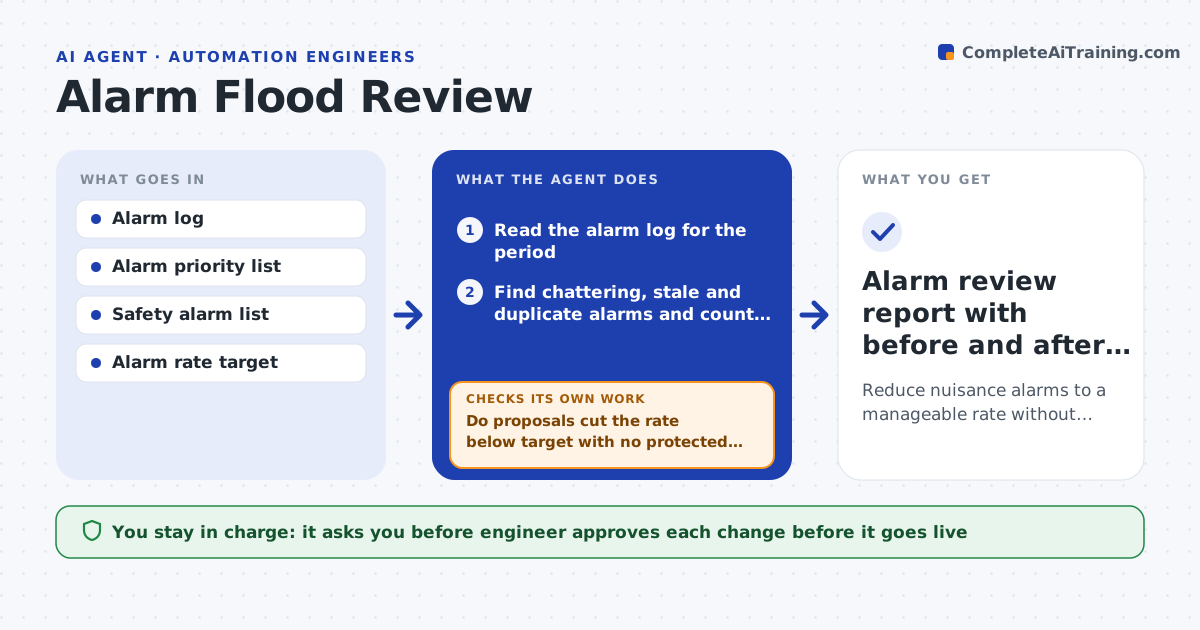
When 400 alarms fire in an hour, the one that matters is missed. This agent reads the alarm log for the last month and finds the worst offenders: chattering alarms that flip on and off, stale alarms that stay on for days, and duplicates triggered by the same cause. It counts alarms per operator per hour against the target. For each offender it proposes a fix such as a deadband, an on-delay, a priority change or removal, and tests the proposal by replaying the past log to see how many alarms would be left. Safety and critical alarms are protected from reduction. After the engineer approves and the change goes live, it measures the alarm rate again. Edge case: a chattering alarm hides a real intermittent fault, so the agent flags it for maintenance.
How it works
Follow the arrows from top to bottom. The orange dashed arrow is the loop: when a check fails, the agent goes back and tries again.
Read the steps as a list
- Monthly review or flood report
- Read the alarm log for the period
- Find chattering, stale and duplicate alarms and count alarms per hour
- Propose deadbands, delays or priority changes for the top offenders
- Replay the past log with each proposal
- Do proposals cut the rate below target with no protected alarm lost?If not: reduce the change size or choose another fix, and replay again. Back to step 3.
- Engineer approves changes to the live systemThe agent waits here for your OK.
- Apply the changes through the normal change process
- Measure the alarm rate over the next two weeks
- Is the live rate within 15% of the replay result?If not: inspect the new top alarms and propose another round. Back to step 3.
- Alarm review report with before and after rates
How it decides
It ranks alarms by count and duration, proposes the mildest change that removes the nuisance, and never touches alarms on the protected list.
- Flag as chattering any alarm that triggers over 5 times in 10 minutes
- Flag as stale any alarm active over 24 hours
- Never change alarms on the safety list
- Aim for under 6 alarms per operator per hour
Make it yours
Every agent is a starting point. You choose these settings for your own situation.
- Alarms per hour target (default 6)
- Chatter and stale rules
- Protected alarm list
- Review schedule
- Replay window (default 30 days)
What keeps you in control
It always asks you first
- Engineer approves each change before it goes live
- Operations lead approves priority changes
Hard limits
- Never change safety or critical alarms
- Never modify the live system, only recommend and then apply through the change process
It stops when
- Done: the live alarm rate is within target
- Stop: the remaining alarms come from process faults needing maintenance
Set it up
We guide you through the set-up, step by step
Members get the full set-up guide for this agent. No technical skills needed: you copy, paste and upload.
- One set of instructions to paste into your AI, with the clicks for ChatGPT, Claude, Microsoft 365 Copilot, Gemini and Grok
- The agent then walks you through connecting your own data, one source at a time
- A downloadable copy with the flow chart, the rules and the full guide