AI agent for automation engineers
As-Built Wiring Verification Agent
Make the drawings match the installed wiring before startup
What it does
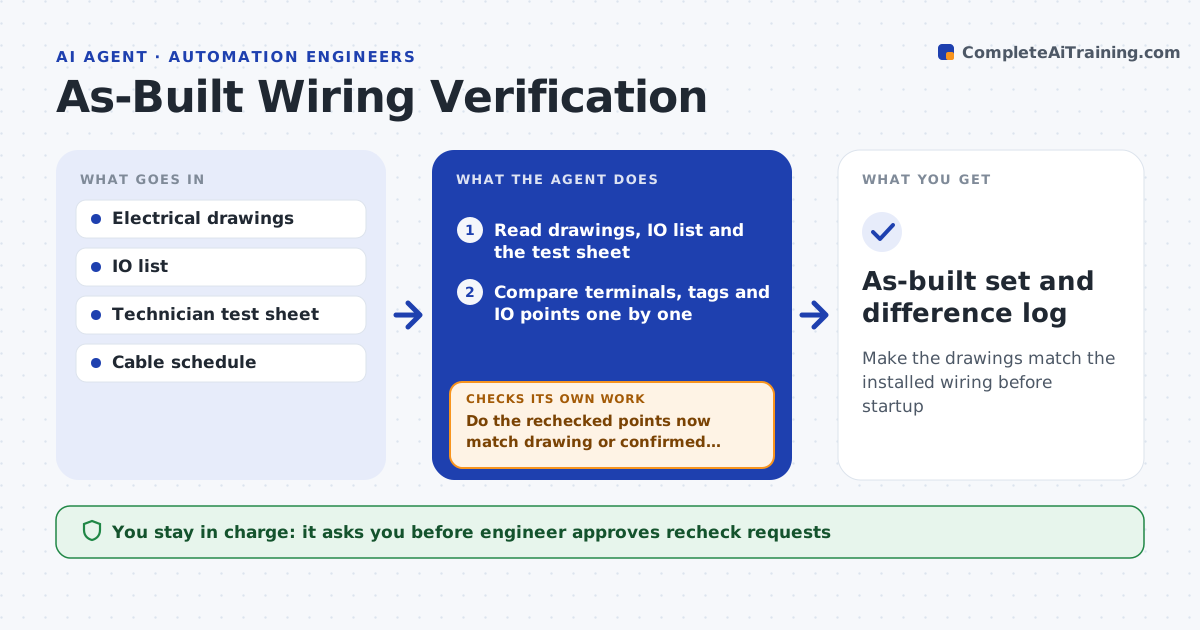
Wires land on the wrong terminals during installation, and the drawings are never corrected. This agent reads the drawings and the technician's test sheet from the panel check. It compares terminal numbers, wire tags, cable names and IO points between the two. It lists every difference: missing tags, swapped terminals, extra jumpers and IO points tested with the wrong signal. It sends the technician a recheck list for each, waits for the answers, and compares again. When the differences are confirmed as real changes, it drafts the drawing updates as markup. The engineer approves the as-built drawings. Edge case: two terminals are swapped on both ends and the loop works, so the agent asks whether the drawing or the wiring should change.
How it works
Follow the arrows from top to bottom. The orange dashed arrow is the loop: when a check fails, the agent goes back and tries again.
Read the steps as a list
- Technician's test sheet submitted
- Read drawings, IO list and the test sheet
- Compare terminals, tags and IO points one by one
- List differences by type and severity
- Engineer approves the recheck request to the technicianThe agent waits here for your OK.
- Send recheck requests and record the answers
- Decide for each difference: update drawing or rewire
- Do the rechecked points now match drawing or confirmed change?If not: send the remaining points back for another recheck. Back to step 3.
- Draft drawing markups for confirmed changes
- Engineer approves the as-built drawingsThe agent waits here for your OK.
- As-built set and difference log
How it decides
It treats any mismatch between drawing and test sheet as open until a recheck confirms which one is right, then decides whether to change the drawing or request a rewire.
- Treat safety circuits and emergency stops as highest priority
- Mark any untested IO point as a gap, not a pass
- Prefer changing the drawing when the wiring works and is safe
- Require rewire when a change affects a protective function
Make it yours
Every agent is a starting point. You choose these settings for your own situation.
- Drawing format
- Safety circuits list
- Types of difference to flag
- How the technician sends the sheet
- Markup colors and style
What keeps you in control
It always asks you first
- Engineer approves recheck requests
- Engineer approves the as-built drawings
Hard limits
- Never change drawings without confirmation from a recheck
- Never accept an untested safety circuit
It stops when
- Done: every difference is closed and drawings are approved
- Stop: a safety circuit mismatch needs a rewire
Set it up
We guide you through the set-up, step by step
Members get the full set-up guide for this agent. No technical skills needed: you copy, paste and upload.
- One set of instructions to paste into your AI, with the clicks for ChatGPT, Claude, Microsoft 365 Copilot, Gemini and Grok
- The agent then walks you through connecting your own data, one source at a time
- A downloadable copy with the flow chart, the rules and the full guide