AI agent for paramedics
Ambulance Rig Check Agent
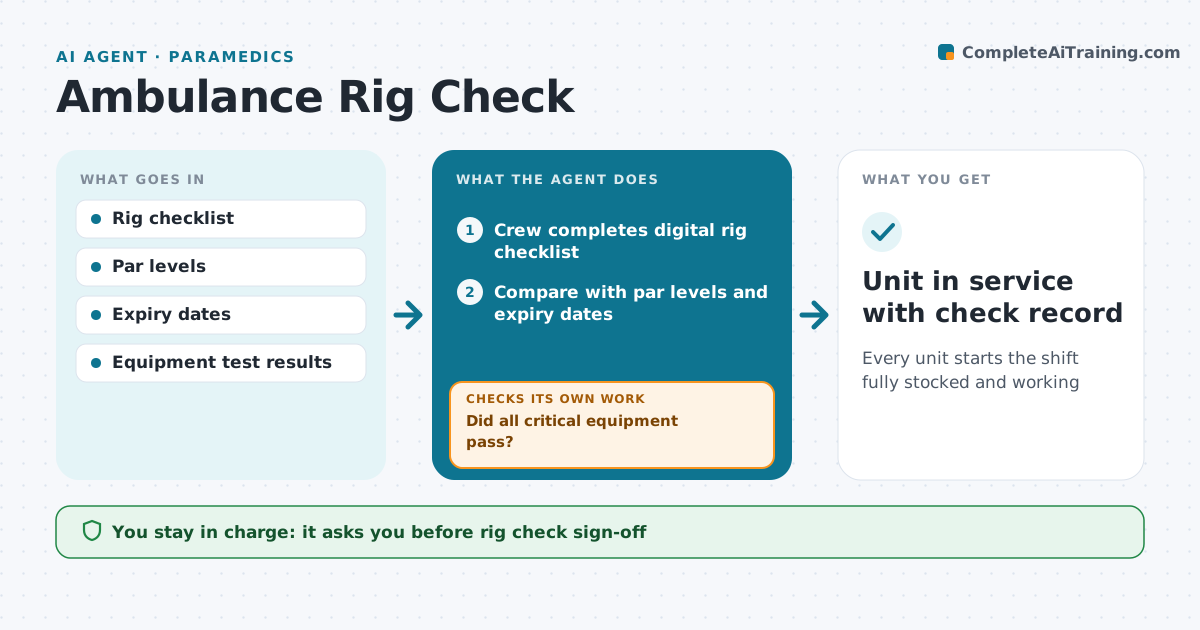
Every unit starts the shift fully stocked and working
What it does
Every shift starts with a rig check of equipment, drugs and supplies, and a gap found mid-call can harm a patient. This agent turns the service's checklist into a quick digital check and records what the crew finds. It compares results with par levels and expiry dates and flags missing items, items expiring within 30 days and failed equipment tests, such as a monitor self-test or suction. If a critical item like the defibrillator fails, it tells the crew to mark the unit out of service and notify dispatch per policy. Otherwise it drafts a restock request to station supply and repair tickets for faults. It checks that flagged items were replaced or fixed before the unit goes in service. Repeated faults on one device go to the fleet lead. The crew lead signs off. Edge case: a failed defibrillator takes the unit out of service.
How it works
Follow the arrows from top to bottom. The orange dashed arrow is the loop: when a check fails, the agent goes back and tries again.
Read the steps as a list
- Shift starts
- Crew completes digital rig checklist
- Compare with par levels and expiry dates
- Did all critical equipment pass?If not: mark the unit out of service and notify dispatch. Back to step 3.
- Draft restock request and repair tickets
- Were all flagged items replaced or fixed?If not: keep unit flagged and remind supply. Back to step 5.
- Crew lead signs off the checkThe agent waits here for your OK.
- Unit in service with check record
How it decides
Each item is compared with par and expiry. Critical failures stop the unit; others become restock or repair tasks.
- Critical item failure means out of service
- Expiry within 30 days is swapped
- Repeated faults on one device go to the fleet lead
Make it yours
Every agent is a starting point. You choose these settings for your own situation.
- Checklist per unit type
- Expiry warning days
- Critical item list
- Who receives restock requests
What keeps you in control
It always asks you first
- Rig check sign-off
- Taking a unit out of service
Hard limits
- The agent never marks a failed device as working
- Out-of-service decisions follow policy
It stops when
- Done: unit in service
- Stop: critical failure, unit out of service until fixed
Set it up
We guide you through the set-up, step by step
Members get the full set-up guide for this agent. No technical skills needed: you copy, paste and upload.
- One set of instructions to paste into your AI, with the clicks for ChatGPT, Claude, Microsoft 365 Copilot, Gemini and Grok
- The agent then walks you through connecting your own data, one source at a time
- A downloadable copy with the flow chart, the rules and the full guide