AI agent for legislative assistants
Amendment and Committee Draft Tracking Agent
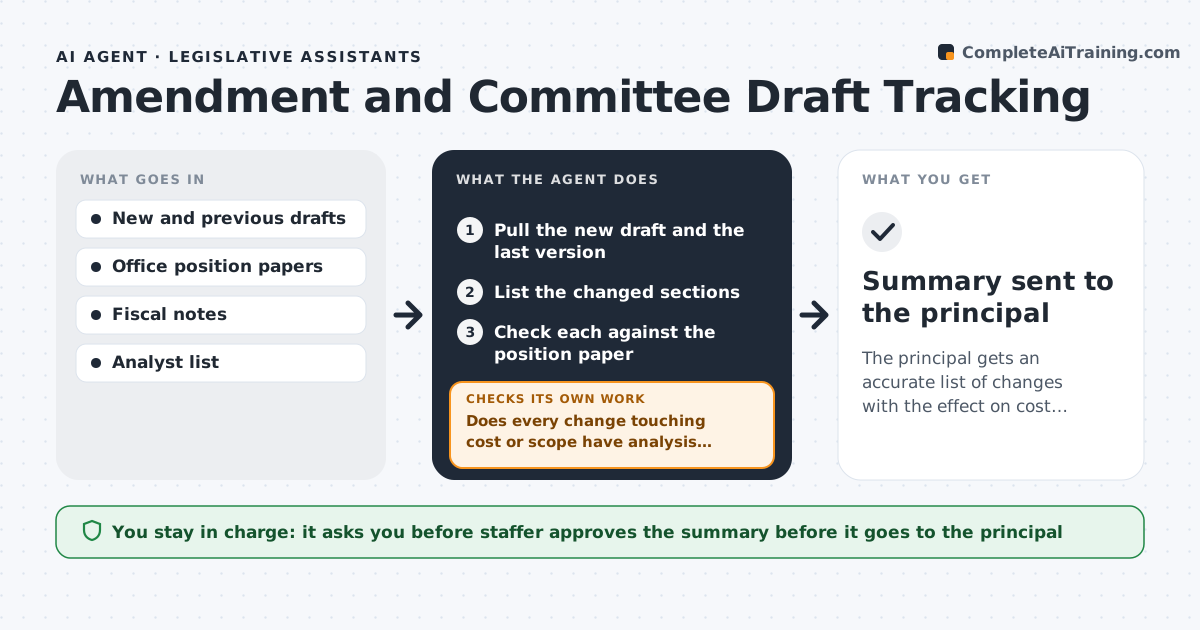
The principal gets an accurate list of changes with the effect on cost, scope and the office's position, approved by the staffer.
What it does
Bills change in committee, and staff miss which amendment altered the cost or the scope. The agent pulls each new draft, compares it with the last version, and lists the changed sections in plain words. It checks every changed section against the office's position paper and flags conflicts or new costs. When the analysis behind a change is missing, it asks the right analyst for it. After replies arrive, it rechecks the summary. The staffer approves the summary before it goes to the principal. Edge case: an amendment that only renumbers sections but changes a cross-reference that moves a funding rule.
How it works
Follow the arrows from top to bottom. The orange dashed arrow is the loop: when a check fails, the agent goes back and tries again.
Read the steps as a list
- New draft or amendment published
- Pull the new draft and the last version
- List the changed sections
- Check each against the position paper
- Does every change touching cost or scope have analysis behind it?If not: Request the missing fiscal or legal analysis from the analyst. Back to step 4.
- Flag conflicts and new costs
- Check cross-references and renumbered sections
- Does the summary reflect the latest analysis?If not: Revise the summary and recheck the changes. Back to step 3.
- Draft the summary for the principal
- Staffer approves the summaryThe agent waits here for your OK.
- Summary sent to the principal
How it decides
It treats any changed section that touches cost, scope, definitions or dates as important, and checks each against the office's stated position.
- Flag any change to funding, definitions or dates
- Always check cross-references after renumbering
- A change that contradicts the position paper goes to the top
- Ask for analysis when a cost change has no fiscal note
Make it yours
Every agent is a starting point. You choose these settings for your own situation.
- Bills and committees tracked
- Position papers to compare
- Types of change to prioritize
- Format of the summary
What keeps you in control
It always asks you first
- Staffer approves the summary before it goes to the principal
Hard limits
- Never send a summary without approval
- Do not state a legal opinion
It stops when
- Done: summary approved and sent
- Stop: the draft text is unavailable or unreadable
Set it up
We guide you through the set-up, step by step
Members get the full set-up guide for this agent. No technical skills needed: you copy, paste and upload.
- One set of instructions to paste into your AI, with the clicks for ChatGPT, Claude, Microsoft 365 Copilot, Gemini and Grok
- The agent then walks you through connecting your own data, one source at a time
- A downloadable copy with the flow chart, the rules and the full guide