AI agent for legislative assistants
Amendment Comparison and Impact Agent
A short briefing note on what each amendment changes, with conflicts and knock-on effects listed and sourced
What it does
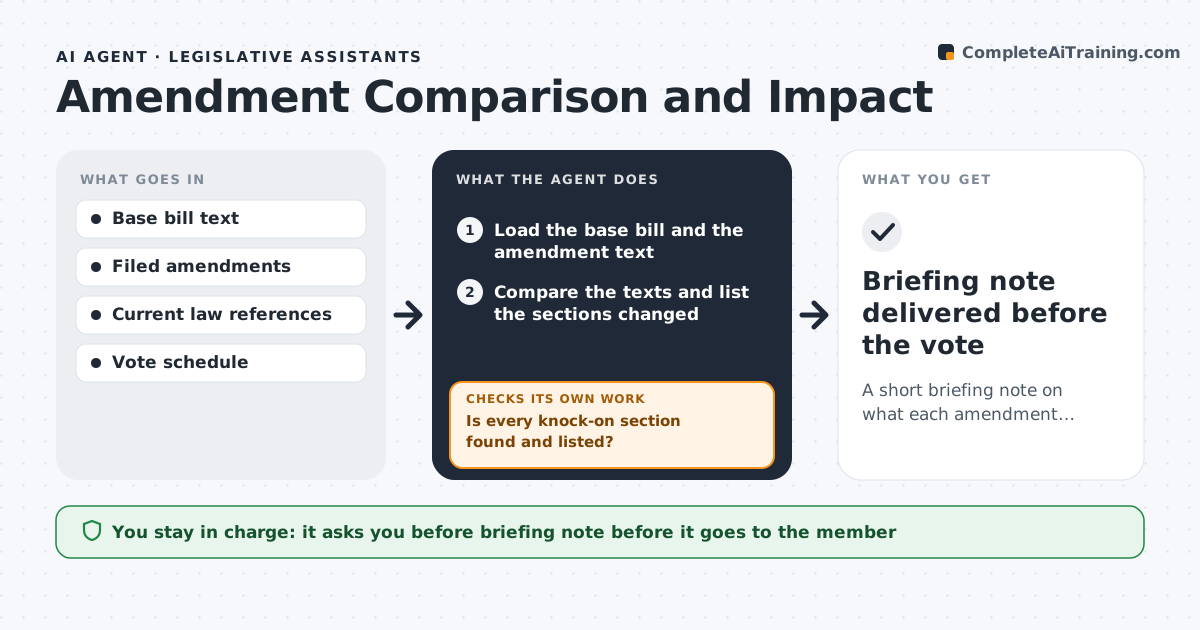
Floor amendments arrive hours before a vote, and staff must work out what each one really changes. This agent compares each amendment against the base bill text and lists the sections changed, with the effect in plain words, such as raising a cap from $5 million to $8 million. It checks cross-references, definitions and effective dates for knock-on changes, and tests for conflicts between amendments filed on the same section. When a new amendment is filed, it reruns the comparison and the conflict check. Before the note goes out, it checks that each stated effect points to a specific line and that no section number is wrong. The assistant approves the briefing note. Edge case: an amendment that changes a definition used in four other sections gets all four listed.
How it works
Follow the arrows from top to bottom. The orange dashed arrow is the loop: when a check fails, the agent goes back and tries again.
Read the steps as a list
- An amendment is filed
- Load the base bill and the amendment text
- Compare the texts and list the sections changed
- Describe each effect in plain words with the line it comes from
- Search for cross-references and definitions affected
- Is every knock-on section found and listed?If not: search again using defined terms and section numbers. Back to step 3.
- Compare with other filed amendments for conflicts
- Draft the briefing note
- Does every stated effect match a cited line of text?If not: correct the effect or remove it and note the uncertainty. Back to step 7.
- Assistant approves the briefing noteThe agent waits here for your OK.
- Briefing note delivered before the vote
How it decides
A change is material when it alters an amount, a date, a definition or who is covered. Conflicts are flagged when amendments edit the same text.
- Treat changes to amounts, dates, definitions and coverage as material
- Flag amendments that edit the same lines as conflicts
- List every section that uses a changed definition
- Mark effects as uncertain if text is ambiguous
Make it yours
Every agent is a starting point. You choose these settings for your own situation.
- Definition of a material change
- Note length and format
- Sources for current law
- Notice time before votes
What keeps you in control
It always asks you first
- Briefing note before it goes to the member
Hard limits
- Never advises how to vote
- Never sends the note without approval
It stops when
- Done: the note is approved and delivered
- Stop: the base text is missing
Set it up
We guide you through the set-up, step by step
Members get the full set-up guide for this agent. No technical skills needed: you copy, paste and upload.
- One set of instructions to paste into your AI, with the clicks for ChatGPT, Claude, Microsoft 365 Copilot, Gemini and Grok
- The agent then walks you through connecting your own data, one source at a time
- A downloadable copy with the flow chart, the rules and the full guide