AI agent for microbiologists
Antimicrobial Susceptibility Results Review Agent
Only valid, plausible susceptibility results are released
What it does
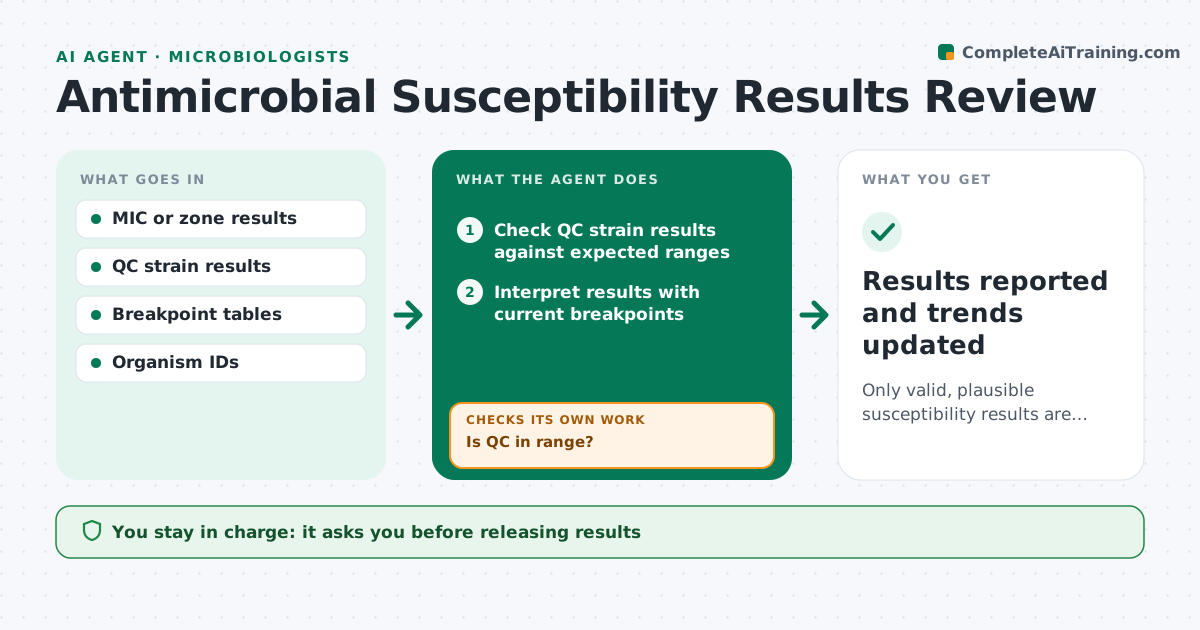
Susceptibility tests decide which antibiotics are reported as working for a patient's infection, so a wrong result can lead to the wrong treatment. When a batch is read, this agent first checks that the quality control strains fell within their expected ranges. Batches with QC out of range are held and a repeat is requested. It then applies the current breakpoint tables to interpret each MIC or zone result. It looks for unusual or impossible patterns, such as resistance to a drug the organism is naturally susceptible to, or a phenotype that needs confirmation. Flagged isolates are sent for confirmatory tests, and the agent rechecks when results arrive. It also tracks resistance rates over time for the antibiogram. The microbiologist releases results. Edge case: a possible carbapenemase producer is flagged at once for confirmation and an infection control notice.
How it works
Follow the arrows from top to bottom. The orange dashed arrow is the loop: when a check fails, the agent goes back and tries again.
Read the steps as a list
- Test batch read
- Check QC strain results against expected ranges
- Is QC in range?If not: hold the batch and request a repeat. Back to step 2.
- Interpret results with current breakpoints
- Look for unusual or impossible patterns
- Are all isolates plausible or confirmed?If not: order confirmation tests and wait for results. Back to step 4.
- Microbiologist releases resultsThe agent waits here for your OK.
- Results reported and trends updated
How it decides
It releases a batch only when QC is in range, interprets results with current breakpoints, and holds isolates with unusual patterns for confirmation.
- Hold batches with QC out of range
- Flag patterns that need confirmation
- Notify infection control for alert organisms
Make it yours
Every agent is a starting point. You choose these settings for your own situation.
- Breakpoint standard and version
- Alert organism list
- Confirmation test rules
- Antibiogram period
What keeps you in control
It always asks you first
- Releasing results
- Infection control notices
Hard limits
- Never releases results
- Never changes breakpoint tables
It stops when
- Done: results released
- Stop: repeated QC failure; escalate to the lab lead
Set it up
We guide you through the set-up, step by step
Members get the full set-up guide for this agent. No technical skills needed: you copy, paste and upload.
- One set of instructions to paste into your AI, with the clicks for ChatGPT, Claude, Microsoft 365 Copilot, Gemini and Grok
- The agent then walks you through connecting your own data, one source at a time
- A downloadable copy with the flow chart, the rules and the full guide