AI agent for computer science students
Assignment Submission Readiness Agent
Make sure the submission meets every stated requirement before it is handed in
What it does
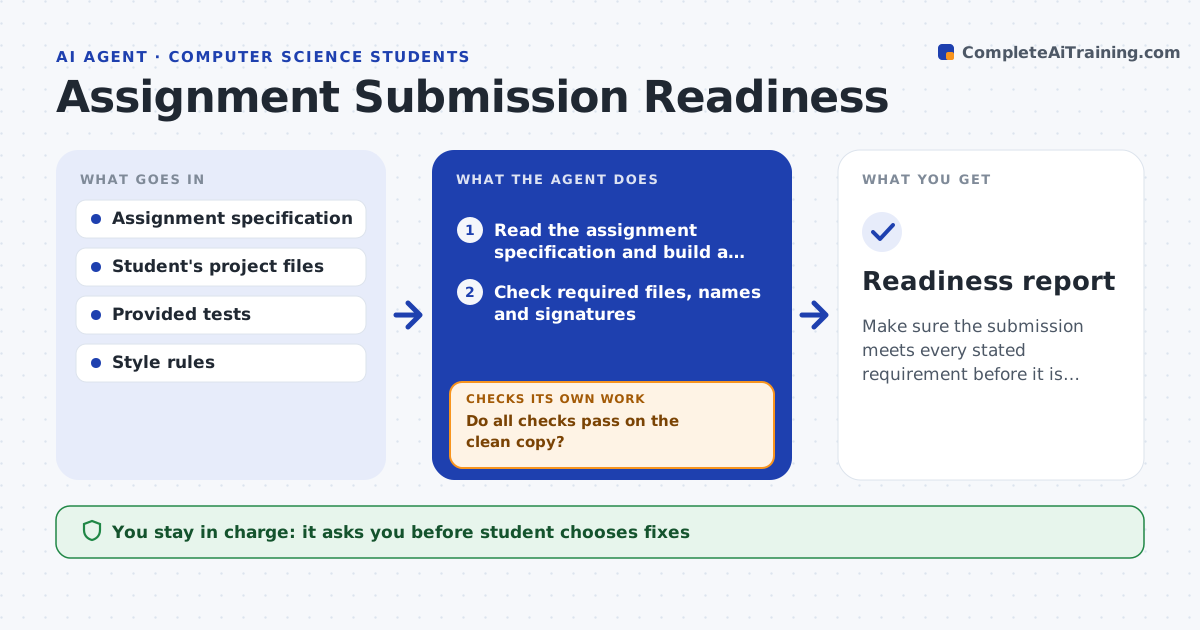
Points are lost because a file was not included, a test fails or the README is missing, not because the code is bad. This agent reads the assignment specification and builds a checklist from it: required files and names, functions with exact signatures, tests, style rules, documentation and the submission format. It runs the provided tests and the style checker, checks the file list, and compares function signatures with the spec. It lists each failure with the file and line. After the student fixes them, it checks again, including a clean build from a fresh copy of the submission folder. The student approves submission. Edge case: tests pass on the student's machine but fail from a clean copy due to a missing file, so the agent reports it.
How it works
Follow the arrows from top to bottom. The orange dashed arrow is the loop: when a check fails, the agent goes back and tries again.
Read the steps as a list
- Deadline approaching
- Read the assignment specification and build a checklist
- Check required files, names and signatures
- Run the provided tests and style checks
- List failures with file and line
- Suggest fixes without writing the solution
- Student decides which fixes to makeThe agent waits here for your OK.
- Rebuild from a clean copy of the submission folder and rerun the checks
- Do all checks pass on the clean copy?If not: list the remaining failures and check again. Back to step 4.
- Student approves submissionThe agent waits here for your OK.
- Readiness report
How it decides
It treats every stated requirement as a check and passes the work only when all checks pass on a clean copy of the submission.
- Treat every requirement in the specification as a check
- Run the tests on a clean copy, not the working folder
- Flag functions whose signature differs from the spec
- Check that the README and required comments exist
Make it yours
Every agent is a starting point. You choose these settings for your own situation.
- Assignment specification
- Style rules and checker
- Language and test runner
- Submission format
- Deadline reminders
What keeps you in control
It always asks you first
- Student chooses fixes
- Student approves submission
Hard limits
- Never write or rewrite the solution code
- Never submit the work for the student
It stops when
- Done: all checks pass on a clean copy
- Stop: the work does not meet a core requirement and needs more time
Set it up
We guide you through the set-up, step by step
Members get the full set-up guide for this agent. No technical skills needed: you copy, paste and upload.
- One set of instructions to paste into your AI, with the clicks for ChatGPT, Claude, Microsoft 365 Copilot, Gemini and Grok
- The agent then walks you through connecting your own data, one source at a time
- A downloadable copy with the flow chart, the rules and the full guide