
AI agent for paid media specialists
Auction Insights Competitor Response Agent
Spot competitor changes early and respond to the real cause of lost share.
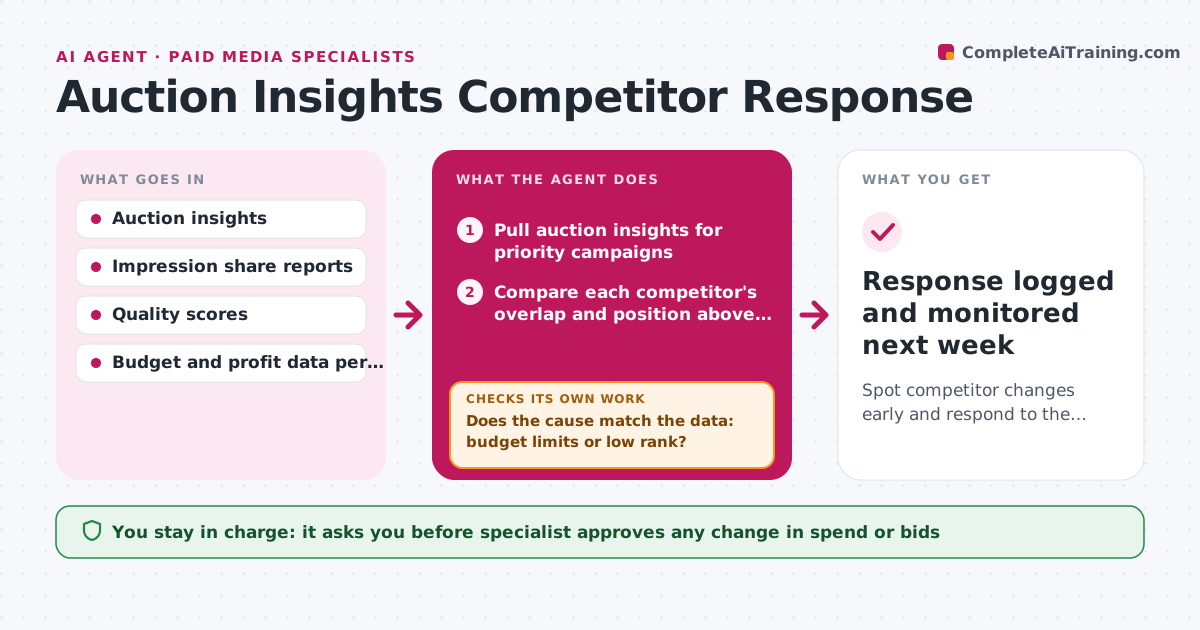
What it does
A new competitor starts bidding on your best terms, and impression share drops 10 points over a month before it shows up in sales. Each week the agent reads the auction insights for the main campaigns and compares each competitor's overlap rate, position above rate and impression share with earlier weeks. It flags new or growing competitors and then tests why share is lost: is it a budget limit, or low ad rank from bids or quality? It checks budget-lost and rank-lost share, and looks at quality scores and ad relevance. It proposes a response matching the cause, such as a budget increase, a bid change for specific terms, a quality fix on the landing page or no action where the term is not profitable. The specialist approves any change in spend. Edge case: a competitor who is only on one low-value term.
How it works
Follow the arrows from top to bottom. The orange dashed arrow is the loop: when a check fails, the agent goes back and tries again.
Read the steps as a list
- Weekly review starts
- Pull auction insights for priority campaigns
- Compare each competitor's overlap and position above rate with prior weeks
- Flag new or fast-growing competitors
- Pull budget-lost and rank-lost share and quality scores
- Name the likely cause of lost share for each term group
- Does the cause match the data: budget limits or low rank?If not: collect more data by term and device and name the cause again. Back to step 4.
- Propose a response and estimate its cost and effect
- Is the response profitable at the term's margin?If not: propose a cheaper option or no action. Back to step 8.
- Specialist approves any change in spendThe agent waits here for your OK.
- Response logged and monitored next week
How it decides
A competitor is flagged when its overlap grows by 10 points or it newly appears on a priority term. The response depends on whether the loss is budget-driven or rank-driven.
- Flag competitors gaining 10 points of overlap or new on a priority term
- Increase budget when budget-lost share exceeds rank-lost share
- Fix quality score when rank-lost share is larger
- Do not chase terms with low margin
Make it yours
Every agent is a starting point. You choose these settings for your own situation.
- Priority campaigns and terms
- Overlap alert (default 10 points)
- Margin data used
- Review day
- Who approves spend
What keeps you in control
It always asks you first
- Specialist approves any change in spend or bids
- Specialist approves landing page change requests
Hard limits
- Never change bids or budgets itself
- Do not run ads against competitor trademarks without approval
It stops when
- Done: response approved and logged
- Stop: data is incomplete for the period, rerun when reports are available
Set it up
We guide you through the set-up, step by step
Members get the full set-up guide for this agent. No technical skills needed: you copy, paste and upload.
- One set of instructions to paste into your AI, with the clicks for ChatGPT, Claude, Microsoft 365 Copilot, Gemini and Grok
- The agent then walks you through connecting your own data, one source at a time
- A downloadable copy with the flow chart, the rules and the full guide



