AI agent for director of strategies
Benchmark Peer Set Selection Agent
Choose a defensible peer set whose data supports the benchmark
What it does
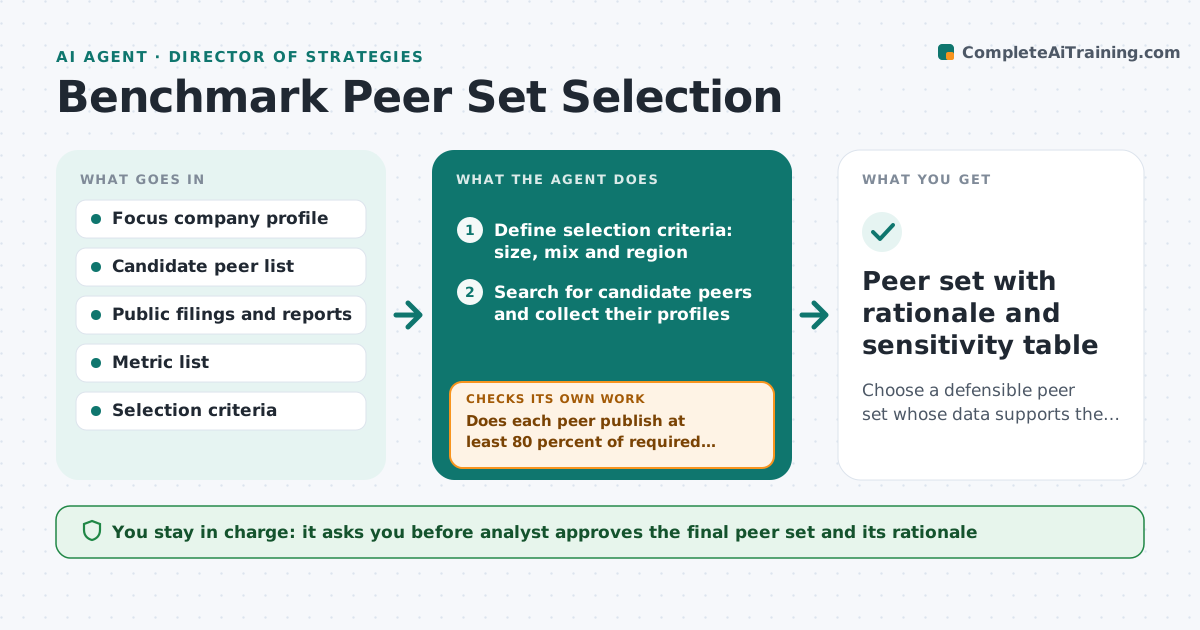
A benchmark is only as good as its peers. If the set mixes a regional firm with a global giant, or includes companies whose data cannot be found, every comparison is challenged in the meeting. This agent builds the peer set carefully. It proposes candidates by size, product mix and region, checks which metrics each one actually publishes, and drops peers lacking data. It then tests sensitivity by recalculating the benchmark with and without each peer, to see whether one company drives the result. It documents why each peer is included. The analyst approves the final set. Edge case: the closest competitor is private and shares no data. The agent keeps it as a qualitative reference and explains the gap.
How it works
Follow the arrows from top to bottom. The orange dashed arrow is the loop: when a check fails, the agent goes back and tries again.
Read the steps as a list
- Benchmark scope agreed
- Define selection criteria: size, mix and region
- Search for candidate peers and collect their profiles
- Score each candidate against the criteria
- Check which required metrics each candidate publishes
- Does each peer publish at least 80 percent of required metrics?If not: Drop the peer or replace it with the next best candidate and rescore. Back to step 2.
- Run the benchmark with and without each peer
- Does any single peer move the median by more than 10 percent?If not: Flag the peer, test a substitute and recompare. Back to step 3.
- Analyst approves the final peer setThe agent waits here for your OK.
- Peer set with rationale and sensitivity table
How it decides
A peer qualifies if it matches size, mix and region criteria and publishes at least 80 percent of the required metrics. A peer that moves the median by more than 10 percent is flagged.
- Size within 0.5x to 2x of the focus company unless the analyst widens it
- Minimum 6 peers, preferably 8
- Peers with under 80 percent metric coverage are dropped
- A peer driving more than 10 percent of the median is flagged
Make it yours
Every agent is a starting point. You choose these settings for your own situation.
- Size range of peers (default 0.5x to 2x)
- Minimum data coverage (default 80 percent)
- Number of peers (default 8)
- Sensitivity threshold (default 10 percent)
- Regions to include
What keeps you in control
It always asks you first
- Analyst approves the final peer set and its rationale
Hard limits
- Marks every data point with its source
- Never uses figures it cannot trace
It stops when
- Done: peer set meets coverage and sensitivity rules
- Stop: fewer than 6 usable peers, report the data gap
Set it up
We guide you through the set-up, step by step
Members get the full set-up guide for this agent. No technical skills needed: you copy, paste and upload.
- One set of instructions to paste into your AI, with the clicks for ChatGPT, Claude, Microsoft 365 Copilot, Gemini and Grok
- The agent then walks you through connecting your own data, one source at a time
- A downloadable copy with the flow chart, the rules and the full guide