AI agent for midwifes
Birth Outcome Statistics Report Agent
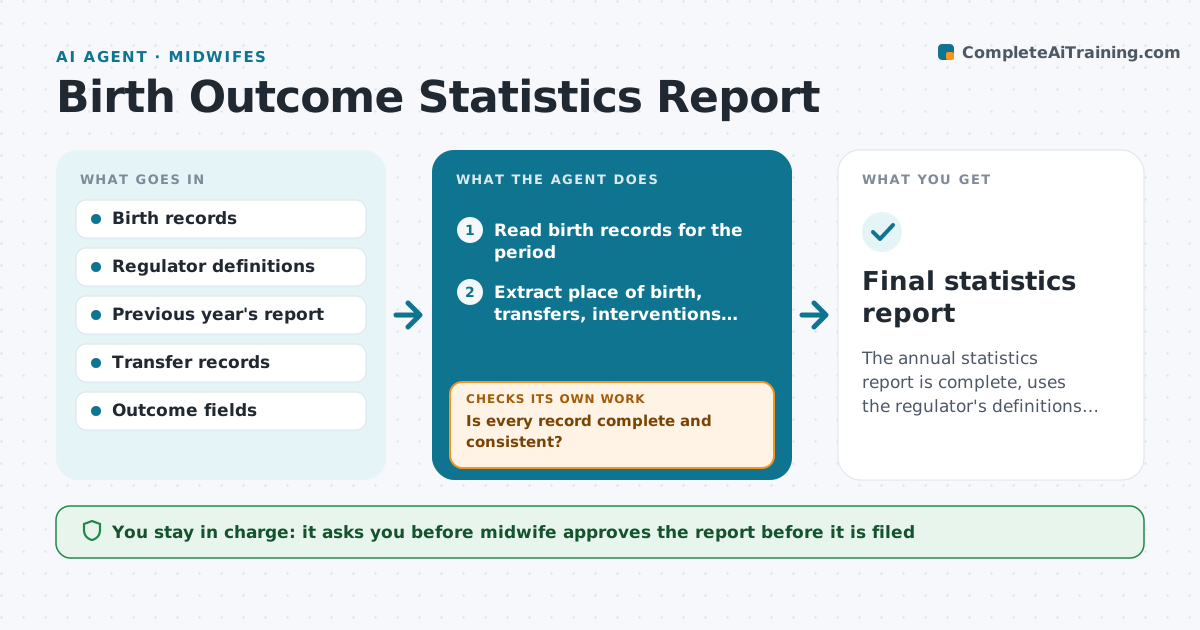
The annual statistics report is complete, uses the regulator's definitions and is approved before filing.
What it does
Annual outcome statistics for regulators and the practice are assembled by hand from charts. The agent reads the birth records, extracts place of birth, transfers, interventions and outcomes, and checks each against the regulator's definitions. If values are missing or contradictory, it lists them for correction and recomputes after the midwife fixes them. It then compares totals with the previous year to find sudden jumps and builds the report. The midwife approves the report before filing. Edge case: a planned home birth that transferred in labor, which must be counted by plan and outcome as the definitions say.
How it works
Follow the arrows from top to bottom. The orange dashed arrow is the loop: when a check fails, the agent goes back and tries again.
Read the steps as a list
- Reporting period ends
- Read birth records for the period
- Extract place of birth, transfers, interventions and outcomes
- Check each record against the definitions
- Is every record complete and consistent?If not: List the problem records for the midwife to correct. Back to step 4.
- Recompute the counts after corrections
- Compare totals with the previous year
- Are there unexplained jumps or gaps?If not: Check the records behind the jump and note the reason. Back to step 6.
- Draft the report in the regulator's format
- Midwife approves the report before filingThe agent waits here for your OK.
- Final statistics report
How it decides
It applies the regulator's definitions line by line, and treats any missing or contradictory field as an error to fix before counting.
- Count each birth once
- Use the regulator's definition for each term
- Flag changes of more than 20% from last year
- Hold records with missing outcomes
Make it yours
Every agent is a starting point. You choose these settings for your own situation.
- Reporting period
- Regulator template
- Jump threshold (default 20%)
- Fields required
What keeps you in control
It always asks you first
- Midwife approves the report before it is filed
Hard limits
- Never file a report itself
- Keep identifying details out of the report
It stops when
- Done: report approved and ready to file
- Stop: definitions are unclear and the midwife must confirm with the regulator
Set it up
We guide you through the set-up, step by step
Members get the full set-up guide for this agent. No technical skills needed: you copy, paste and upload.
- One set of instructions to paste into your AI, with the clicks for ChatGPT, Claude, Microsoft 365 Copilot, Gemini and Grok
- The agent then walks you through connecting your own data, one source at a time
- A downloadable copy with the flow chart, the rules and the full guide