AI agent for midwifes
Home Birth Transfer Readiness Agent
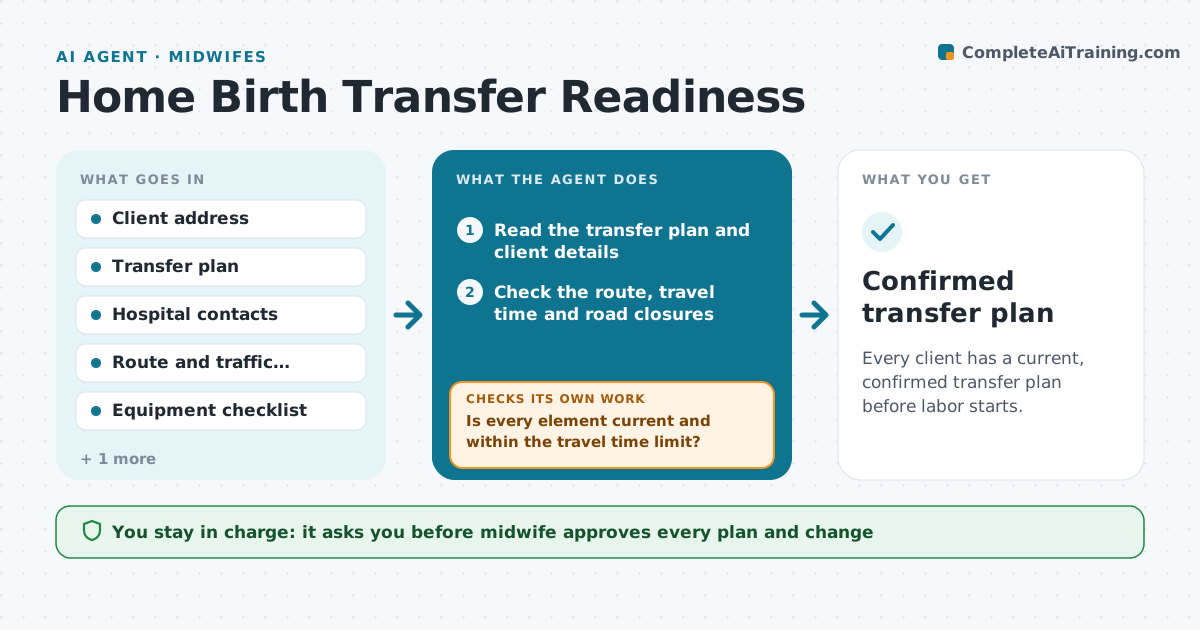
Every client has a current, confirmed transfer plan before labor starts.
What it does
A transfer plan made at 20 weeks may be wrong at 38 weeks: a road closure, a changed address or an expired supply. At set weeks the agent checks each client's transfer plan: the hospital contact and phone, travel route and time, the ambulance information and the emergency equipment checklist. It flags changes and updates the plan. If a road closure, a changed address or a missing item appears, it updates the plan and asks the midwife to confirm. It rechecks after each change. The midwife approves every update and any change of the plan itself. Edge case: if the travel time to the hospital exceeds the practice's limit, the agent flags the case for a discussion with the midwife and the client.
How it works
Follow the arrows from top to bottom. The orange dashed arrow is the loop: when a check fails, the agent goes back and tries again.
Read the steps as a list
- Client reaches 36 or 38 weeks
- Read the transfer plan and client details
- Check the route, travel time and road closures
- Check hospital and ambulance contacts
- Check the emergency equipment and expiry dates
- Is every element current and within the travel time limit?If not: Update the plan, list the issue and ask the midwife to confirm. Back to step 3.
- Draft the updated plan and a client note
- Midwife approves the plan and the noteThe agent waits here for your OK.
- Save the plan and send it to the client
- Does the updated plan pass all checks?If not: Rerun the checks and ask the midwife about the open item. Back to step 3.
- Confirmed transfer plan
How it decides
It compares each plan element with current information and flags any change or missing item.
- Travel time above the limit needs a discussion
- A changed address needs a new route check
- Expired equipment is replaced before 38 weeks
- Rerun the check at 38 weeks
Make it yours
Every agent is a starting point. You choose these settings for your own situation.
- Check weeks
- Travel time limit
- Equipment list
- Contacts
- Client note wording
What keeps you in control
It always asks you first
- Midwife approves every plan and change
- Midwife decides any change of birth location
Hard limits
- Never change a birth plan without the midwife
- Never delay a flagged issue
- Never send a plan without approval
It stops when
- Done: the plan is confirmed at 38 weeks
- Stop: the client changes plan or location
Set it up
We guide you through the set-up, step by step
Members get the full set-up guide for this agent. No technical skills needed: you copy, paste and upload.
- One set of instructions to paste into your AI, with the clicks for ChatGPT, Claude, Microsoft 365 Copilot, Gemini and Grok
- The agent then walks you through connecting your own data, one source at a time
- A downloadable copy with the flow chart, the rules and the full guide