AI agent for financial analysts
Budget Variance Commentary Agent
Clear, checked variance commentary for every material line
What it does
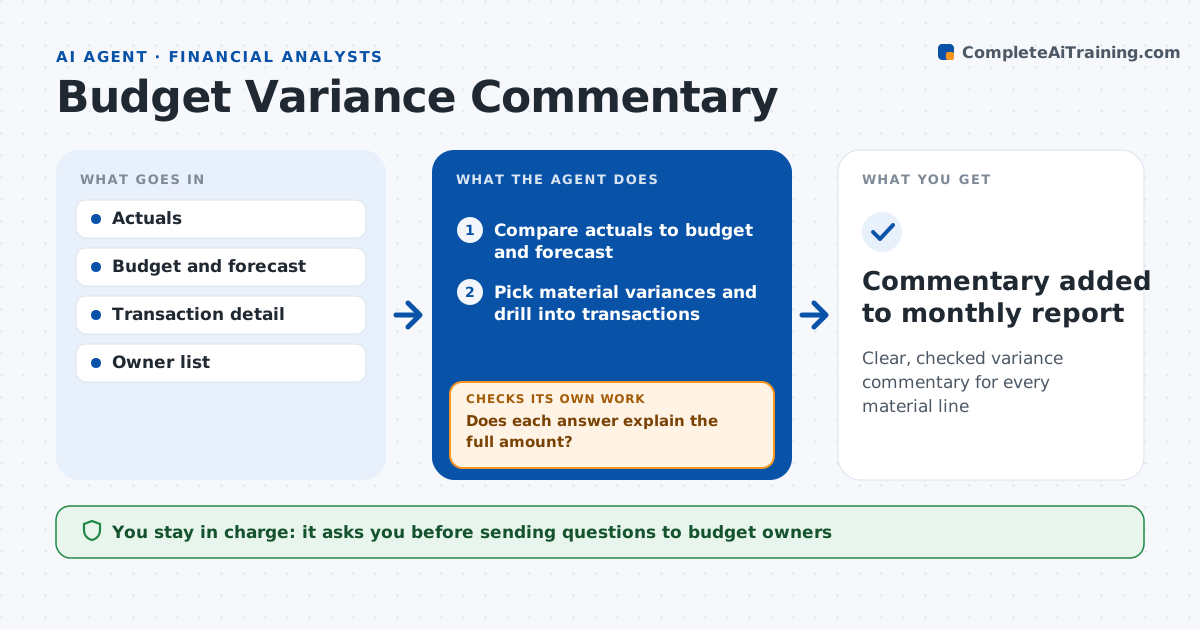
After close, finance teams chase budget owners for explanations, and the answers are often vague or do not add up. This agent compares actuals to budget and forecast for each department and account. It picks the variances above the threshold, drills into transactions to find likely drivers such as timing, volume, price or a one-off item, and sends a question to each budget owner with the evidence. It reads the answers and checks them against the numbers. If an answer does not explain the full gap, it asks a specific follow-up. Timing items get a note on when they will reverse. It then writes the commentary for the monthly pack. The finance leader approves the final text. Edge case: an accrual reversed from last month makes a variance look large, so the agent nets the two months before asking anyone.
How it works
Follow the arrows from top to bottom. The orange dashed arrow is the loop: when a check fails, the agent goes back and tries again.
Read the steps as a list
- Month close is final
- Compare actuals to budget and forecast
- Pick material variances and drill into transactions
- Send owner questions with evidence
- Does each answer explain the full amount?If not: send a follow-up question with the unexplained remainder. Back to step 4.
- Draft commentary for the pack
- Finance leader approves commentaryThe agent waits here for your OK.
- Commentary added to monthly report
How it decides
It selects variances by size and percent, then tests each owner explanation against the transaction detail.
- Variance over $25,000 and 5%: needs commentary
- Timing items: note expected month of reversal
- Unexplained over 20% of the gap: follow up
Make it yours
Every agent is a starting point. You choose these settings for your own situation.
- Variance thresholds in amount and percent
- Departments in scope
- Owner reply deadline
- Commentary style and length
What keeps you in control
It always asks you first
- Sending questions to budget owners
- Final commentary
Hard limits
- Never changes budget figures
- Never publishes commentary without approval
It stops when
- Done: all material lines explained
- Stop: close not final
Set it up
We guide you through the set-up, step by step
Members get the full set-up guide for this agent. No technical skills needed: you copy, paste and upload.
- One set of instructions to paste into your AI, with the clicks for ChatGPT, Claude, Microsoft 365 Copilot, Gemini and Grok
- The agent then walks you through connecting your own data, one source at a time
- A downloadable copy with the flow chart, the rules and the full guide