AI agent for investment bankers
Buyer Outreach Tracking Agent
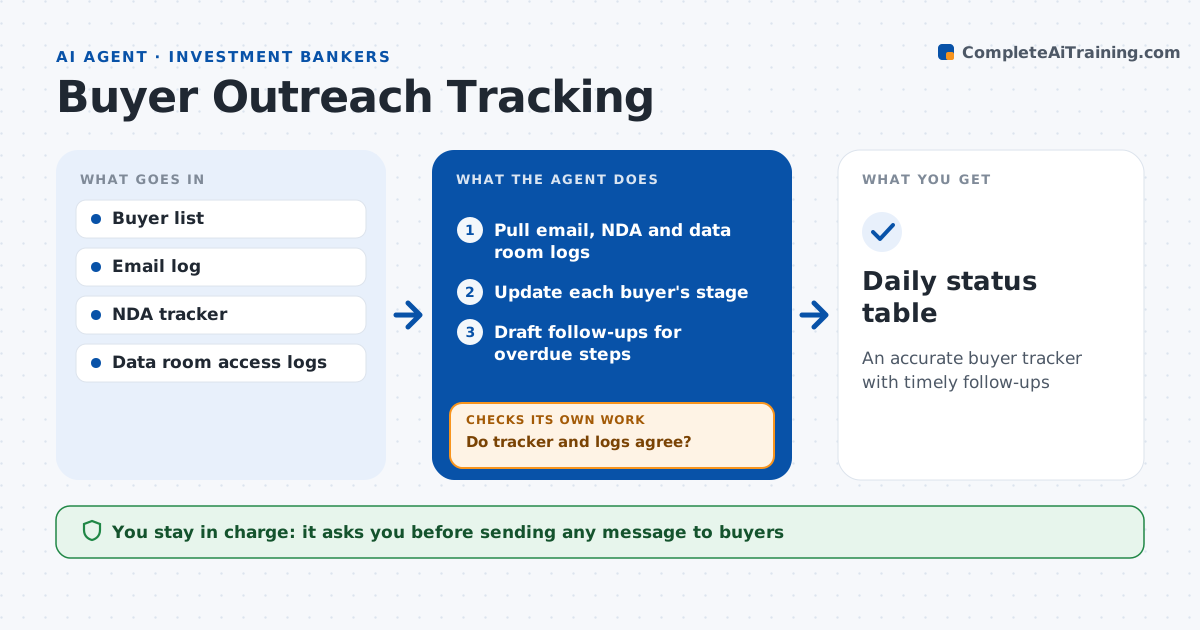
An accurate buyer tracker with timely follow-ups
What it does
In a sale process, dozens of buyers move through teasers, NDAs, data room access and bids at different speeds, and a missed follow-up can cost a bidder. This agent keeps the buyer list with contacts, records when teasers went out, tracks NDA status and markups, and logs data room access and bid dates. Each day it checks for overdue steps, such as an NDA with no reply in five days, and drafts follow-ups for the banker to send. It compares the tracker with data room logs and email to catch missed updates; when they disagree, it corrects the tracker and lists the conflicts for the banker. It produces a daily status table for the deal team. The banker approves every message to buyers and anything shared with the client. Edge case: a buyer signs the NDA but has not opened the data room in ten days, so the agent flags low interest.
How it works
Follow the arrows from top to bottom. The orange dashed arrow is the loop: when a check fails, the agent goes back and tries again.
Read the steps as a list
- Daily process update
- Pull email, NDA and data room logs
- Update each buyer's stage
- Do tracker and logs agree?If not: correct the tracker and list conflicts for the banker. Back to step 3.
- Draft follow-ups for overdue steps
- Banker approves outreachThe agent waits here for your OK.
- Daily status table
How it decides
It compares each buyer's stage to the process timeline and flags overdue steps.
- NDA no reply in 5 days: follow up
- No data room access in 10 days: flag low interest
- Bid date missed: alert deal lead
Make it yours
Every agent is a starting point. You choose these settings for your own situation.
- Follow-up timing
- Status table columns
- Client view detail
- Interest flags
What keeps you in control
It always asks you first
- Sending any message to buyers
- Sharing status with the client
Hard limits
- Never contacts buyers directly
- Never grants data room access
It stops when
- Done: tracker updated
- Stop: process paused
Set it up
We guide you through the set-up, step by step
Members get the full set-up guide for this agent. No technical skills needed: you copy, paste and upload.
- One set of instructions to paste into your AI, with the clicks for ChatGPT, Claude, Microsoft 365 Copilot, Gemini and Grok
- The agent then walks you through connecting your own data, one source at a time
- A downloadable copy with the flow chart, the rules and the full guide