AI agent for director of business developments
Co-Sell Account Overlap Matching Agent
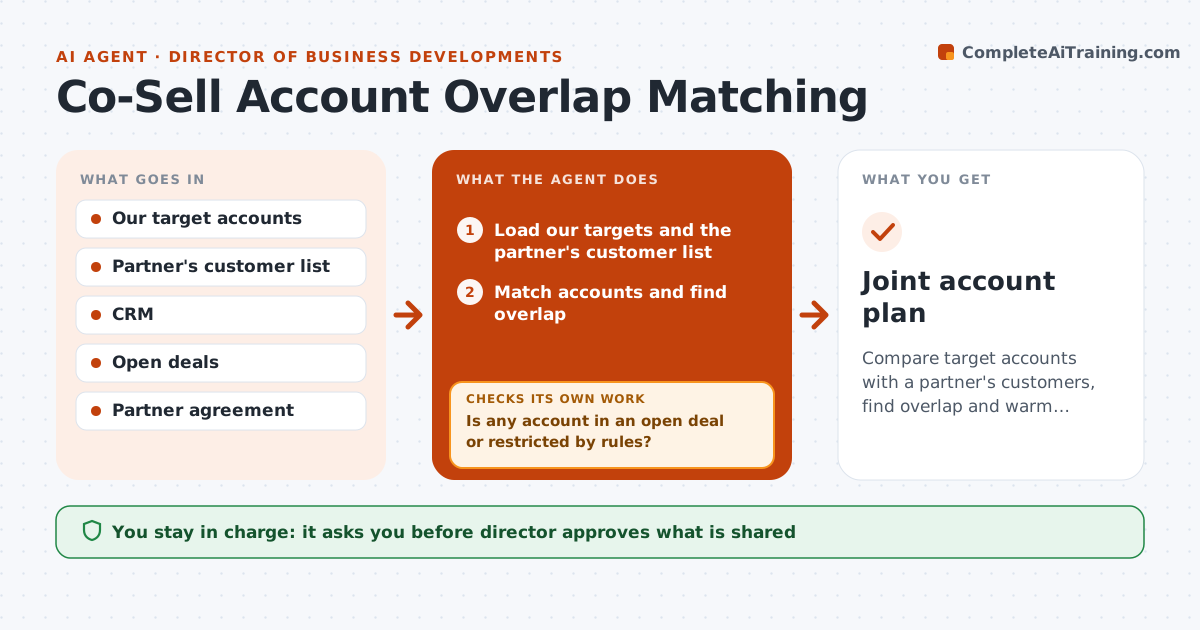
Compare target accounts with a partner's customers, find overlap and warm contacts, and draft a joint account plan
What it does
Joint selling stalls because nobody knows where target accounts overlap. The agent compares our target accounts with a partner's customer list and finds the matches. It adds warm contacts from both sides and ranks accounts by fit and the strength of the relationship. Before drafting a plan, it checks conflicts with existing deals and channel rules, and removes accounts that are already in play. It drafts a joint account plan with roles, actions and dates for the top accounts. It rechecks conflicts again before anything is shared. The director approves what goes to the partner. Edge case: a top account is in a late-stage deal with another partner, so the agent removes it from the plan.
How it works
Follow the arrows from top to bottom. The orange dashed arrow is the loop: when a check fails, the agent goes back and tries again.
Read the steps as a list
- New partner or quarterly review
- Load our targets and the partner's customer list
- Match accounts and find overlap
- Find warm contacts on both sides
- Rank the overlap by fit and relationship
- Is any account in an open deal or restricted by rules?If not: Remove it and note the reason. Back to step 2.
- Draft a joint account plan with roles and dates
- Does the plan still have no conflicts after the update?If not: Remove the conflicts and redraft. Back to step 6.
- Director approves what is shared with the partnerThe agent waits here for your OK.
- Joint account plan
How it decides
Overlap is ranked by fit and warm contact; conflicts with open deals are removed before anything is shared.
- Remove accounts with open deals past the proposal stage
- Share only account names, never pricing
- Rank by fit score then warm contact
- Limit the plan to 15 accounts
Make it yours
Every agent is a starting point. You choose these settings for your own situation.
- Account limit (default 15)
- Conflict stage cutoff
- Fields shared
- Review cycle
What keeps you in control
It always asks you first
- Director approves what is shared
- Director approves outreach to named accounts
Hard limits
- Never share data with a partner without approval
- Never include accounts with a conflict
It stops when
- Done: plan approved and shared
- Stop: partner terms forbid sharing account lists
Set it up
We guide you through the set-up, step by step
Members get the full set-up guide for this agent. No technical skills needed: you copy, paste and upload.
- One set of instructions to paste into your AI, with the clicks for ChatGPT, Claude, Microsoft 365 Copilot, Gemini and Grok
- The agent then walks you through connecting your own data, one source at a time
- A downloadable copy with the flow chart, the rules and the full guide