AI agent for computer science students
Code Review Self-Check Agent
A submission with the highest-value problems fixed, backed by a passing test and rubric check
What it does
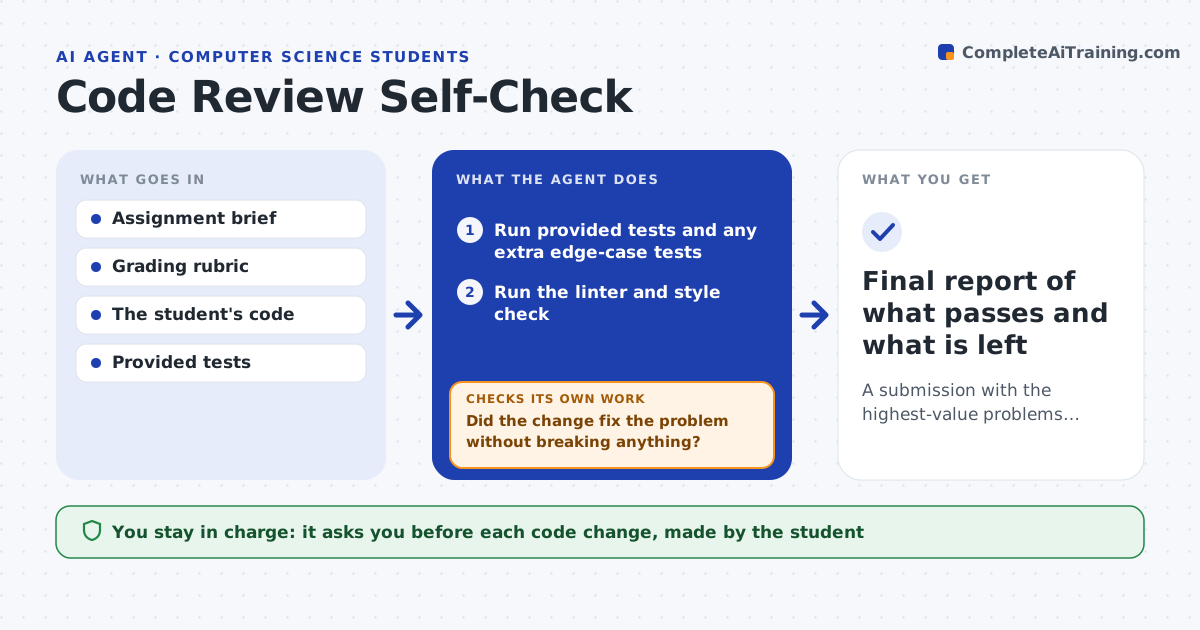
Most lost marks on programming assignments come from things a student could have caught: a failing edge case, a style rule, a missing comment. Before submission this agent runs the assignment's tests, a linter and a style check, then compares the code to the grading rubric line by line. It lists problems in order of marks at risk, so the student fixes the costliest ones first. After each fix it runs everything again, because one change often breaks another test. It keeps a running score estimate and stops when the remaining items are minor or the student chooses to stop. The student decides what to change and submits personally. Edge case: the agent notices a test passing only because of a hard-coded value and flags it as a risk instead of counting it as a pass.
How it works
Follow the arrows from top to bottom. The orange dashed arrow is the loop: when a check fails, the agent goes back and tries again.
Read the steps as a list
- Student asks for a self-check
- Run provided tests and any extra edge-case tests
- Run the linter and style check
- Map each rubric line to evidence in the code
- Rank problems by marks at risk
- Student chooses which problem to fix firstThe agent waits here for your OK.
- Re-run tests and checks after the student's change
- Did the change fix the problem without breaking anything?If not: show which test or rule broke and rerank the list. Back to step 4.
- Is the estimated score above the student's target?If not: move to the next problem on the list. Back to step 5.
- Final report of what passes and what is left
How it decides
Problems are ranked by the marks the rubric attaches to them. A fix is accepted only when the tests and linter pass again after it.
- Rank rubric items by marks, highest first
- Treat tests that pass on hard-coded values as unverified
- Warn when code appears to be added only to fit the test inputs
- Stop suggesting changes when remaining items are worth under 2 percent
Make it yours
Every agent is a starting point. You choose these settings for your own situation.
- Target score before stopping (default 90 percent)
- Which checks to run (tests, lint, style, comments)
- Strictness of the style rules
- How early before the deadline to remind
What keeps you in control
It always asks you first
- Each code change, made by the student
- Submission, done by the student
Hard limits
- Never writes the student's solution for them
- Never submits on the student's behalf
It stops when
- Done: score target reached or only minor items remain
- Stop: the tests will not run, for example a missing file
Set it up
We guide you through the set-up, step by step
Members get the full set-up guide for this agent. No technical skills needed: you copy, paste and upload.
- One set of instructions to paste into your AI, with the clicks for ChatGPT, Claude, Microsoft 365 Copilot, Gemini and Grok
- The agent then walks you through connecting your own data, one source at a time
- A downloadable copy with the flow chart, the rules and the full guide