AI agent for business analysts
Competitor Supply Chain Signal Agent
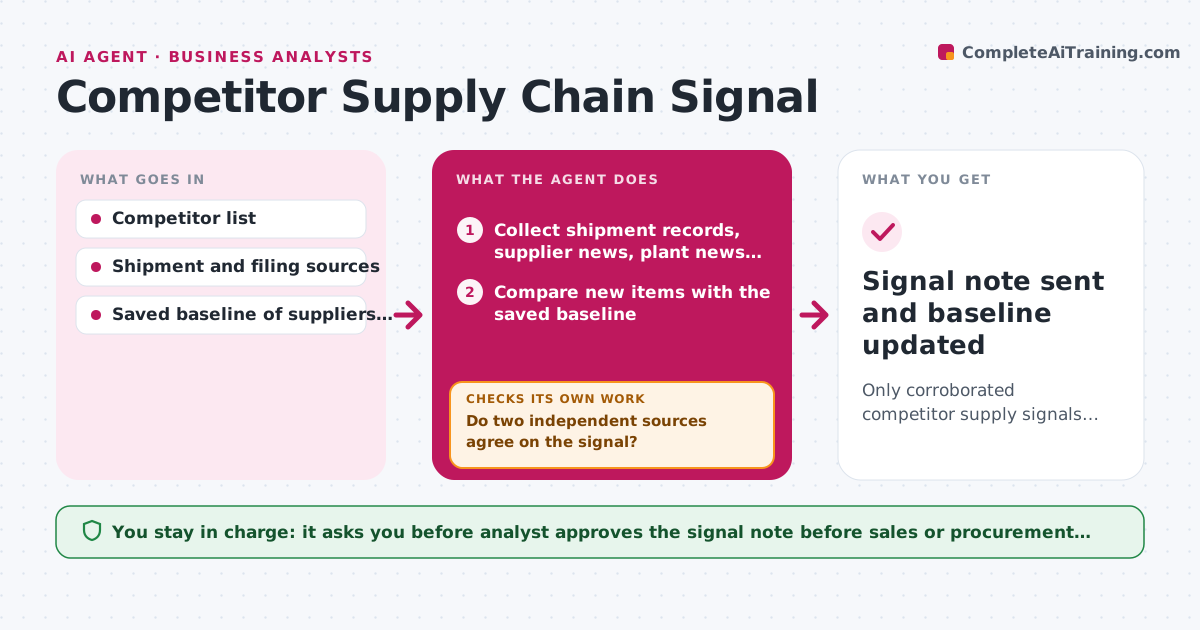
Only corroborated competitor supply signals reach sales and procurement, with evidence.
What it does
A competitor's shortage or new supplier shows up first in small places: shipment records, plant news, a filing footnote, a hiring post for a sourcing role. This agent checks those sources each week for every tracked competitor and compares what it finds with the saved baseline. One signal alone is noise, so it tests whether two independent signals agree before calling anything a trend. If only one exists, it searches for a second source and drops the lead if none appears after two attempts. It drafts a signal note for the analyst, who approves it before it goes to sales or procurement. Edge case: a drop in shipments matches a holiday week, so the agent discards it.
How it works
Follow the arrows from top to bottom. The orange dashed arrow is the loop: when a check fails, the agent goes back and tries again.
Read the steps as a list
- Weekly scan begins
- Collect shipment records, supplier news, plant news and filings per competitor
- Compare new items with the saved baseline
- List candidate signals and their sources
- Do two independent sources agree on the signal?If not: search for a second source; after two tries drop the lead and note it as unconfirmed. Back to step 2.
- Rule out seasonal or calendar causes
- Is the change larger than normal variation for this period?If not: discard the signal and log the reason. Back to step 3.
- Draft the signal note with evidence and impact on sales and procurement
- Analyst approves the note before it is sentThe agent waits here for your OK.
- Signal note sent and baseline updated
How it decides
A trend needs two independent signals within 30 days. A single signal is held for up to two re-searches, then dropped.
- Require 2 independent sources within 30 days.
- Compare against the same week last year before calling a change.
- Drop an uncorroborated lead after 2 re-searches.
- Flag a signal as high impact when it touches a supplier shared with us.
Make it yours
Every agent is a starting point. You choose these settings for your own situation.
- Competitors tracked
- Source list per competitor
- Corroboration window (default 30 days)
- Recipients of approved notes
What keeps you in control
It always asks you first
- Analyst approves the signal note before sales or procurement see it
Hard limits
- Use public sources only
- Label each signal as confirmed or unconfirmed
It stops when
- Done: note approved and baseline updated.
- Stop: no corroborated signals this week, so the log is saved.
Set it up
We guide you through the set-up, step by step
Members get the full set-up guide for this agent. No technical skills needed: you copy, paste and upload.
- One set of instructions to paste into your AI, with the clicks for ChatGPT, Claude, Microsoft 365 Copilot, Gemini and Grok
- The agent then walks you through connecting your own data, one source at a time
- A downloadable copy with the flow chart, the rules and the full guide