AI agent for cfos
Cost Reduction Opportunity Tracker Agent
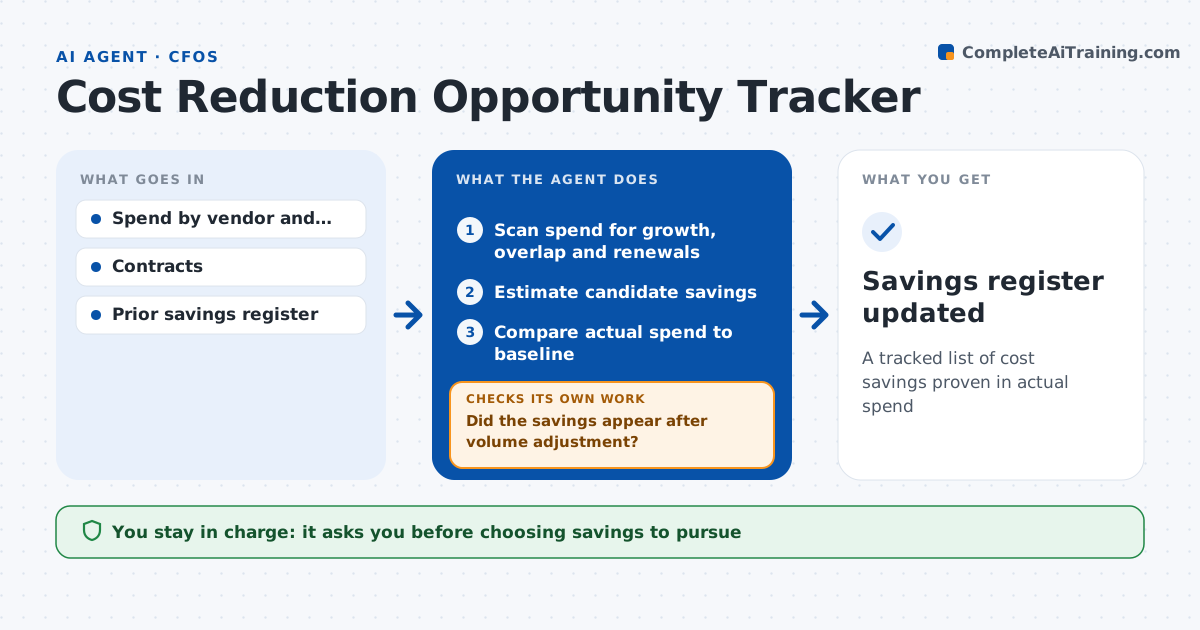
A tracked list of cost savings proven in actual spend
What it does
Savings ideas are easy to announce and hard to prove, so many never show up in the numbers. This agent finds and tracks cost savings. Each month it scans spending by vendor and category for growth, duplicate vendors for the same service and contracts close to renewal. It lists candidate savings with an estimate. The CFO picks which ones to pursue, and for each the agent records the baseline and the target. Each month after, it checks actual spend against the baseline to confirm the savings appeared. If not, it looks for why: price creep, new usage or a delay in the change, and reports to the owner. It counts savings only from rate changes, not lower volume. The CFO approves what is reported as saved. Edge case: spend dropped because of lower volume, so the agent separates volume from rate before counting savings.
How it works
Follow the arrows from top to bottom. The orange dashed arrow is the loop: when a check fails, the agent goes back and tries again.
Read the steps as a list
- Monthly spend data ready
- Scan spend for growth, overlap and renewals
- Estimate candidate savings
- CFO picks savings to pursueThe agent waits here for your OK.
- Compare actual spend to baseline
- Did the savings appear after volume adjustment?If not: find the cause and flag the owner, then recheck next month. Back to step 5.
- Savings register updated
How it decides
It counts savings only when the rate or unit cost falls against the baseline, adjusted for volume.
- Two or more vendors for the same service: flag consolidation
- Contract renewal within 90 days: add to review list
- Savings counted only on rate change, not volume drop
Make it yours
Every agent is a starting point. You choose these settings for your own situation.
- Spend categories to scan
- Renewal look-ahead window
- Minimum savings worth tracking
- Report format for leadership
What keeps you in control
It always asks you first
- Choosing savings to pursue
- Reporting savings to the board
Hard limits
- Never cancels or signs contracts
- Never contacts vendors
It stops when
- Done: register updated for the month
- Stop: spend data not mapped to categories
Set it up
We guide you through the set-up, step by step
Members get the full set-up guide for this agent. No technical skills needed: you copy, paste and upload.
- One set of instructions to paste into your AI, with the clicks for ChatGPT, Claude, Microsoft 365 Copilot, Gemini and Grok
- The agent then walks you through connecting your own data, one source at a time
- A downloadable copy with the flow chart, the rules and the full guide