AI agent for elected officials
Council Agenda Packet Review Agent
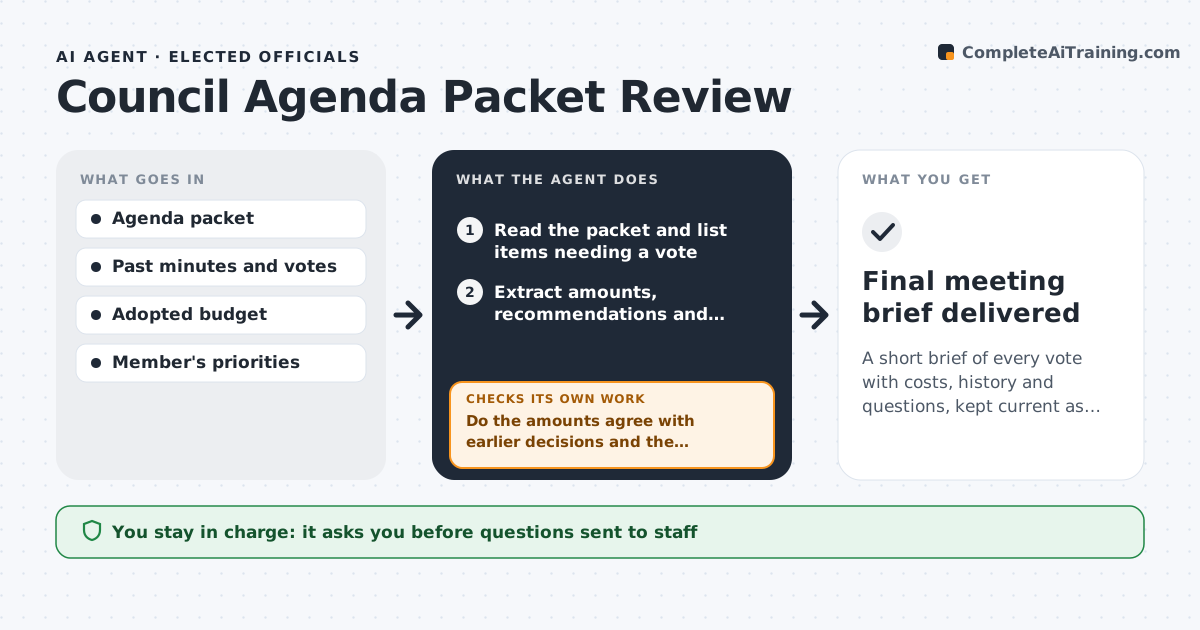
A short brief of every vote with costs, history and questions, kept current as addenda arrive
What it does
A council packet can run to 400 pages and arrives on Thursday for a Tuesday vote. The member needs to know what is being voted on, what it costs, what has been decided before and what to ask. This agent reads the packet and extracts each item that needs a vote. For each, it finds the money involved, the staff recommendation, the vendor or applicant and any attachments. It compares the item with past council decisions and the adopted budget, for example whether a contract is above the earlier estimate or whether funds are available. It flags concerns and drafts questions for staff. If an addendum arrives, it rereads it and updates the summary. The official approves the questions sent to staff. Edge case: an item on the consent calendar contains a large contract, and the agent moves it up the list.
How it works
Follow the arrows from top to bottom. The orange dashed arrow is the loop: when a check fails, the agent goes back and tries again.
Read the steps as a list
- The agenda packet is published
- Read the packet and list items needing a vote
- Extract amounts, recommendations and attachments for each item
- Find earlier decisions and budget lines for each item
- Do the amounts agree with earlier decisions and the budget?If not: mark the difference and search for the change order or amendment that explains it. Back to step 3.
- Rank items by impact and flag concerns
- Draft questions for staff on each flagged item
- Official approves the questions sent to staffThe agent waits here for your OK.
- Check for addenda and replies before the meeting
- Do addenda change any item or answer a question?If not: update the brief and revise affected questions. Back to step 3.
- Final meeting brief delivered
How it decides
It ranks items by dollar impact, change from earlier decisions and fit with the member's priorities, and flags an item when numbers differ from earlier documents.
- Flag amounts more than 10% above earlier estimates
- Pull consent items above $100,000 to the top
- Flag items without a funding source
- Update the brief within one hour of an addendum
Make it yours
Every agent is a starting point. You choose these settings for your own situation.
- Dollar threshold for pulling consent items (default $100,000)
- Variance threshold (default 10%)
- Member priorities
- Brief format
What keeps you in control
It always asks you first
- Questions sent to staff
Hard limits
- Never sends questions without approval
- Does not recommend how to vote
- Cites the page for each number
It stops when
- Done: final brief delivered before the meeting
- Stop: the packet is unreadable or incomplete
Set it up
We guide you through the set-up, step by step
Members get the full set-up guide for this agent. No technical skills needed: you copy, paste and upload.
- One set of instructions to paste into your AI, with the clicks for ChatGPT, Claude, Microsoft 365 Copilot, Gemini and Grok
- The agent then walks you through connecting your own data, one source at a time
- A downloadable copy with the flow chart, the rules and the full guide