AI agent for senior vice presidents
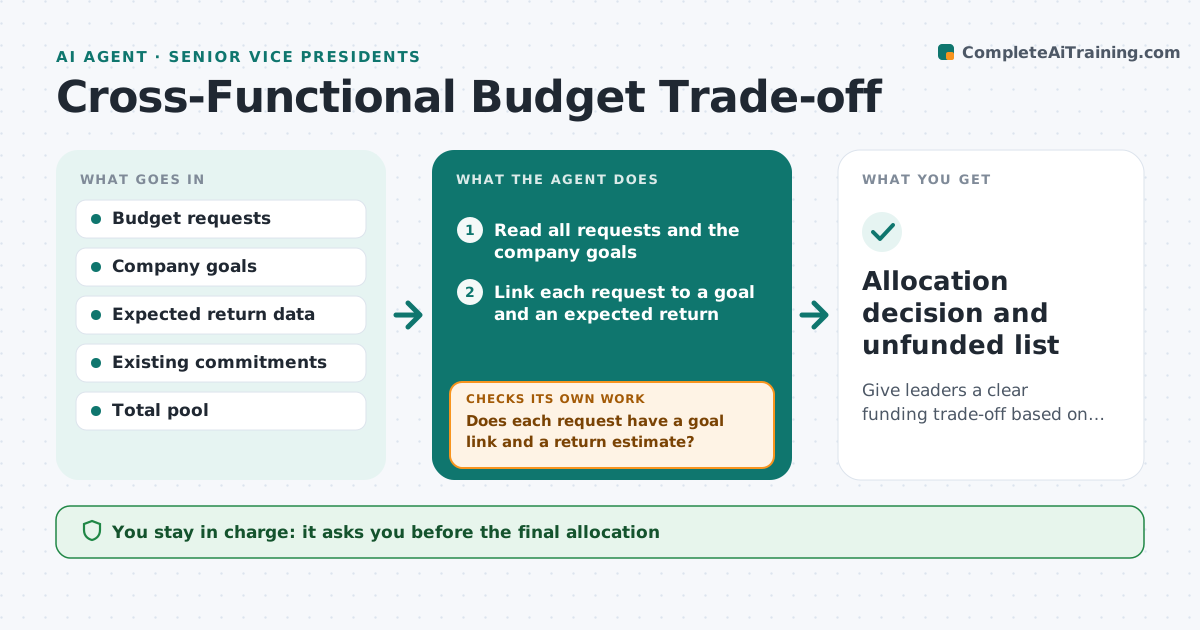
Cross-Functional Budget Trade-off Agent
Give leaders a clear funding trade-off based on goals and return rather than pressure.
What it does
At budget time every function sends a request that totals far more than the funds available. The loudest team often wins. This agent reads each request and ties it to company goals and expected return. It asks owners for missing numbers, such as the expected revenue or cost saving, and models funding at several levels, for example 90%, 100% and 110% of the pool. For each level it checks the effect on commitments already made, such as contracts and headcount. After owners reply, it reruns the model and shows what changed. The executive approves the allocation. Edge case: a request with no return estimate and no link to a goal is marked unfunded until the owner supplies one.
How it works
Follow the arrows from top to bottom. The orange dashed arrow is the loop: when a check fails, the agent goes back and tries again.
Read the steps as a list
- Budget requests are submitted
- Read all requests and the company goals
- Link each request to a goal and an expected return
- Does each request have a goal link and a return estimate?If not: Ask the owner for the missing numbers and wait for the reply. Back to step 3.
- Model funding at 90%, 100% and 110% of the pool
- Check each scenario against existing commitments
- Does every scenario honor commitments and fit the pool?If not: Remove the lowest ranked items until it fits. Back to step 5.
- Draft the trade-off summary with what each level buys and loses
- Executive approves the allocationThe agent waits here for your OK.
- Allocation decision and unfunded list
How it decides
Ranks each request by return per unit and goal fit, funds commitments first, then adds requests in order until the pool is used.
- Commitments are funded first
- Requests with no return estimate are unfunded
- Rank by return per unit of spend and goal fit
- Show what is lost at every funding level
Make it yours
Every agent is a starting point. You choose these settings for your own situation.
- Funding levels to model (default 90, 100, 110%)
- Ranking rule
- Commitments list
- Reply deadline for owners
- Reserve held back
What keeps you in control
It always asks you first
- The final allocation
- Any release of funds
- Any change to the goals used for ranking
Hard limits
- Never release money itself
- Never change a request without the owner
It stops when
- Done: allocation approved
- Stop: pool changes, rerun
- Stop: requests not received
Set it up
We guide you through the set-up, step by step
Members get the full set-up guide for this agent. No technical skills needed: you copy, paste and upload.
- One set of instructions to paste into your AI, with the clicks for ChatGPT, Claude, Microsoft 365 Copilot, Gemini and Grok
- The agent then walks you through connecting your own data, one source at a time
- A downloadable copy with the flow chart, the rules and the full guide