AI agent for chief operating officers
Customer SLA Penalty Exposure Agent
Penalty risk is seen and acted on during the month, not after it.
What it does
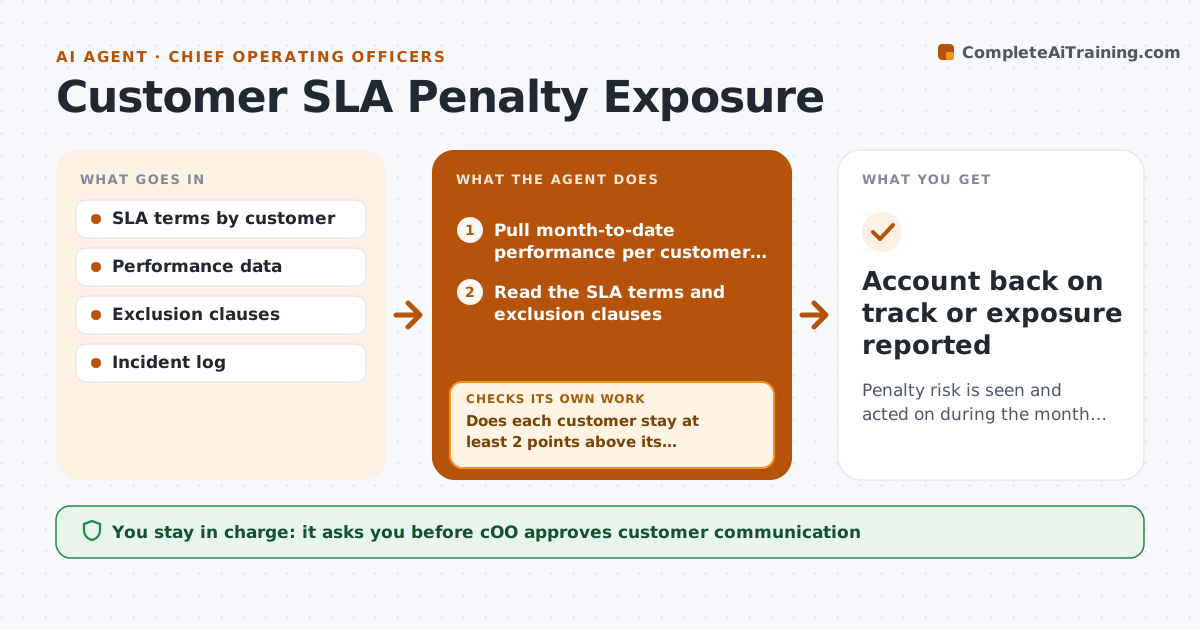
The report arrives on the 3rd and shows response times missed for the biggest customer, and the credit is already owed. This agent compares performance with each contract's service level every day. It projects the month-end result for each metric, such as response time or uptime, and flags accounts at risk. It reads the exclusion clauses, such as planned maintenance or customer-caused delays, to see what really counts. For accounts at risk, it prepares a recovery plan with options such as added staff, priority queues or a proactive call. The COO approves any customer communication. Edge case: an outage during a customer-approved maintenance window is excluded by the contract.
How it works
Follow the arrows from top to bottom. The orange dashed arrow is the loop: when a check fails, the agent goes back and tries again.
Read the steps as a list
- Daily SLA check
- Pull month-to-date performance per customer and metric
- Read the SLA terms and exclusion clauses
- Remove excluded events from the calculation
- Project month-end results from the current trend
- Does each customer stay at least 2 points above its threshold?If not: recheck the exclusions and data, then rank the at-risk accounts. Back to step 2.
- Estimate penalty exposure and draft a recovery plan with options and costs
- COO approves customer communicationThe agent waits here for your OK.
- Track results after actions and rerun the projection
- Did the actions bring the projection back above the threshold?If not: propose a stronger option and update the exposure. Back to step 7.
- Account back on track or exposure reported
How it decides
It flags an account when the projected month-end result falls within 2 points of a threshold or below it after applying exclusions.
- Flag within 2 points of a threshold.
- Apply exclusion clauses before calculating.
- Rank accounts by penalty exposure.
- Recommend a proactive customer call when exposure exceeds the set amount.
Make it yours
Every agent is a starting point. You choose these settings for your own situation.
- Warning margin (default 2 points)
- Metrics tracked
- Exposure threshold for COO alerts
- Recipients
What keeps you in control
It always asks you first
- COO approves customer communication
Hard limits
- Show which clauses were applied
- Never send customer communication itself
It stops when
- Done: all accounts above threshold or exposure reported.
- Stop: data feed down, so the COO is told.
Set it up
We guide you through the set-up, step by step
Members get the full set-up guide for this agent. No technical skills needed: you copy, paste and upload.
- One set of instructions to paste into your AI, with the clicks for ChatGPT, Claude, Microsoft 365 Copilot, Gemini and Grok
- The agent then walks you through connecting your own data, one source at a time
- A downloadable copy with the flow chart, the rules and the full guide