AI agent for dispatchers
Dispatch Log Quality Audit Agent
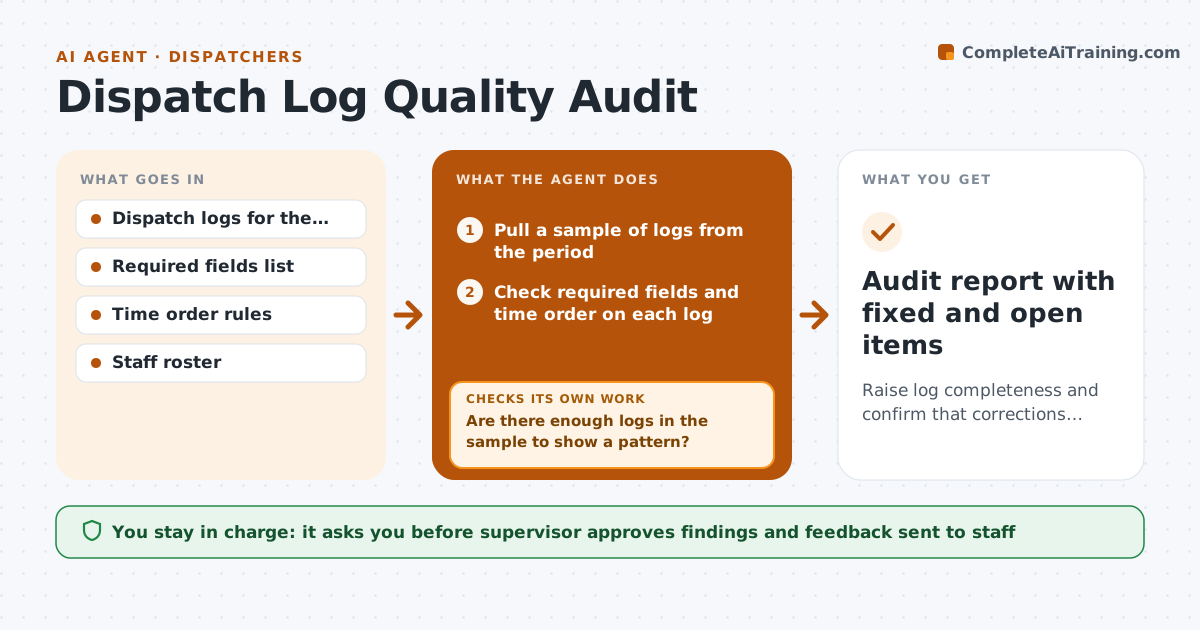
Raise log completeness and confirm that corrections actually fixed the entries.
What it does
Missing times and thin notes in a dispatch log are easy to ignore until a review or a complaint needs them. This agent samples logs each week, checks that required fields are filled and that times run in a sensible order, and lists the gaps. It groups findings by dispatcher and by type so the supervisor sees patterns, not just single errors. After the supervisor approves, the agent sends correction requests to staff. A few days later it reviews the same logs again to confirm the fixes held and that nothing was changed in a way that breaks the time order. Edge case: a call logged as dispatched before it was received is flagged as an order error, not a missing field.
How it works
Follow the arrows from top to bottom. The orange dashed arrow is the loop: when a check fails, the agent goes back and tries again.
Read the steps as a list
- Weekly audit window opens
- Pull a sample of logs from the period
- Check required fields and time order on each log
- Group gaps by type and by dispatcher
- Are there enough logs in the sample to show a pattern?If not: Increase the sample and check again. Back to step 2.
- Supervisor approves the findings and staff feedbackThe agent waits here for your OK.
- Send correction requests to staff with the log reference
- Wait for the correction window to close
- Reopen the same logs
- Do the corrected logs pass all checks?If not: Flag the remaining gaps and send a firmer second request. Back to step 3.
- Audit report with fixed and open items
How it decides
It flags an entry when a required field is empty or the times are out of order, and counts a fix only when a second review passes.
- Required fields: call time, dispatch time, arrival time, unit, outcome
- Dispatch time before receive time counts as an order error
- Sample at least 10 percent of the week's logs
- A log that fails twice goes to the supervisor
Make it yours
Every agent is a starting point. You choose these settings for your own situation.
- Share of logs sampled (default 10 percent)
- Required fields list
- Correction window (default 5 days)
- How often it runs (default weekly)
What keeps you in control
It always asks you first
- Supervisor approves findings and feedback sent to staff
Hard limits
- Never edit a log itself
- Never send feedback to staff without the supervisor's approval
It stops when
- Done: every sampled log passes or is listed as open for the supervisor
- Stop: logs cannot be read or the sample is too small to judge
Set it up
We guide you through the set-up, step by step
Members get the full set-up guide for this agent. No technical skills needed: you copy, paste and upload.
- One set of instructions to paste into your AI, with the clicks for ChatGPT, Claude, Microsoft 365 Copilot, Gemini and Grok
- The agent then walks you through connecting your own data, one source at a time
- A downloadable copy with the flow chart, the rules and the full guide