AI agent for dispatchers
Dispatch Shift Handover Agent
A complete, accurate handover so nothing is dropped at shift change
What it does
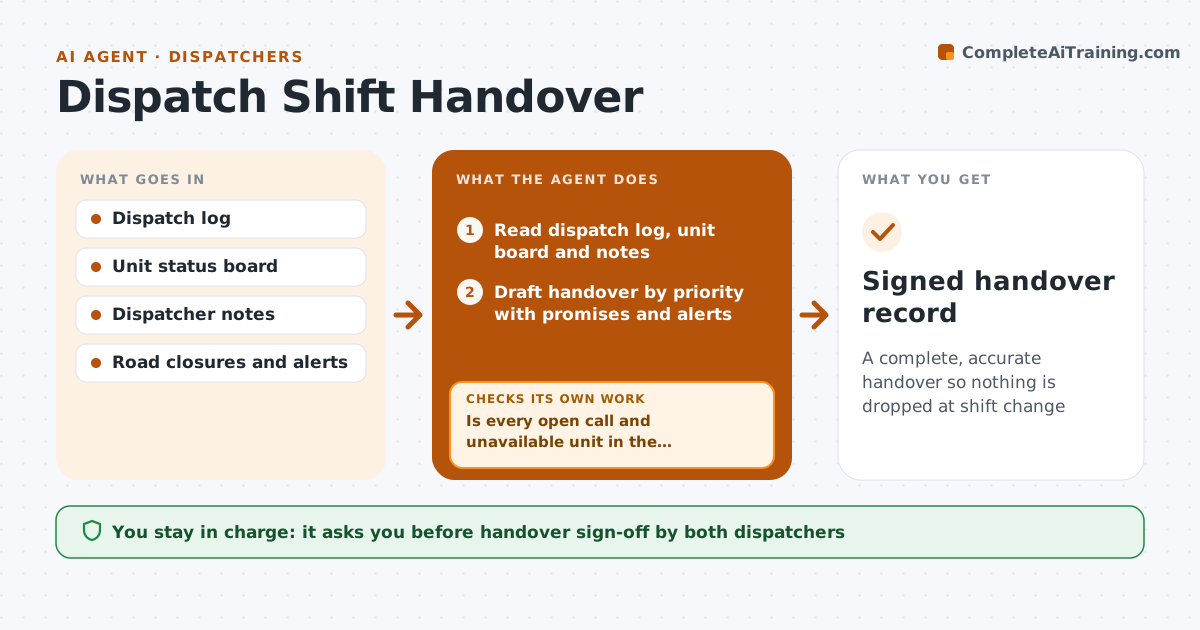
At shift change, the incoming dispatcher needs to know which calls are still open, which units are committed, what callers were promised and what is unusual today, and verbal handovers miss things. Thirty minutes before shift change, this agent reads the dispatch log, unit status board and dispatcher notes. It drafts a handover grouped by priority, with callback promises inside the next hour at the very top. Units out of service list a reason and expected return, and road closures and weather alerts are included. It then compares the draft with the live open-call and unit lists. Every open call and every unit not available must appear. If anything is missing, it adds it and checks again right before handover. The outgoing dispatcher reviews and the incoming dispatcher confirms receipt. Edge case: a call opened in the last five minutes is added in the final recheck.
How it works
Follow the arrows from top to bottom. The orange dashed arrow is the loop: when a check fails, the agent goes back and tries again.
Read the steps as a list
- 30 minutes before shift change
- Read dispatch log, unit board and notes
- Draft handover by priority with promises and alerts
- Compare draft with the live open-call and unit lists
- Is every open call and unavailable unit in the handover?If not: add missing items and recheck. Back to step 3.
- Outgoing dispatcher reviews the handoverThe agent waits here for your OK.
- Run a final comparison five minutes before handover
- Did any new call or unit change appear since the review?If not: add the new items to the top of the handover. Back to step 3.
- Incoming dispatcher confirms receiptThe agent waits here for your OK.
- Signed handover record
How it decides
Every open call and every unit not in available status must appear; items are ordered by priority and time to the next promise.
- Callback promises inside an hour go first
- Units out of service list a reason and expected return
- Road closures and weather alerts are included
Make it yours
Every agent is a starting point. You choose these settings for your own situation.
- Lead time before shift change (default 30 minutes)
- Handover sections
- Priority order rules
- Sign-off method
What keeps you in control
It always asks you first
- Handover sign-off by both dispatchers
Hard limits
- Read-only on the dispatch system
- Never closes or changes calls
It stops when
- Done: handover confirmed
- Stop: dispatch system unavailable, use the paper backup template
Set it up
We guide you through the set-up, step by step
Members get the full set-up guide for this agent. No technical skills needed: you copy, paste and upload.
- One set of instructions to paste into your AI, with the clicks for ChatGPT, Claude, Microsoft 365 Copilot, Gemini and Grok
- The agent then walks you through connecting your own data, one source at a time
- A downloadable copy with the flow chart, the rules and the full guide