AI agent for midwifes
Due-Date Caseload Capacity Agent
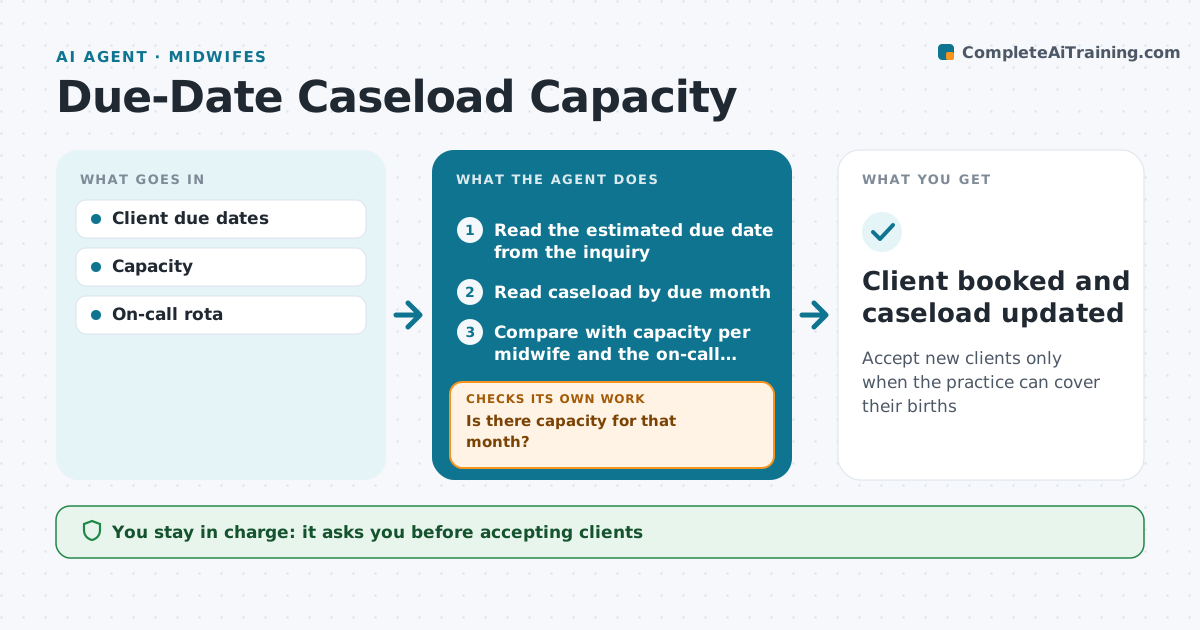
Accept new clients only when the practice can cover their births
What it does
Midwifery practices can only safely attend a certain number of births each month, and on-call midwives burn out when one month is overbooked. This agent tracks current clients by due month and compares the count with capacity per midwife and with the on-call rota. When someone inquires, it tells the intake person whether the client's due month has room. It also checks whether holidays, planned leave and rota gaps still leave cover. If a month is full, it drafts a waitlist reply and lists nearby practices. If cover is thin, it marks the month as limited and asks the lead midwife. It updates counts when clients transfer or deliver early. Staff approve every new client. Edge case: several clients due around a holiday with reduced cover are flagged even if the month is under capacity.
How it works
Follow the arrows from top to bottom. The orange dashed arrow is the loop: when a check fails, the agent goes back and tries again.
Read the steps as a list
- New client inquiry
- Read the estimated due date from the inquiry
- Read caseload by due month
- Compare with capacity per midwife and the on-call rota
- Is there capacity for that month?If not: offer a waitlist place and list nearby practices for the intake person. Back to step 3.
- Do planned leave and holidays still leave cover?If not: mark the month as limited and ask the lead midwife. Back to step 4.
- Lead midwife confirms acceptanceThe agent waits here for your OK.
- Client booked and caseload updated
How it decides
Clients per due month are compared with capacity and cover.
- Capacity per midwife per month
- Holidays reduce capacity
- Waitlist when full
Make it yours
Every agent is a starting point. You choose these settings for your own situation.
- Capacity
- Holiday rules
- Waitlist message
- Rota source
What keeps you in control
It always asks you first
- Accepting clients
Hard limits
- No clinical decisions
It stops when
- Done: inquiry answered
- Stop: practice closed to intake
Set it up
We guide you through the set-up, step by step
Members get the full set-up guide for this agent. No technical skills needed: you copy, paste and upload.
- One set of instructions to paste into your AI, with the clicks for ChatGPT, Claude, Microsoft 365 Copilot, Gemini and Grok
- The agent then walks you through connecting your own data, one source at a time
- A downloadable copy with the flow chart, the rules and the full guide