AI agent for caregivers
Emergency Information Sheet Agent
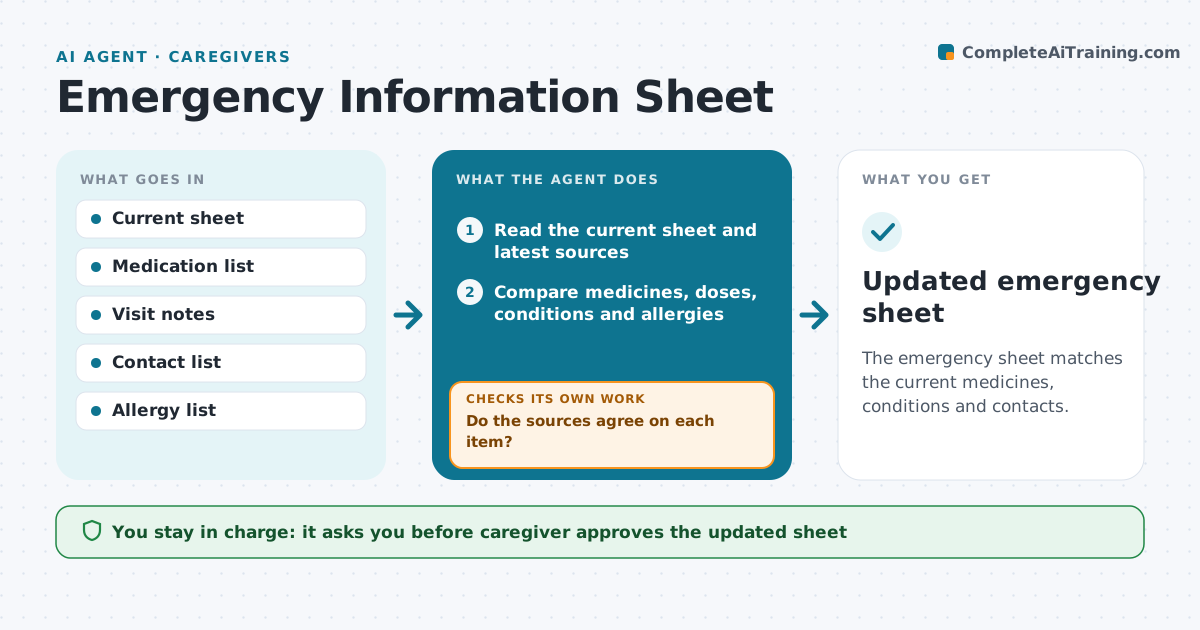
The emergency sheet matches the current medicines, conditions and contacts.
What it does
An emergency sheet lists medicines, conditions, allergies and contacts, and it is only useful if it is current. In a real emergency, an old sheet can mislead a paramedic. After any visit or medicine change, and once a month, the agent compares the sheet with the current medicine list, contacts, conditions and recent notes. It lists differences and drafts an updated version. It checks the contacts, for example by testing whether the number format is valid or whether the caregiver confirms it, and checks doses between sources. If a contact bounces or a dose differs between sources, it asks the caregiver to confirm before saving. The caregiver approves the new sheet. Edge case: a new allergy goes to the top of the sheet and the old copies are marked as replaced.
How it works
Follow the arrows from top to bottom. The orange dashed arrow is the loop: when a check fails, the agent goes back and tries again.
Read the steps as a list
- Visit, medicine change or monthly run
- Read the current sheet and latest sources
- Compare medicines, doses, conditions and allergies
- Check contacts for errors or changes
- List every difference
- Do the sources agree on each item?If not: Ask the caregiver to confirm the correct dose or contact before updating. Back to step 3.
- Draft the updated sheet
- Caregiver approves the new sheetThe agent waits here for your OK.
- Save and share the updated sheet with the usual contacts
- Does the saved sheet match the sources and are old copies replaced?If not: Fix the differences and mark old copies as replaced. Back to step 3.
- Updated emergency sheet
How it decides
It compares each field with the latest source and holds any conflicting item for the caregiver.
- Any difference in dose is held for confirmation
- A new allergy goes first on the sheet
- Old copies must be replaced
- Review monthly even with no changes
Make it yours
Every agent is a starting point. You choose these settings for your own situation.
- Review schedule
- Who receives the sheet
- Format and language
- Fields included
- Contact check method
What keeps you in control
It always asks you first
- Caregiver approves the updated sheet
- Caregiver approves who receives it
Hard limits
- Never decide a dose or condition itself
- Never share the sheet without approval
- Never keep an old version in use
It stops when
- Done: the sheet matches all sources and is shared
- Stop: a conflict is not resolved
Set it up
We guide you through the set-up, step by step
Members get the full set-up guide for this agent. No technical skills needed: you copy, paste and upload.
- One set of instructions to paste into your AI, with the clicks for ChatGPT, Claude, Microsoft 365 Copilot, Gemini and Grok
- The agent then walks you through connecting your own data, one source at a time
- A downloadable copy with the flow chart, the rules and the full guide