AI agent for event planners
Event Contingency Watch Agent
Spot and handle event risks before event day
What it does
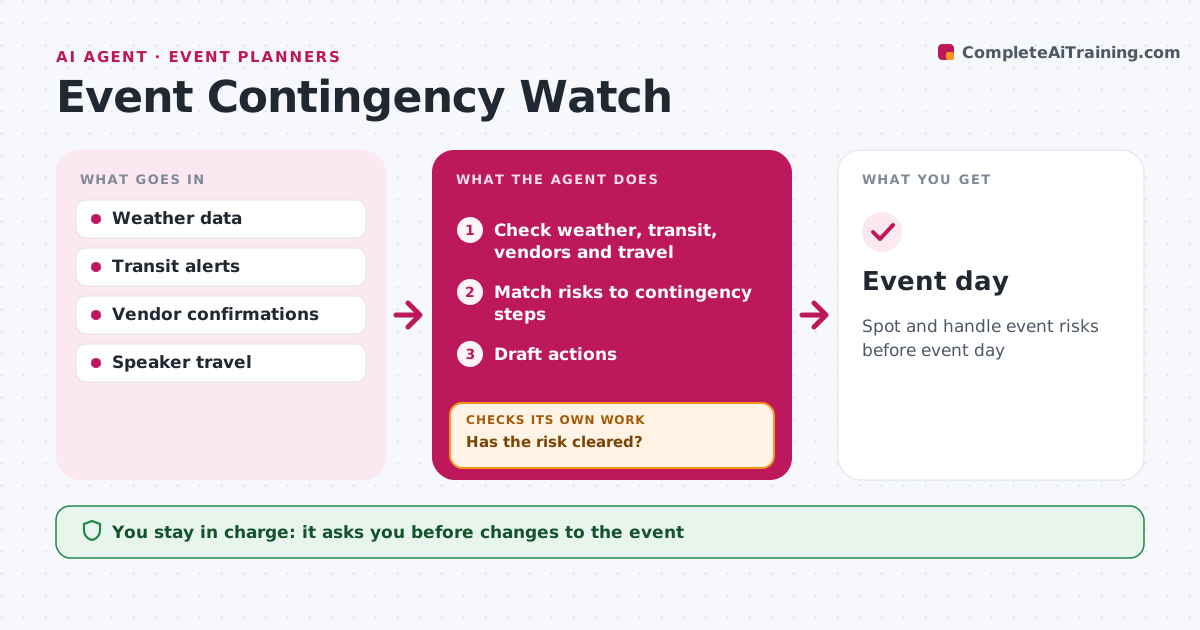
In-person events depend on many things going right, and problems found on the day are hard to fix. In the two weeks before an event, this agent watches weather, transit alerts, vendor delivery confirmations and speaker travel status. When a risk appears, it matches it to the step in the contingency plan and drafts the action, such as booking a backup room or setting up a virtual option for a speaker whose flight was canceled. Vendors still unconfirmed five days out get a call request. The event marketer approves every change. The agent then rechecks each risk daily until it clears, and if it does not, it moves to the next contingency step. Edge case: a severe weather warning triggers a go or no-go decision meeting instead of a single fix.
How it works
Follow the arrows from top to bottom. The orange dashed arrow is the loop: when a check fails, the agent goes back and tries again.
Read the steps as a list
- Two weeks before event
- Check weather, transit, vendors and travel
- Match risks to contingency steps
- Draft actions
- Event marketer approves changesThe agent waits here for your OK.
- Has the risk cleared?If not: keep checking daily and escalate. Back to step 2.
- Event day
How it decides
Each risk is matched to a contingency plan step.
- Severe weather triggers go or no-go meeting
- Unconfirmed vendors 5 days out get calls
- Speaker travel issues trigger virtual option
Make it yours
Every agent is a starting point. You choose these settings for your own situation.
- Watch period
- Risk types
- Contingency plan
What keeps you in control
It always asks you first
- Changes to the event
Hard limits
- Never cancels events itself
- Never signs vendor changes
It stops when
- Done: event held
- Stop: event cancelled
Set it up
We guide you through the set-up, step by step
Members get the full set-up guide for this agent. No technical skills needed: you copy, paste and upload.
- One set of instructions to paste into your AI, with the clicks for ChatGPT, Claude, Microsoft 365 Copilot, Gemini and Grok
- The agent then walks you through connecting your own data, one source at a time
- A downloadable copy with the flow chart, the rules and the full guide