AI agent for maintenance managers
Hotel Preventive Maintenance Scheduling Agent
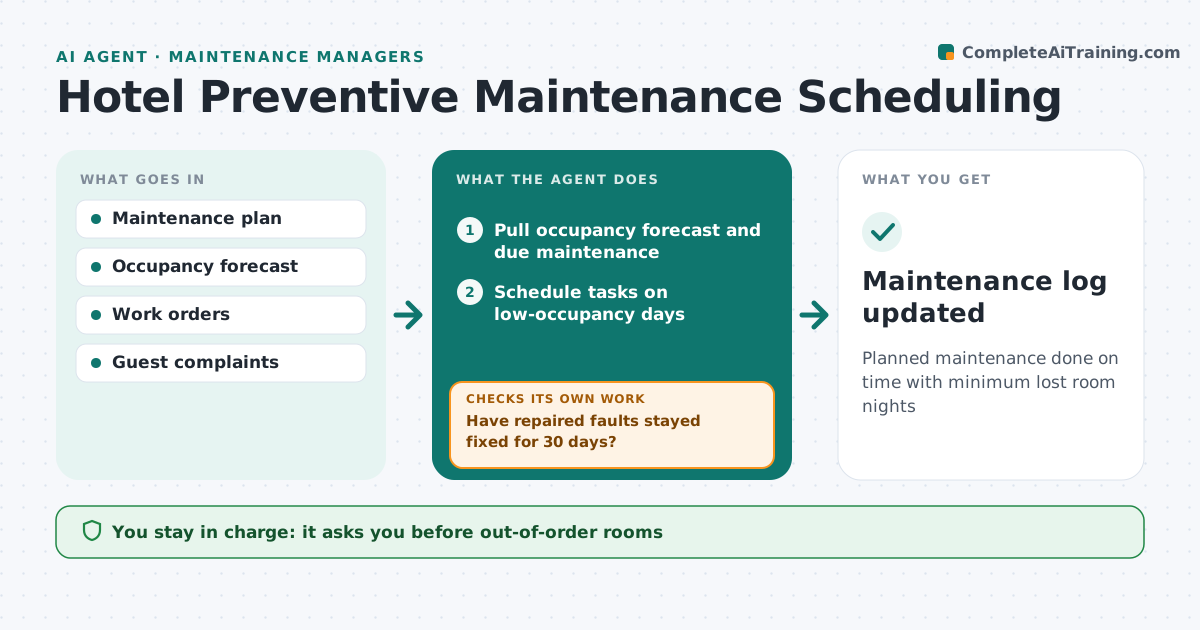
Planned maintenance done on time with minimum lost room nights
What it does
Hotels need regular maintenance of rooms, HVAC, lifts and kitchens without losing room revenue. Each week this agent pulls the occupancy forecast and the maintenance tasks that are due, then schedules work on low-occupancy days so rooms come out of service when they are least needed. Safety items are never delayed for occupancy. The hotel manager approves any out-of-order rooms and contractor spending. The agent then creates work orders and tracks completion. It also reads guest complaints and engineer notes for repeat issues in the same room. If a task was marked done but the same fault returns within 30 days, it reopens the task and suggests a deeper fix, such as replacing a unit instead of repairing it again. Edge case: when a sold-out week falls on a planned lift service, the agent asks the contractor about night work instead of closing a lift at peak.
How it works
Follow the arrows from top to bottom. The orange dashed arrow is the loop: when a check fails, the agent goes back and tries again.
Read the steps as a list
- Weekly schedule run
- Pull occupancy forecast and due maintenance
- Schedule tasks on low-occupancy days
- Hotel manager approves out-of-order rooms and contractor spendThe agent waits here for your OK.
- Create work orders and track completion
- Have repaired faults stayed fixed for 30 days?If not: reopen the task and suggest a deeper fix. Back to step 3.
- Maintenance log updated
How it decides
It schedules tasks on lowest occupancy days and reopens tasks when faults repeat.
- Rooms taken out only below 80% occupancy
- Repeat faults within 30 days reopened
- Safety items never delayed
Make it yours
Every agent is a starting point. You choose these settings for your own situation.
- Occupancy limit for maintenance
- Repeat fault window
- Spend limit
- Task list
What keeps you in control
It always asks you first
- Out-of-order rooms
- Contractor spend over limit
Hard limits
- Safety checks never postponed
- No spend without approval
It stops when
- Done: weekly plan set
- Stop: safety issue, escalate immediately
Set it up
We guide you through the set-up, step by step
Members get the full set-up guide for this agent. No technical skills needed: you copy, paste and upload.
- One set of instructions to paste into your AI, with the clicks for ChatGPT, Claude, Microsoft 365 Copilot, Gemini and Grok
- The agent then walks you through connecting your own data, one source at a time
- A downloadable copy with the flow chart, the rules and the full guide