AI agent for employee relations specialists
HR Case Evidence Organizer Agent
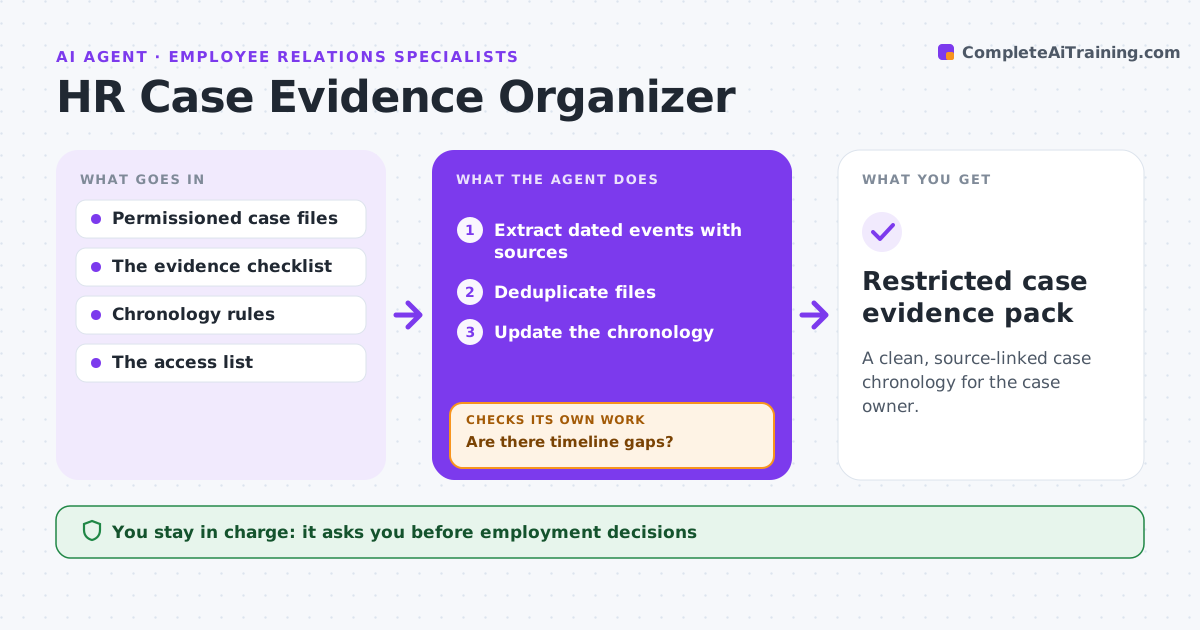
A clean, source-linked case chronology for the case owner.
What it does
HR case files often contain duplicated, unordered or incomplete evidence. When a case opens or files are added, this agent extracts dated events from the files the case team is permitted to see. It removes duplicate files and builds a chronology in which every event links to its source. It checks for gaps in the timeline and creates tasks for missing evidence. It never judges credibility: when accounts conflict, they are shown side by side with their sources. The case owner reviews the pack, and employment decisions and findings stay with people. Nothing is shared outside the case team. Edge case: an email chain appears in three forwarded copies, so the agent keeps the most complete one and links the others.
How it works
Follow the arrows from top to bottom. The orange dashed arrow is the loop: when a check fails, the agent goes back and tries again.
Read the steps as a list
- Case opened or files added
- Extract dated events with sources
- Deduplicate files
- Update the chronology
- Are there timeline gaps?If not: create a missing-evidence task. Back to step 4.
- Case owner reviewsThe agent waits here for your OK.
- Restricted case evidence pack
How it decides
It looks for documents that close timeline gaps and keeps conflicting accounts separate.
- No credibility judgments.
- Conflicting accounts are shown side by side.
- Keep the most complete copy of duplicates and link the rest.
- Nothing is shared outside the case team.
Make it yours
Every agent is a starting point. You choose these settings for your own situation.
- Files and folders the agent may read
- Gap length that triggers a missing-evidence task (default 10 days)
- Who receives evidence tasks
- Who reviews the pack
- Chronology format
What keeps you in control
It always asks you first
- Employment decisions
- Credibility findings
- Sharing outside the team
Hard limits
- Strict access control.
It stops when
- Done: chronology complete.
Set it up
We guide you through the set-up, step by step
Members get the full set-up guide for this agent. No technical skills needed: you copy, paste and upload.
- One set of instructions to paste into your AI, with the clicks for ChatGPT, Claude, Microsoft 365 Copilot, Gemini and Grok
- The agent then walks you through connecting your own data, one source at a time
- A downloadable copy with the flow chart, the rules and the full guide