AI agent for clinical research coordinators
Informed Consent Process Documentation Agent
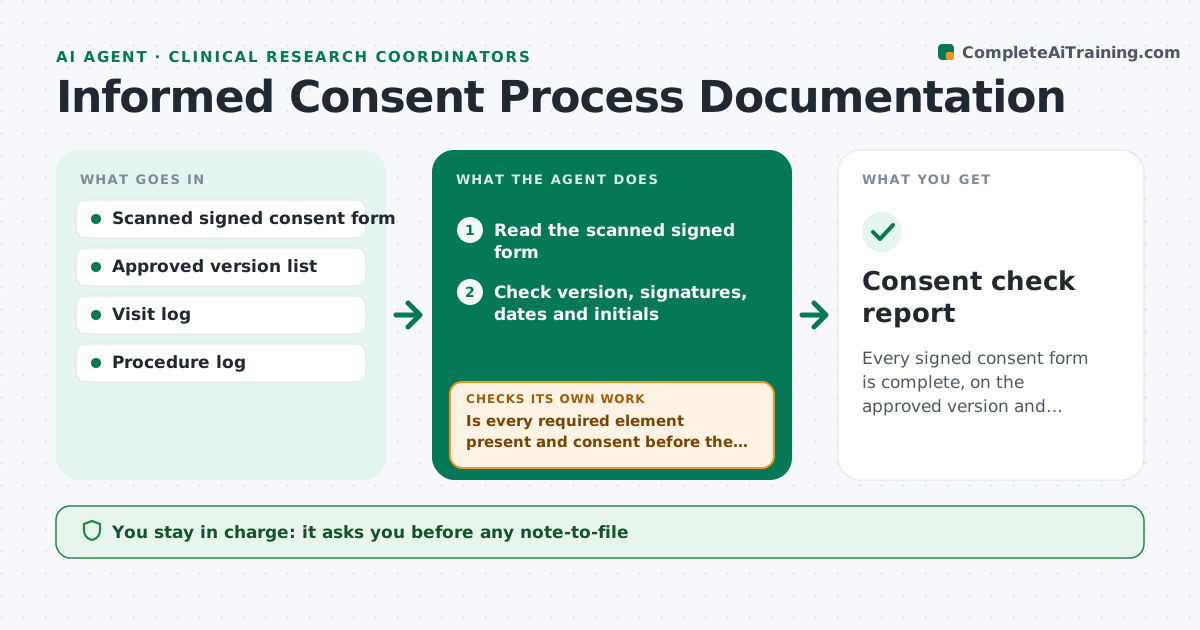
Every signed consent form is complete, on the approved version and consistent with the visit log
What it does
Consent paperwork errors are among the most common findings at a study audit, and they are hard to fix later. After each consent visit, this agent reads the signed form and checks the version number, participant and investigator signatures, dates, and initials. It compares the consent date to the visit log and to the first study procedure, so it can spot a procedure done before consent. For each issue it drafts a note-to-file. The coordinator and principal investigator decide the correction. After the corrections are filed, it rechecks the form and the log. Edge case: the form version is current but a newer one was approved the week before, so the agent flags that the participant signed an outdated version.
How it works
Follow the arrows from top to bottom. The orange dashed arrow is the loop: when a check fails, the agent goes back and tries again.
Read the steps as a list
- Consent visit completed
- Read the scanned signed form
- Check version, signatures, dates and initials
- Compare to the approved version list and the visit log
- Is every required element present and consent before the first procedure?If not: list each issue and draft a note-to-file. Back to step 3.
- Rank issues by participant impact
- Request corrections from the coordinator
- Is each correction filed and the form now complete?If not: reissue the request and flag the open item to the PI. Back to step 3.
- PI and coordinator approve all correctionsThe agent waits here for your OK.
- Record the resolved status in the binder log
- Consent check report
How it decides
A form passes only when version, signatures, dates and initials are complete and consent precedes every study procedure.
- Fail a form with any missing signature or date
- Flag any procedure dated before consent as a possible deviation
- Flag a version that is not the current approved version
- Never let corrections back-date an entry
Make it yours
Every agent is a starting point. You choose these settings for your own situation.
- Forms and elements checked
- Note-to-file wording
- How soon after the visit to run (default same day)
- Who is notified
What keeps you in control
It always asks you first
- Any note-to-file
- Any correction to a consent form
Hard limits
- Never edits or back-dates a consent record
- Never contacts participants
It stops when
- Done: forms complete or issues documented
- Stop: version list is missing
Set it up
We guide you through the set-up, step by step
Members get the full set-up guide for this agent. No technical skills needed: you copy, paste and upload.
- One set of instructions to paste into your AI, with the clicks for ChatGPT, Claude, Microsoft 365 Copilot, Gemini and Grok
- The agent then walks you through connecting your own data, one source at a time
- A downloadable copy with the flow chart, the rules and the full guide