AI agent for civil servants
Insurance Complaint Chronology Agent
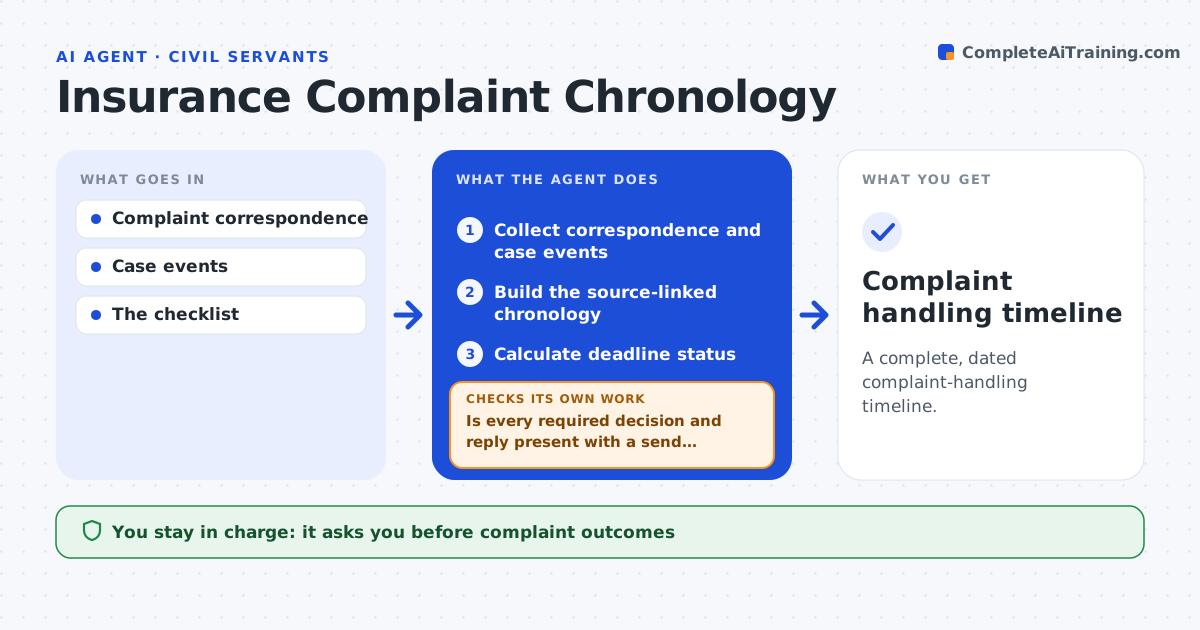
A complete, dated complaint-handling timeline.
What it does
Complaint handling records often miss dated decisions or replies, which matters because regulators set strict response timelines. When a case is reviewed or nears a deadline, this agent builds a chronology from correspondence and case events, linking each entry to its source. It checks that every required step, such as acknowledgement, final decision and reply, is present with a send receipt. An unsent draft counts as a draft, not a response. Missing events are flagged with the days left before the deadline. It prepares a reviewer packet for the complaint administrator. It never decides outcomes or writes to the regulator. Edge case: a final response letter sits in the drafts folder dated May 2, but there is no send record, so the step stays open.
How it works
Follow the arrows from top to bottom. The orange dashed arrow is the loop: when a check fails, the agent goes back and tries again.
Read the steps as a list
- Case review or deadline approaching
- Collect correspondence and case events
- Build the source-linked chronology
- Is every required decision and reply present with a send receipt?If not: flag the missing event with the days left and alert the handler. Back to step 3.
- Calculate deadline status
- Prepare the reviewer packet
- Complaint administrator reviewsThe agent waits here for your OK.
- Complaint handling timeline
How it decides
It looks up missing events and only counts sent responses.
- Sent means a send receipt exists.
- Missing steps are flagged with days left before the deadline.
- Outcomes are never suggested by the agent.
Make it yours
Every agent is a starting point. You choose these settings for your own situation.
- Required steps and timelines per jurisdiction
- Days before the deadline that trigger an alert (default 10)
- Sources for send receipts
- Who reviews the packet
What keeps you in control
It always asks you first
- Complaint outcomes
- Regulator communication
Hard limits
- No outcomes decided.
It stops when
- Done: timeline complete.
Set it up
We guide you through the set-up, step by step
Members get the full set-up guide for this agent. No technical skills needed: you copy, paste and upload.
- One set of instructions to paste into your AI, with the clicks for ChatGPT, Claude, Microsoft 365 Copilot, Gemini and Grok
- The agent then walks you through connecting your own data, one source at a time
- A downloadable copy with the flow chart, the rules and the full guide