AI agent for private equity associates
Investment Committee Memo Agent
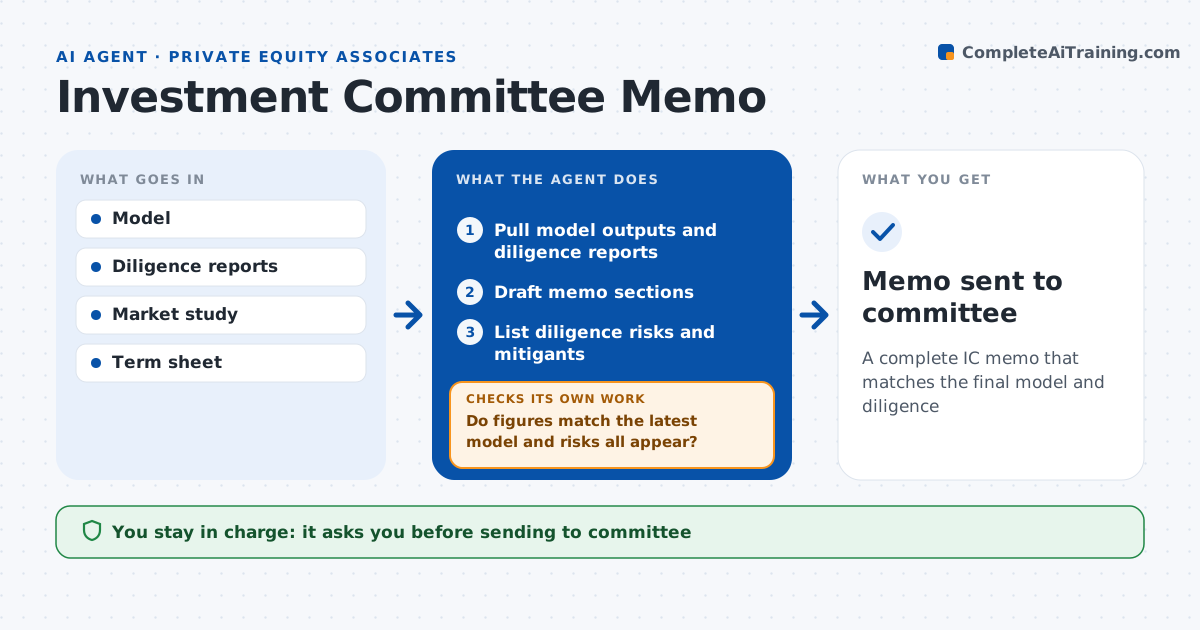
A complete IC memo that matches the final model and diligence
What it does
Investment committee memos are assembled under deadline from many reports and model versions, so stale figures and missing risks slip through. This agent builds the memo. It pulls the model outputs, diligence findings, market work and deal terms, and fills each section. It drafts the thesis and lists every diligence risk with its mitigant. It then checks every figure against the latest model version and confirms that each red flag from diligence appears in the risks section. If anything is missing or does not match, it updates the memo or asks the associate. Returns below the fund target are highlighted. The associate edits and the deal partner approves before it goes to the committee. Edge case: the model was updated last night with a new purchase price, so the agent updates returns throughout.
How it works
Follow the arrows from top to bottom. The orange dashed arrow is the loop: when a check fails, the agent goes back and tries again.
Read the steps as a list
- IC date set
- Pull model outputs and diligence reports
- Draft memo sections
- List diligence risks and mitigants
- Do figures match the latest model and risks all appear?If not: update the text or ask the associate for missing items. Back to step 3.
- Partner approves the memoThe agent waits here for your OK.
- Memo sent to committee
How it decides
It requires figures to match the latest model and every key diligence risk to be covered.
- Model version newer than memo: refresh figures
- Red flag in diligence: must be in risks
- Returns below fund target: highlight
Make it yours
Every agent is a starting point. You choose these settings for your own situation.
- Memo template
- Return targets
- Risk checklist
- Sections to auto-draft
What keeps you in control
It always asks you first
- Sending to committee
Hard limits
- Never changes the model
- Never sends the memo
It stops when
- Done: memo approved
- Stop: model not final
Set it up
We guide you through the set-up, step by step
Members get the full set-up guide for this agent. No technical skills needed: you copy, paste and upload.
- One set of instructions to paste into your AI, with the clicks for ChatGPT, Claude, Microsoft 365 Copilot, Gemini and Grok
- The agent then walks you through connecting your own data, one source at a time
- A downloadable copy with the flow chart, the rules and the full guide